10
• Always empty the dust bin when dust level reached the “MAX” line.
• Grasp the handle on the top of the dust bin. Lift up and out to remove
dust bin from vacuum cleaner.
・ Remove any clogs that might be located at the dust intake connection.
• Remove any clogs that might be located at the upper filter.
• Press latch and the dust bin plate will open and the dust will fall out.
CAUTION
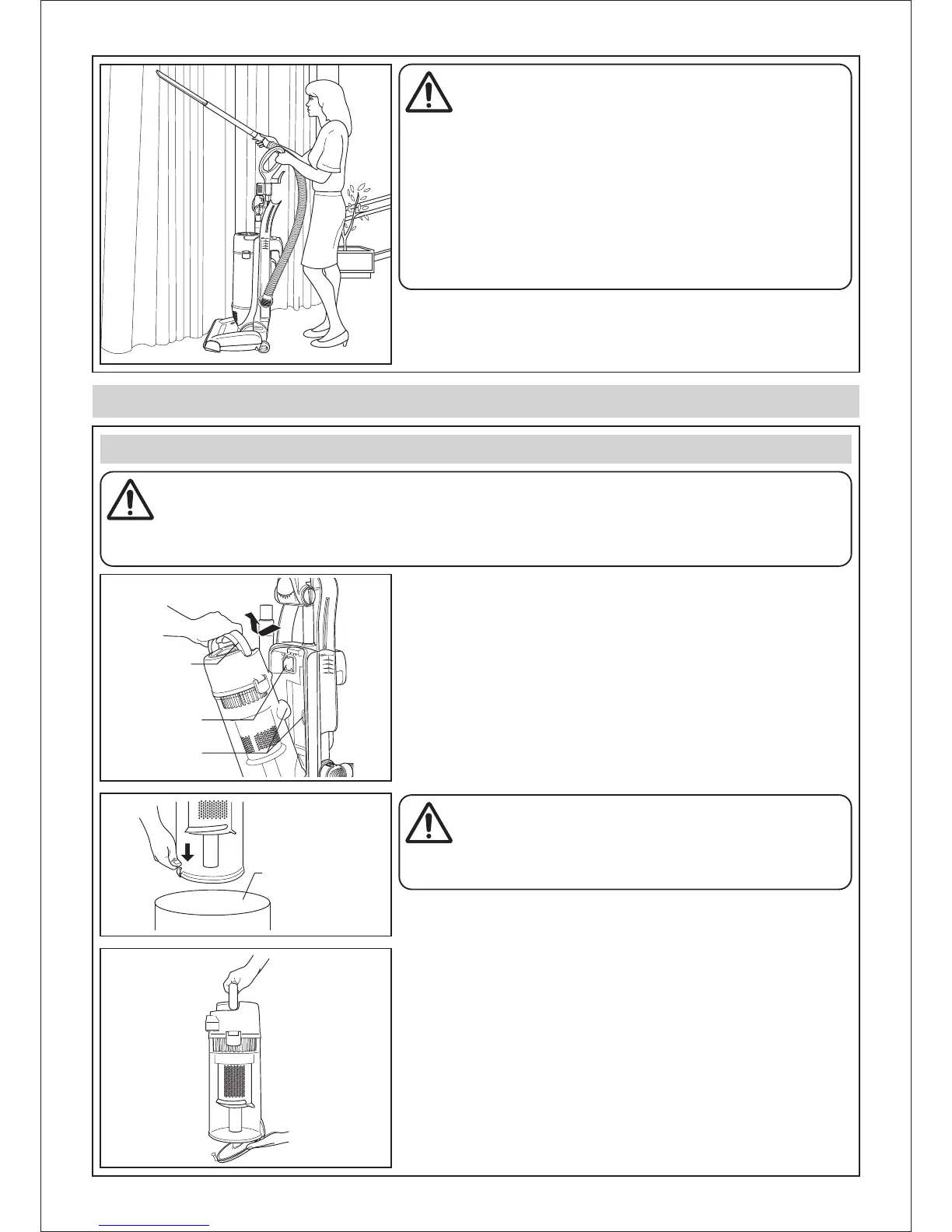
While using the tools, hold the handle with one hand to avoid pulling
the vacuum cleaner over.
While using the tools, always grasp the curved wand and not the tools
or the hose.
CAUTION
Be sure to hold the dust bin over a rubbish container prior to
releasing the dust bin plate.
MAINTENANCE AND SERVICING
DUST BIN CLEANING
WARNING
Disconnect the electrical supply before servicing or cleaning the vacuum cleaner.
Failure to do so could result in electrical shock or personal injury from vacuum cleaner suddenly starting.
Electrical Shock or Personal Injury Hazard
Dust Bin
Handle
Upper Filter
Dust Intake
Connection
Rubbish Container
• Close the dust bin plate.
• After the dust bin is empty of dust, firmly close the dust bin plate.
Make sure you hear a “click” sound to indicate that the dust bin plate is
fully latched.



 To Next Page