13
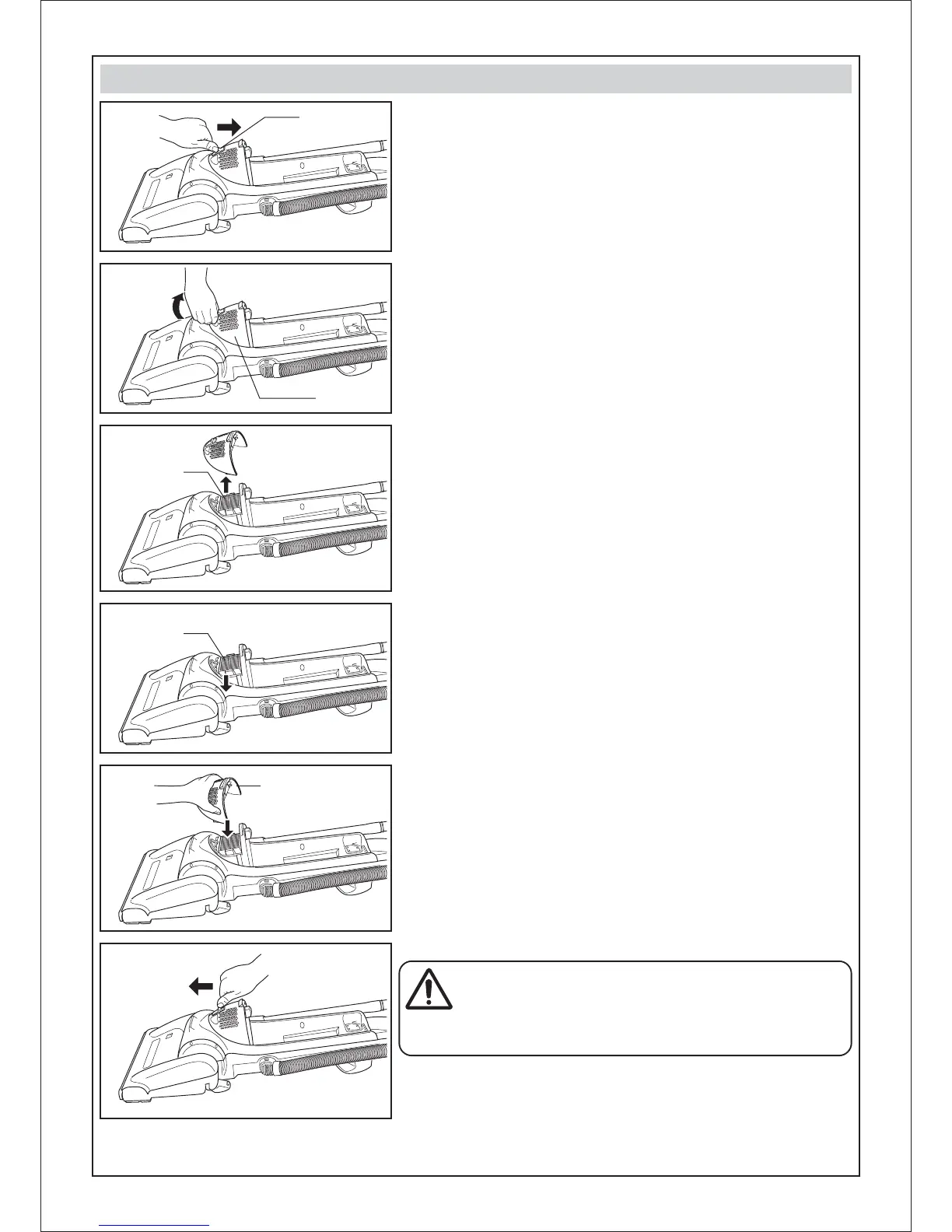
• The HEPA exhaust filter removes dirt from exhaust air.
• Check HEPA exhaust filter after emptying dust bin
Replace when dirty.
• Lay down the vacuum cleaner as shown.
• To remove filter cover, slide upwards the buckle as shown.
• Slide down the buckle as shown.
• Place the filter cover to the body as shown and press into its original
location.
• To install a new HEPA filter or replace the current one, put it into its
original position.
• Grasp the HEPA exhaust filter and pull out to remove it.
• By holding the filter cover as shown, pull it out towards you.
REPLACING HEPA EXHAUST FILTER
WARNING
Do not operate vacuum cleaner with a clogged exhaust filter or
without the exhaust filter cover properly installed.
Important:
If HEPA Exhaust Filter become too dirty, it causes that air suction fall down.
HEPA Exhaust Filter cannot be cleaned and should be replaced at least
once a year.
HEPA
Exhaust Filter
Filter Cover
Filter Cover
HEPA
Exhaust Filter
Buckle



 To Next Page