NOTE:
.
Program
the
remaining
Memory Pads as
desired by
repeating
steps
1-5. You may insert up to 10 memory Programs.
.
When the PROG indicator
is blinking, the
program
can be cancelled
and/or the Pad erased by
pressing
the
STOP/RESET Pad.
B. Programming
Memory Pads for
2 or 3 Stage Heating:
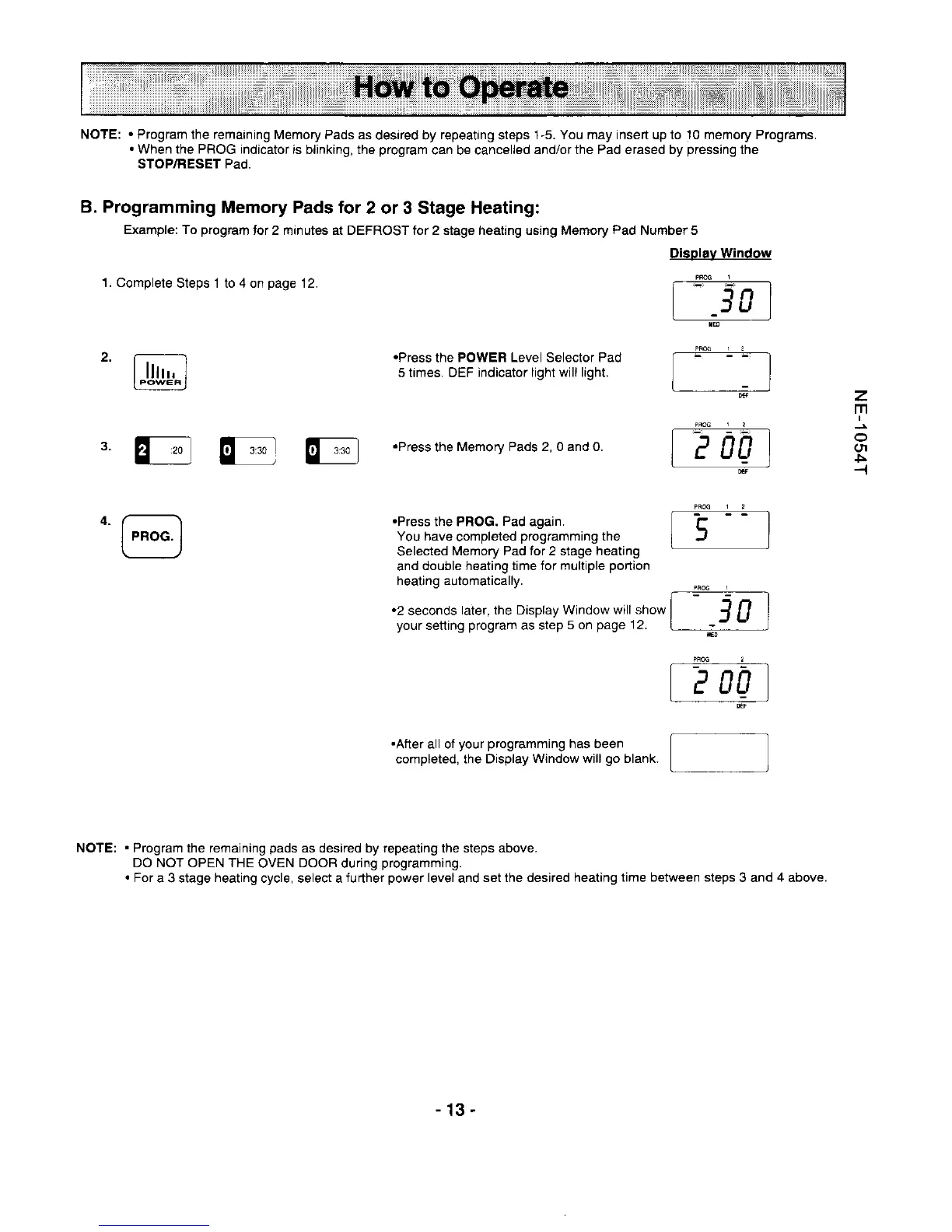
Example: To
program
tor 2 minutes at DEFROST for 2 stage heaiing using Memory
Pad
Number 5
1. Complele
Steps 1 to
4
or
page
12.
.Press
the
POWER Level Selector Pad
5 trmes. DEF
indicator light wiI hght.
.Press
the
Memorv Pads 2, 0 and 0.
'@
.Press
the PROG.
Pad
again.
You have
completed
programming
the
Selected
l\,lemory Pad for 2 stage heating
and
double heating time for
mulliple
portion
heatjng automatically.
.2
seconds
later, the Display Window
will show
your
setting
program
as step
5 on
page
12.
Display Window
---l!99---l-
[-i0]
'.""'.
I
i =J
'-" ;
GNT
lq I
l
E
-_
!!!9_ _ _L_
I
eogl
z
m
o
(rl
5
--l
.After
all of
your programming
has been
completed. the Display
Window will
go
blank.
]
NOTE;
.
Program the remaining
pads
as desired by repeating the steps above.
DO NOT OPEN THE
OVEN
DOOR
during
programming.
.
For
a 3 stage
heating
cycle, select a
further
power
level
and
set the desired healing time
between steps
3 and
4
above.
-13-





 To Next Page