EasyManua.ls Logo

Panasonic NE-1024F - Page 17

Panasonic NE-1024F
20 pages
Print Icon
To Next Page IconTo Next Page
To Previous Page IconTo Previous Page
Loading...
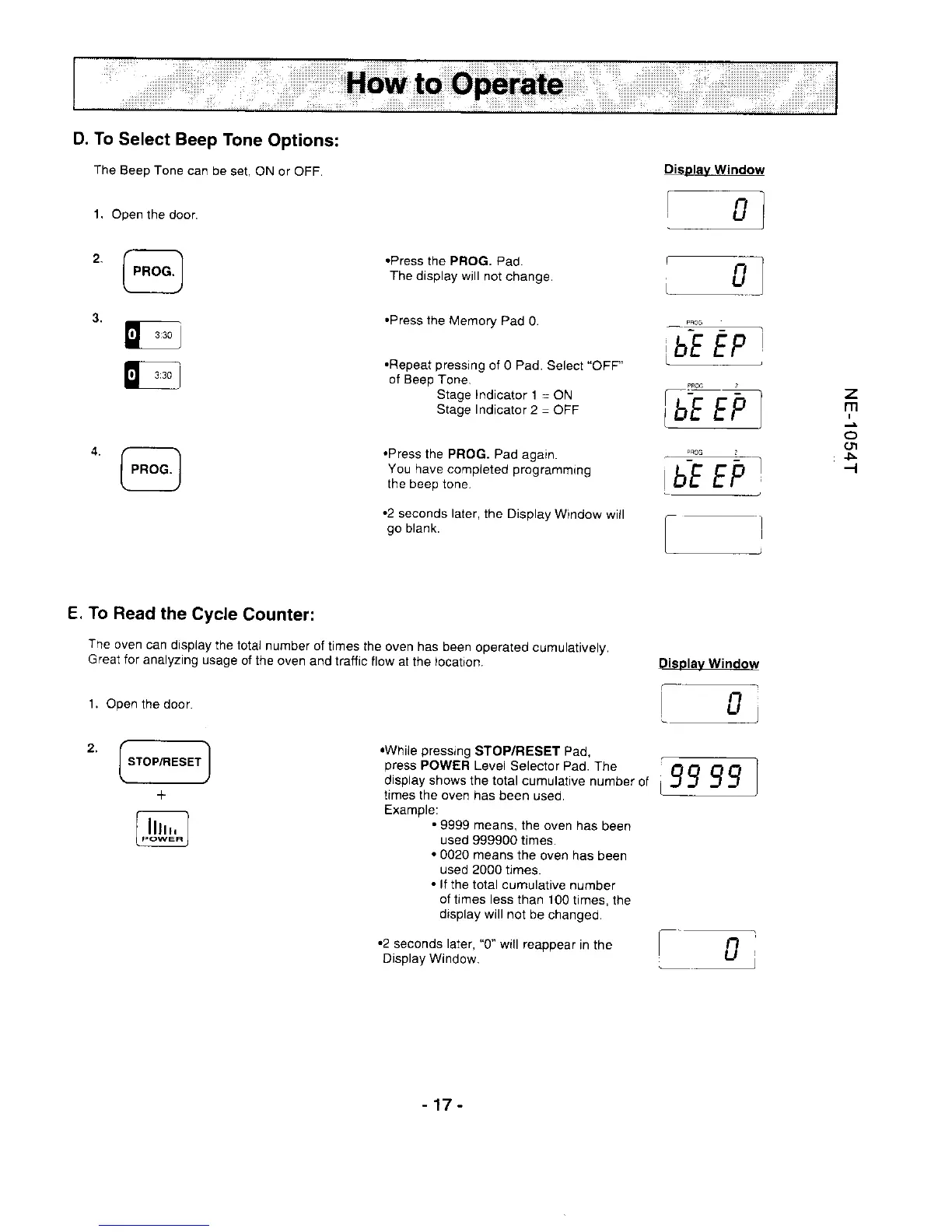
D. To
Select Beep
Tone
Options:
The
Beep Tone
can be
set. ON or OFF.
Open
the door.
@
E
''-
@
1.
Display
Window
.Press
the PFOG. Pad.
The display will
not change.
.Press
the
Memory Pad
0.
.Repeat
pressing
ol 0 Pad.
Select
"OFF"
of Beep
Tone.
Stage lndicator
l
-ON
Stagelndicator2=OFF
.Press
the PROG. Pad
again.
You have completed
programming
the beep
tone.
.2
seconds later,
the Display
Window will
go
blank.
.While
pressing
STOP/RESET Pad,
press
POWER Levei
Selector Pad.
The
display shows
the total cumulative
number
of
trmes the oven
has been
used.
Example:
.9999
means,
the oven has
been
used
999900 times.
.0020
means the
oven has been
used
2000 times.
.
lf
the total cumulative
number
of
times less than 100
times,
the
display
will not
be changed.
.2
seconds later,
"0"
will reappear
in the
Display Window.
l
z
m
(t
5
-.t
E. To Read
the
Cycle
Counter:
The
oven
can dispiay
the total
number
of times the
oven has been
operated cumulatively.
Great for
analyzing usage
of the
oven and tratfic
flow at
the,ocation.
1.Open
the door.
I
STOP,/RESET
I
+
lrr;
u9ry5r.l
Disolay Window
-17
-

Related product manuals