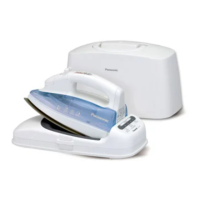
This document describes the Panasonic NI-GT500 and NI-GT200 Steam Generator Irons, designed for household use.
Function Description
The Panasonic Steam Generator Iron is designed to provide efficient and effective ironing with the benefit of steam. It features a steam generator that produces steam under pressure, which helps to smooth out wrinkles in various fabrics. The NI-GT500 model includes additional features such as a level adjustment button and a scale inhibition box, offering more control and easier maintenance. Both models are equipped with a thermostat indicator and a temperature selector (for NI-GT200) or a level scale mark (for NI-GT500) to adjust the heat according to fabric type. The steam switching button allows users to select between enhanced steam and eco steam modes, catering to different ironing needs. The iron also includes a water shortage indicator and a descaling indicator to alert users about maintenance requirements.
Important Technical Specifications
Model: NI-GT500, NI-GT200
Rated Voltage: 220-240 V ~ 50-60 Hz
Power Consumption: 2000-2400 W
Weight: Approx. 4.3 kg
Dimensions (assembly): Approx. 350 × 200 × 300 mm (W × D × H)
Power Plug/Cord Length: Single-phase 3-pole plug, Approx. 1.8 m
Water Tank Capacity: Approx. 1.8 L
Usage: This product is intended for household use only.
Usage Features
First Use: Before first use, it is recommended to remove the label on the product and clean the soleplate with a wet cloth. For NI-GT500, set the level adjustment button to "NI-GT500 only" and for NI-GT200, set the temperature selector to "NI-GT200 only" by following the instructions for "Steam ironing," then iron a wet cloth for a few minutes to clear any residue from the soleplate.
Water Inlet: To fill the water tank, hold the water tank handle, press the water tank latch upward, take out the water tank, and add water through the water inlet. Ensure the water level does not exceed the "MAX" mark.
Temperature Selection:
- NI-GT500: The level adjustment button allows selection of the steam level according to materials of clothes (Acrylic, Silk, Wool, Cotton, Linen, Rayon/Chiffon, Polyester). The iron starts with the eco steam level by default.
- NI-GT200: The temperature selector allows selection of appropriate temperature levels according to materials of clothes.
Power Button: Pressing the power button turns the product on, indicated by a red light. To power off, press and hold the power button for about three seconds.
Steam Switching Button: This button allows switching between enhanced steam and eco steam levels. The eco steam level is suitable for light clothes that need little steam, while enhanced steam is for heavy clothes that need more steam. The product starts with eco steam by default.
Indicators:
- Level Indicator (NI-GT500): Flashes when the iron starts heating, becomes steady when heating is complete. Quick care indicator (red) and optimal care indicator (blue) provide visual feedback.
- Thermostat Indicator (NI-GT200): Turns on when the iron starts heating and off when heating is complete.
- Water Shortage Indicator: Flashes and beeps twice when the water level drops below "MIN". The iron will stop working. Refill the water tank and reinsert it to resume operation.
Steam Ironing:
- Place the power base on a stable surface.
- Take out the water tank and inject water through the water inlet. Use purified water for best results. The maximum capacity is 1.8 L. Ensure the water level is at the "MAX" mark.
- Place the iron on the heat-insulation pad of the power base.
- Connect the power supply. A beep will sound.
- Press the power button. The power indicator turns on.
- For NI-GT500: Set the level adjustment button according to fabric material. The corresponding level indicator and eco steam level indicator will start flashing and then become steady once heating is complete.
- For NI-GT200: Set the temperature selector according to fabric material. The thermostat indicator will start flashing and then become steady once heating is complete.
- Wait about 2 minutes until the level/thermostat indicator becomes steady, indicating the soleplate has finished heating. After about 3 minutes, the steam level indicator becomes steady, and you can press the steam button to use steam for ironing.
- Avoid pressing the steam button when the iron is outside the steam range or when the steam level indicator is still flashing, as water may leak from the soleplate.
Enhanced Steam Boost: For NI-GT500, if the enhanced steam level is set, pressing the steam button twice within one second will generate an enhanced steam boost in a short time (about 2 seconds).
Automatic Shut-off: If the product is not operated within 10 minutes or if dry ironing is used continuously for 10 minutes, the product will automatically power off. To restart, press the power button again.
Fabric and Ironing Recommendations:
- Do not use on leather products.
- For heat-sensitive or dark-colored fabrics, test on a small corner first.
- Keep the soleplate slightly away from clothes labeled "Use press cloth" or "Cool iron."
- Iron clothes labeled "No steam" in dry ironing mode.
- For blended yarn fabrics, select the lowest heat setting.
- For clothes without a fabric care label, refer to the provided table for recommended settings (Soleplate against, Soleplate slightly away, Quick care, Optimal care, Dry ironing only) for various fabrics like Acrylic, Acetate, Nylon, Silk, Wool, Cashmere, Rayon (Chiffon), Polyester, Cotton, and Linen.
Maintenance Features
After Use:
- Place the iron on the heat-insulation pad, press and hold the power button for about two seconds to turn off the product. Unplug the power plug.
- Take out the water tank and pour out any remaining water.
- Install the water tank back on the power base and clean any residual water.
- Store the product in a safe place.
Cleaning:
- Main Body: For stubborn stains, use a soft cloth dipped with neutral detergent.
- Soleplate: If glue or stick-like substances adhere to the soleplate, wipe it with a wet cloth.
- Steam Vents: If scale appears on the steam vents, remove it with a wooden or bamboo toothpick and then wipe the soleplate with a wet cloth.
Descaling (Perform in a place convenient for drainage):
- NI-GT200: When the product has output steam for up to 100 minutes cumulatively.
- NI-GT500: When the product has been used for up to 3,100 minutes cumulatively. The descaling indicator will turn on.
- Disconnect the power supply and wait for more than 60 minutes until the product has fully cooled down.
- Take out the water tank.
- Turn over the power base, place it horizontally on a stable surface, and remove the bottom knob counterclockwise to reveal the drainage outlet.
- Turn over the power base and shake it horizontally several times to pour out the scale and impurities from the boiler inside the product.
- Add an appropriate amount of water to the drainage outlet on the bottom of the power base and shake the power base horizontally several times.
- Turn over the power base, and pour out the scale and impurities from the main body.
- Repeat steps 4-5 until all scale and impurities are poured out. This prevents reduction of steam output due to scale.
- After pouring out all scale and impurities, tighten the knob, restart the product, and press the "RESET" button. The product will then work properly.
- Wind the hose and power cord in the cable trough and store the product in a safe place.
Notes on Descaling:
- Steam output may significantly decrease before the descaling indicator turns on, depending on the region and tap water composition. Therefore, descaling is recommended even before the indicator turns on.
- If steam output is significantly decreased after cleaning, the scale inhibitor may be used up. Contact after-sales service personnel for replacement.
- In addition to reduced descaling agent effectiveness, a shortened service life may also result in decreased steam output.
When the product will not be in use for a long period of time:
- NI-GT200: Drain water from the water tank and rotate the temperature selector to "SILK" steam level.
- NI-GT500: Drain water from the water tank and press the level adjustment button to set the product to the optimal care steam level.

 Need help?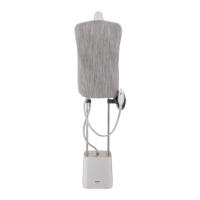



 To Next Page
 General