18
Coffee/Milk
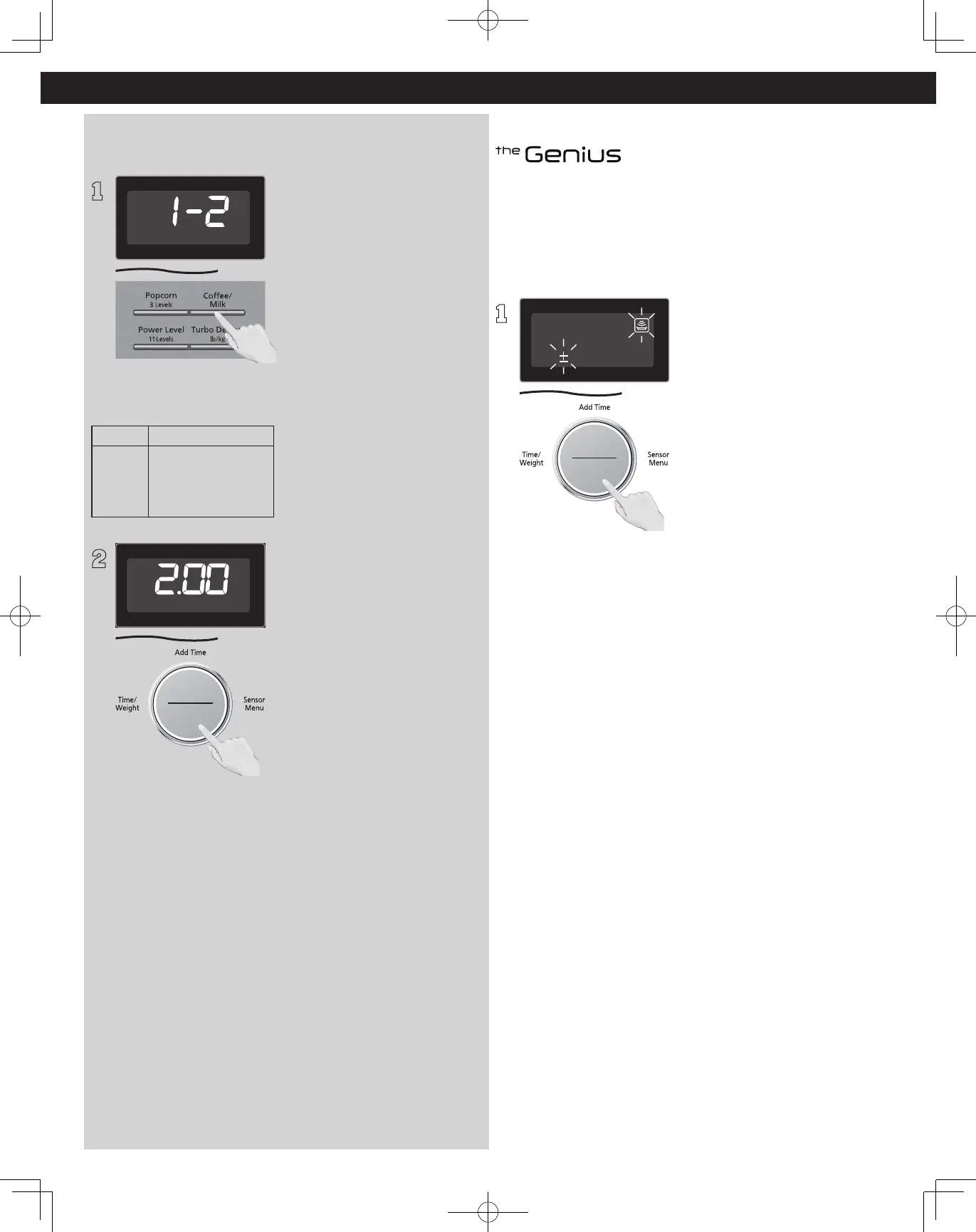
(Example: To reheat 2 cups coffee.)
Sensor Reheat (One Push Reheating)
1
Press Coffee/Milk until the
desired menu appears in the
display window.
Press Menu
once
twice
3 times
4 times
1 cup coffee (1-1)
2 cups coffee (1-2)
1 cup milk (2-1)
2 cups milk (2-2)
2
ヴㄕㄓㄕ
ヴㄆㄏㄔㄐㄓチンㄆㄉㄆㄕ
Press Dial to start. Reheat will
start. The time in the display
window will count down.
NOTES:
1. If the user desires, More/
Less adjustment can be
done. Press More/Less
once to add 10% more
time than suggested,
twice to subtract 10%
cooking time. Press More/
Less three times to original
setting. Press More/Less
before pressing Dial.
2. Use a microwave safe cup.
3. Heated coffee/milk can
erupt if not mixed with air.
Do not heat coffee/milk
in your microwave oven
without stirring before and
halfway through heating.
4. Care must be exercised
not to overheat coffee/
milk when using the
Coffee/Milk feature. It
is programmed to give
proper result when
heating 1 cup or 2 cups
of coffee/milk, starting
from room temperature
for coffee and refrigerator
temperature for milk.
Overheating will cause an
increased risk of scalding,
or water eruption. Refer to
page 4, item 19.
5. 1 cup of milk is ¾ cup
(200ml) to 1 cup (250
ml) and 1 cup of coffee is
⁄cup (150 ml) to ¾ cup
(200 ml).
This unique feature ‘the Genius’
built-in sensor allows you to
reheat a chilled meal with one
push of the dial. It is not necessary
to select the Power level or
cooking time. The built-in sensor
measures the humidity of the food
and calculates the cooking time.
1
ヴㄕㄓㄕ
ヴㄆㄏㄔㄐㄓチンㄆㄉㄆㄕ
When colon or clock mode
is displayed, press the Dial
to start. To reset oven and
return to clock mode, press
Stop/Reset twice. Reheating
is complete when five beeps
sound.
NOTES:
1. Press the dial in two minutes
right after the door was closed,
otherwise One Push Reheating
Function will be rejected and
beeps will sound. Open the door
and close it again will release the
One Push Reheating Function.
2. You are able to adjust the
reheating program to your own
taste. After pressing Dial, +/-
symbol appears in the display,
press More/Less once to add
20% more time than suggested,
twice to subtract 20% cooking
time. Press More/Less three
times to original setting. This
operation should be completed
within 14 seconds. Default mode
is normal.
3. After having used the Sensor
Reheat feature a few times, you
may decide you would prefer
your food cooked to a different
doneness – that is why you would
utilize the More/Less button.
4. The oven automatically
calculates the reheating time or
the remaining reheating time.
5. When steam is detected by the
Genius Sensor and two beeps
sound, the remaining cooking
time will appear in the display.
Casseroles: Add 3 to 4 tbsps
(45to 60 ml) of liquid, cover with
lid or vented plastic wrap. Stir
when time appears in the display
window.
Canned foods: Empty contents
into casserole dish or serving
bowl, cover dish with lid or vented
plastic wrap. After reheating, let
stand for a few minutes.
Plate of food: Arrange food on
plate; top with butter, gravy, etc.
Cover with lid or vented plastic
wrap. After reheating, let stand for
a few minutes.
DO NOT USE SENSOR REHEAT:
1. To reheat bread and pastry
products. Use manual power
and time for these foods.
2. For raw or uncooked foods.
3. If oven cavity is warm.
4. For beverages.
5. For frozen foods.
Operation (continued)



 To Next Page