12
Operation
Dial Feature Using the Microwave for the First Time
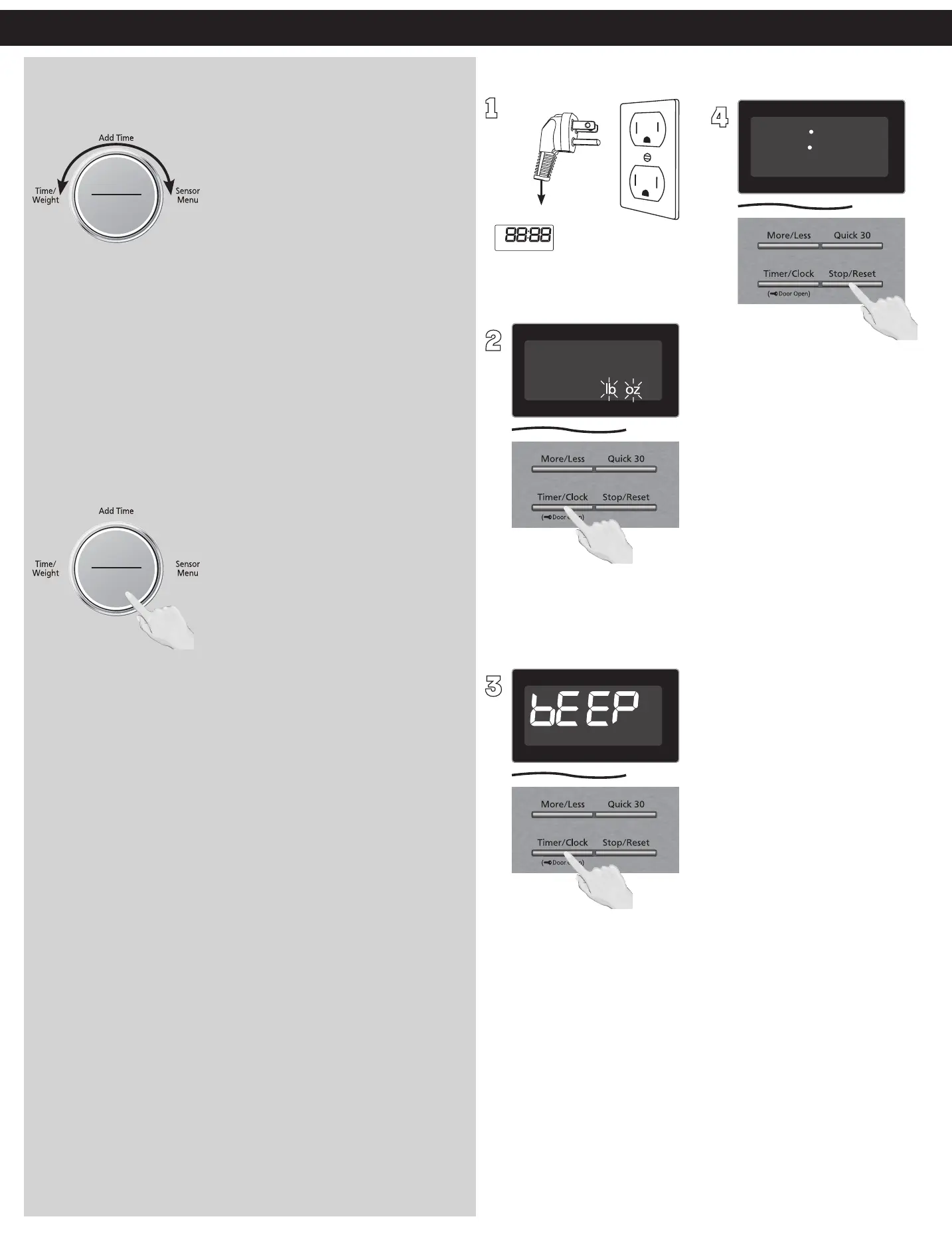
The Dial has the following 5 functions:
ヴㄕㄓㄕ
ヴㄆㄏㄔㄐㄓチンㄆㄉㄆㄕ
Time (Setting time)
Setting the time of clock. After selecting a manual cooking
mode, enter time by turning the Dial. Use the dial for the Add
Time feature. (See page 15)
Sensor Menu (Sensor Cook/Frozen Foods)
After pressing the Sensor Cook or Frozen Foods button, turn the
Dial to select sensor menu (Sensor Cook/Frozen Foods) menu.
(See page 20)
Weight
Turn the Dial to select the food weight for Turbo Defrost.
ヴㄕㄓㄕ
ヴㄆㄏㄔㄐㄓチンㄆㄉㄆㄕ
Start
Press the Dial to start operating the oven. If during cooking the
door is opened or Stop/Reset is pressed once, Dial has to be
pressed again to continue cooking.
Sensor Reheat (One Push Reheating)
When colon or Clock mode is displayed, press dial for quick start
reheating chilled meal. (See page 19)
1
Display Window
Plug into a properly grounded
electrical outlet.
2
Press Dial once, then Press
Timer/Clock to cycle between
the weight system, Imperial
(oz/lb) or Metric (g/kg).
3
Press Dial once, then Press
Timer/Clock to cycle between
the Beep on or Beep off.
4
Press Stop/Reset to confirm;
a colon (:) will appear in the
display window.
NOTES:
These choices can be selected
only when you plug-in the
oven.



 To Next Page