13
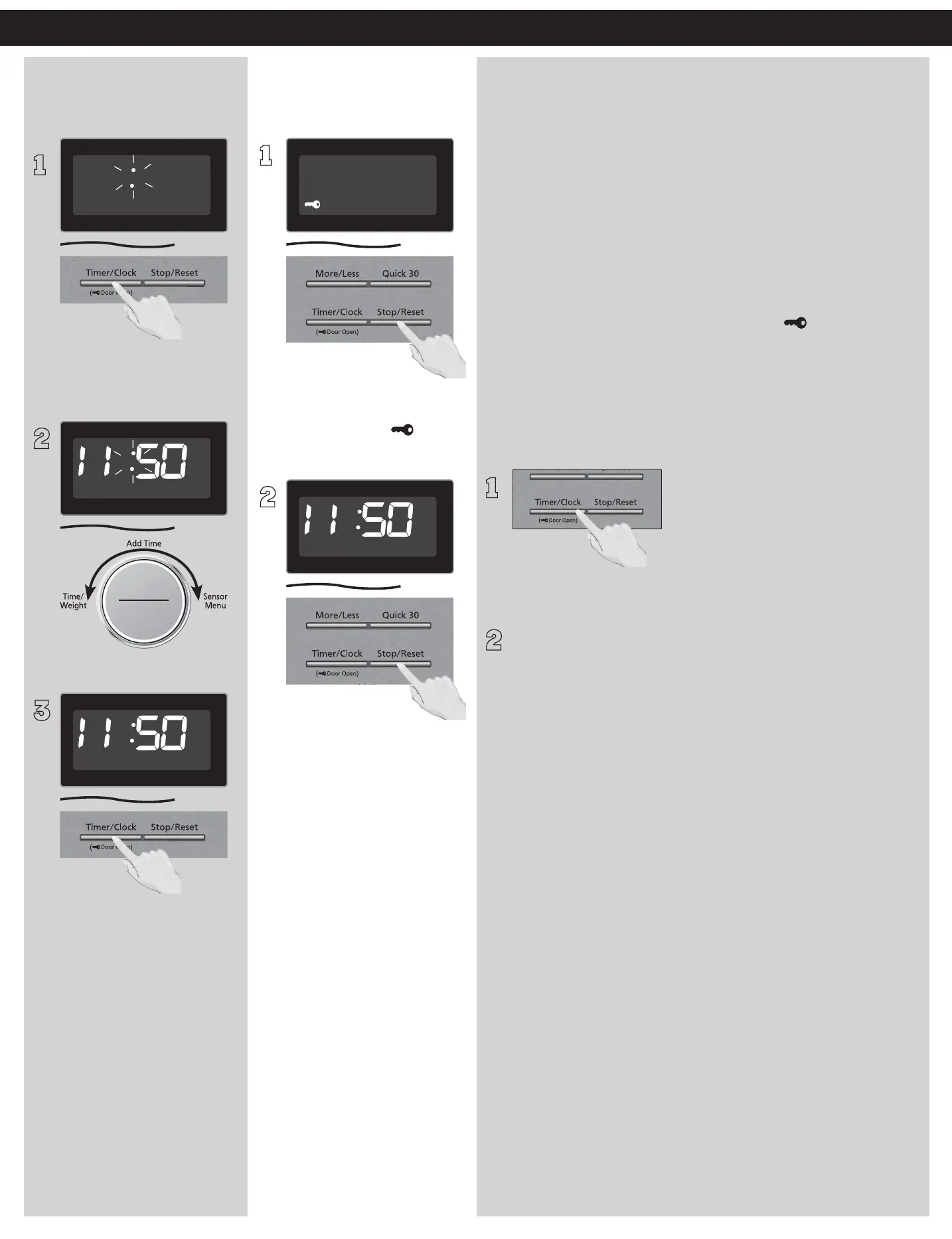
Setting the Clock Setting the Child
Safety Lock
1
With the oven NOT cooking,
press Timer/Clock twice; the
colon will blink.
2
ヴㄕㄓㄕ
ヴㄆㄏㄔㄐㄓチンㄆㄉㄆㄕ
Enter time of day using the Dial.
3
Press Timer/Clock to finish
setting and the colon (:) will
stop blinking.
NOTES:
1. To reset the clock, repeat
steps.
2. The clock will retain the
time of day as long as the
oven is plugged in and
electricity is supplied.
3. The clock is a 12-hour display.
4. Oven will not operate while
colon (:) is flashing.
1
When the time of day appears
in the display, press Stop/
Reset three times; “ ” will
appear in the display.
2
Press Stop/Reset three times;
the display will return to the
time of the day and Child
Safety Lock will be cancelled.
NOTES:
1. This feature prevents the
electronic operation of the
oven until cancelled. It does
not lock the door.
2. To set or cancel Child Safety
Lock, Stop/Reset button
must be pressed 3times
within 10seconds.
3. You can set Child Safety
Lock feature when the
display shows a colon or
time of day.
Operation (continued)
Setting the Child Safety Door Lock
Your microwave is equipped with an electronic child-safety
function, to be more precise: the door lock function, which
enables the oven door to be “locked” so that children or anyone
unfamiliar with it cannot operate it accidentally. Distinguishing
from that of child safety lock, the door lock does not lock access
to the microwave function, it simply prevents burning by opening
the door accidentally. Specifically, the electronic child-safety door
lock is activated or deactivated through specific buttons on the
control panel.
When plugged in, the door lock is automatically activated as
soon as cooking starts. The window flashes “ “ to indicate that
the oven is locked. Follow below sequences to unlock the door,
which must be finished within 10 seconds. If there is not any
operation within 30 minutes from the end of cooking, the door
would be unlocked automatically.
•
To unlock the oven during or after cooking:
1
Press the Timer/Clock button once.
2
Press door release button, the oven door is now unlocked.
Open the door and take out the food with special care.
NOTE:
At the end of cooking, by default, the oven will enter into “Add
Time” mode, if you prefer to add additional time after checking
the food, rotate the knob to set time directly, be sure to perform
add time function within 1 minute. Refer to page 15 for “Add
Time” function.
Continued on the Next Page



 To Next Page