16
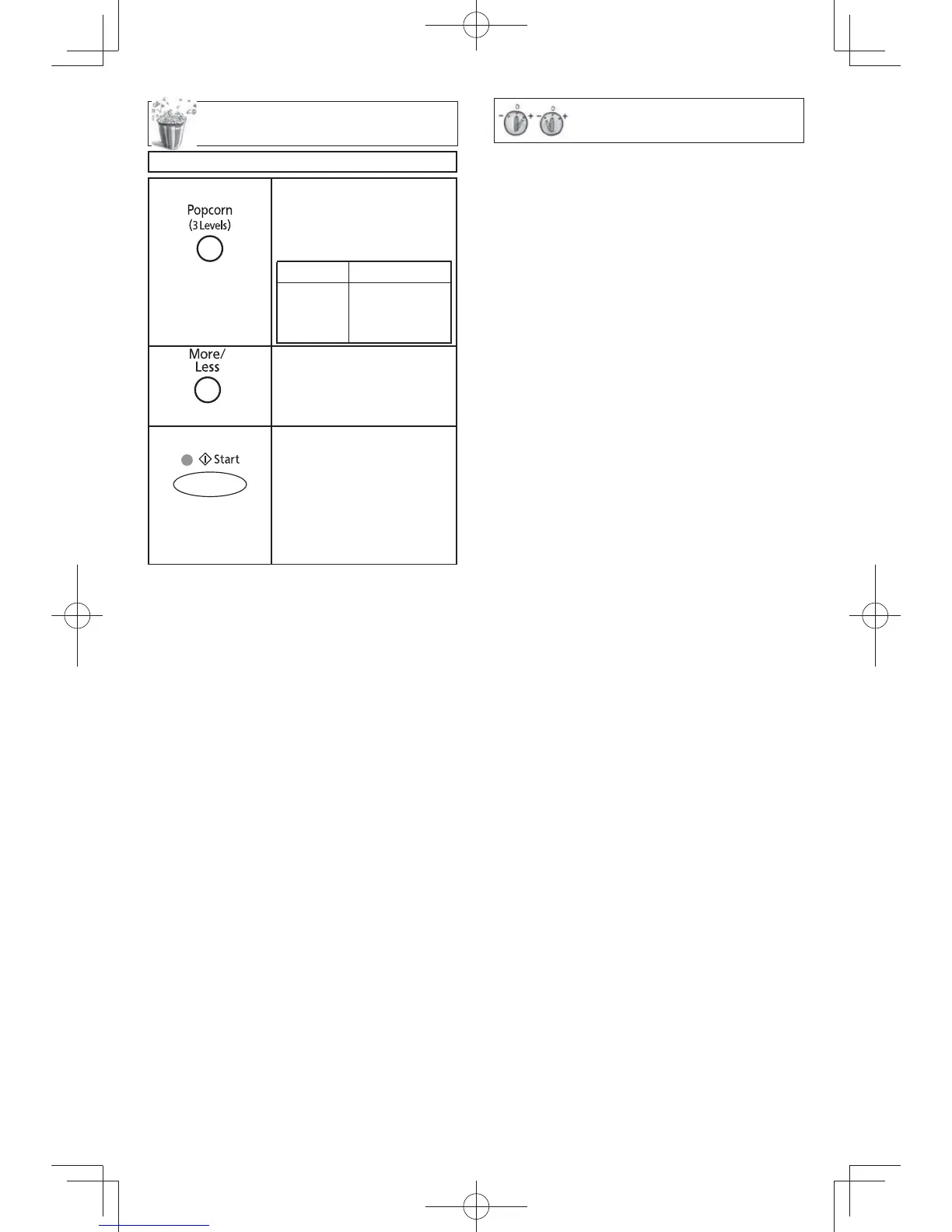
Popcorn Feature
Example: To pop 3.5 oz. (99
g
) of popcorn
1.
Press once.
• Press Popcorn until
the desired size
appears in the display
window.
Press Weight
once
twice
3 times
3.5 oz. (99
g
)
2.75 oz. (78
g
)
1.5 oz. (42
g
)
2.
Optional
• (see More/Less
Feature.)
3.
• Press Start.
After several
seconds, cooking
time appears in
the display window
and begins to count
down.
NOTES ON POPCORN FEATURE:
1. Pop one bag at a time.
2. Place bag in oven according to manu-
facturers’ directions.
3. Start with popcorn at room temperature.
4. Allow popped corn to sit unopened for a
few minutes.
5. Open bag carefully to prevent burns,
because steam will escape.
6. Do not reheat unpopped kernels or reuse
bag.
NOTE:
If popcorn is of a different weight than list-
ed, follow instructions on popcorn package.
Never leave the oven unattended.
If popping slows to 2 to 3 seconds between
pops, stop oven. Overcooking can cause
fi re.
REMARKS:
When popping multiple bags one right
after the other, the cooking time may vary
slightly. This does not affect the popcorn
results.
For Popcorn:
By using the MORE/LESS Button, the
programs can be adjusted to cook popcorn
for a longer or shorter time if desired.
1 tap = Adds approx. 10 secs.
2 taps = Adds approx. 20 secs.
3 taps = Subtracts approx. 10 secs.
4 taps = Subtracts approx. 20 secs.
5 taps = Original setting
Press More/Less Button before pressing
Start.
For Sensor Reheat/Cook and Coffee/
Milk:
Preferences for food doneness vary
with each individual. After having used
the Sensor Reheat/Cook and Coffee/
Milk feature a few times, you may decide
you would prefer your food cooked to a
different doneness.
For Sensor Reheat/Cook:
1 tap = More (Adds approx. 20% time)
2 taps = Less (Subtracts approx. 20%
time)
3 taps = Original setting
For Coffee/Milk:
1 tap = More (Adds approx. 10% time)
2 taps = Less (Subtracts approx. 10%
time)
3 taps = Original setting
Press More/Less Button before pressing
Start.
More/Less Feature
F0003BP00AP_En.indd 16F0003BP00AP_En.indd 16 2015/1/13 13:17:552015/1/13 13:17:55



 To Next Page