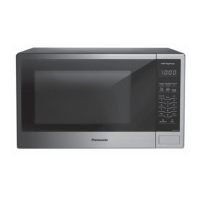
This document is the Owner's Manual for the Panasonic Microwave Oven, models NN-SG448S and NN-SG458S, intended for household use.
Function Description
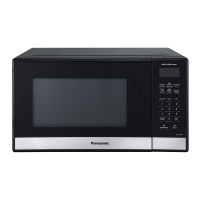
The Panasonic Microwave Oven is a cooking appliance designed for heating and cooking food using microwave energy. It offers various cooking functions, including manual cooking with adjustable power levels and time, as well as several automatic features for convenience.
Important Technical Specifications
- Power Source: 120 VAC, 60 Hz
- Power Consumption: 12 Amps, 1,350 W
- Cooking Power (IEC Test procedure): 900 W
- Outside Dimensions (W x H x D): 19 15/16" x 11 9/16" x 14 3/4" (485 mm x 293 mm x 375 mm)
- Oven Cavity Dimensions (W x H x D): 12 3/8" x 8 11/16" x 13 3/4" (314 mm x 221 mm x 347 mm)
- Operating Frequency: 2,450 MHz
- Net Weight: Approx. 28 lbs (12.7 kg)
The oven features a 12-hour clock display and a maximum cooking time of 30 minutes for P10 (HIGH) power level, and 99 minutes, 99 seconds for other power levels.
Usage Features
Basic Operation:
- First-Time Use: Upon plugging in, the oven defaults to the imperial measure system (oz/lb). The user can cycle between imperial, metric (g/kg), or US (oz/lb) weight systems by pressing "Start" after plugging in.
- Setting the Clock: Press "Clock" once, then use the number pads to enter the time of day. Press "Clock" again to confirm. The colon will stop blinking.
- Child Safety Lock: This feature prevents accidental operation. To set, ensure the microwave is not in use and the time of day is displayed, then press "Start" three times within 10 seconds. To disable, press "Stop/Reset" three times within 10 seconds. This feature prevents electronic operation but does not lock the door.
- Child-safety Electronic Door Lock Feature: This function prevents accidental opening of the door during operation. It is automatically activated when the oven is plugged in. After cooking finishes, the display shows " " to indicate the oven is locked. To unlock during or after cooking, press the "Door Open" pad once. To deactivate temporarily, press "Defrost" - "Timer" - "Popcorn" in turn. To reactivate, press "Defrost" - "Timer" - "Popcorn" in turn, or replug the oven.
- Manual Cooking: Select the desired power level (P10 is highest, P1 is lowest) by pressing "Power Level" repeatedly. Then, set the cooking time using the number pads. Press "Start" to begin.
- Quick 30: This feature allows setting or adding cooking time in 30-second increments, up to 5 minutes, at a preset P10 power level. Press "Quick 30" repeatedly for the desired time.
- Popcorn: Press "Popcorn" until the desired size (3.5 oz/100g, 3.0 oz/85g, or 1.75 oz/50g) appears in the display. The oven will automatically pop the popcorn. Users can adjust cooking time by pressing "More" or "Less".
- Auto Defrost: This feature defrosts meat, poultry, and seafood. Enter the weight of the food in pounds (e.g., 1.9 lbs for 1 lb 14 oz). The oven will signal midway through defrosting for turning or rearranging.
- Auto Reheat: Press "Auto Reheat" until the desired serving size (9.0, 12.0, 15.0, 18.0 Oz) appears. This feature is for previously cooked foods and recommends covering food loosely.
- Auto Cook: Press "Auto Cook" until the number corresponding to the desired food category (Beverages, Pizza, Potatoes, Frozen Vegetables, Dinner Plate, Fresh Vegetables, Frozen Entrées) appears. Then, if desired, press "Serving/Weight" to select the food weight.
- Setting a Standing Time: After cooking, some recipes require a standing time. To set this, follow manual cooking steps, then press "Timer" and enter the desired stand time.
- Setting a Delayed Start: To delay the start of cooking, press "Timer", enter the desired delay time, then follow manual cooking steps (power level and cooking time).
- Stage Cooking: The oven supports up to three stages of cooking. Repeat the manual cooking steps for each stage before pressing "Start".
Food Characteristics and Cooking Techniques:
The manual provides detailed guidance on how different food characteristics (bone and fat, density, quantity, shape, size, starting temperature) affect microwave cooking. It also outlines essential cooking techniques:
- Piercing: For foods with skins or membranes to allow steam to escape.
- Browning: Using browning sauces or sugar to achieve a browned appearance.
- Spacing: Arranging individual foods evenly in a circular pattern for uniform cooking.
- Covering: To retain moisture and prevent splattering.
- Stirring: To distribute heat evenly, bringing cooked edges toward the center.
- Rearranging: For small items like chicken pieces or shrimp.
- Turning: For large foods like roasts or turkeys, to ensure even cooking.
- Standing Time: To allow foods to complete cooking after the oven is off.
- Test for Doneness: Using conventional cooking tests and microwave-safe thermometers.
Maintenance Features
Care and Cleaning:
Regular cleaning is crucial to prevent rusting, arcing, and damage to the oven.
- Before Cleaning: Unplug the oven or leave the door open.
- After Cleaning: Ensure the Roller Ring and Glass Tray are in place, then press "Stop/Reset" to clear the display.
- Outside Oven Surfaces: Clean with a damp cloth.
- Label: Do not remove; wipe with a damp cloth.
- Inside the Oven: Wipe with a damp cloth after use. Mild detergent may be used. Do not use harsh detergents or abrasives. The inside surface is covered with a heat and vapor barrier film, which should not be removed.
- Oven Door: Wipe with a soft dry cloth to remove steam.
- Oven Cavity Floor: Clean with mild detergent, water, or window cleaner, and dry.
- Wave Guide Cover: Do not remove; keep it clean like the inside of the oven.
- Control Panel: Clean with a soft dry cloth if wet. Do not use harsh detergents or abrasives. The protective film can be removed.
- Glass Tray: Remove and wash in warm soapy water or a dishwasher.
- Roller Ring: Wash in mild soapy water or a dishwasher.
Troubleshooting:
The manual includes a "Before Requesting Service" section to help users diagnose and resolve common issues such as:
- TV interference.
- Steam accumulation on the door.
- Oven not turning on or not starting cooking.
- Wobbly Glass Tray or noise during operation.
- Child Safety Lock activation.
Accessories:
Parts, accessories, and instruction books can be purchased online at http://www.panasonic.ca/english/support. Available parts include the Instructions/Operating Manual, Glass Tray, and Roller Ring Assembly.
Warranty:
A one (1) year limited warranty is provided by Panasonic Canada Inc. for defects in material and workmanship under normal use, for products purchased in Canada from an authorized dealer. The warranty requires a purchase receipt and covers repair, replacement, or refund at Panasonic's option. It excludes normal wear and tear, cosmetic damage, shipping damage, misuse, improper installation, and commercial use.

 Need help?
 General


 To Next Page