Edit mode
44
VQT0N43
ª Before recording with audio dubbing
≥Set to Tape Recording Mode.
≥When you want to preserve the original sound
taken during recording, set [SETUP] >>
[AUDIO REC] >> [12bit] to take pictures. (When
set [16bit], the sounds taken during recording
are erased after recording with audio dubbing.)
≥Set [BASIC] >> [REC SPEED] >> [SP] to take
pictures.
ª
To play back the sound recorded with
audio dubbing
You can switch between the sound recorded with
audio dubbing and the original sound.
Set [SETUP] >> [12bit AUDIO] >> [ST2] or [MIX].
[ST1]: It only plays back the original sound.
[ST2]: It only plays back the sound added by
audio dubbing.
[MIX]: It simultaneously plays back the original
sound and the sound added with audio
dubbing.
ª
To dub audio while listening to a
pre-recorded sound
≥When you set [SETUP] >> [12bit AUDIO] >>
[ST2], you can check the pre-recorded sound.
≥When a microphone is used for audio dubbing,
use headphones to listen to the pre-recorded
sound while dubbing the audio. (When using
headphones, set [AV JACK] >> [OUT/Ë].)
Printing pictures by directly
connecting to the printer (PictBridge)
To print pictures by directly connecting the movie
camera to the printer, use a printer compatible
with PictBridge. (Read the operating instructions
for the printer.)
≥Insert a card and set to Picture Playback
Mode.
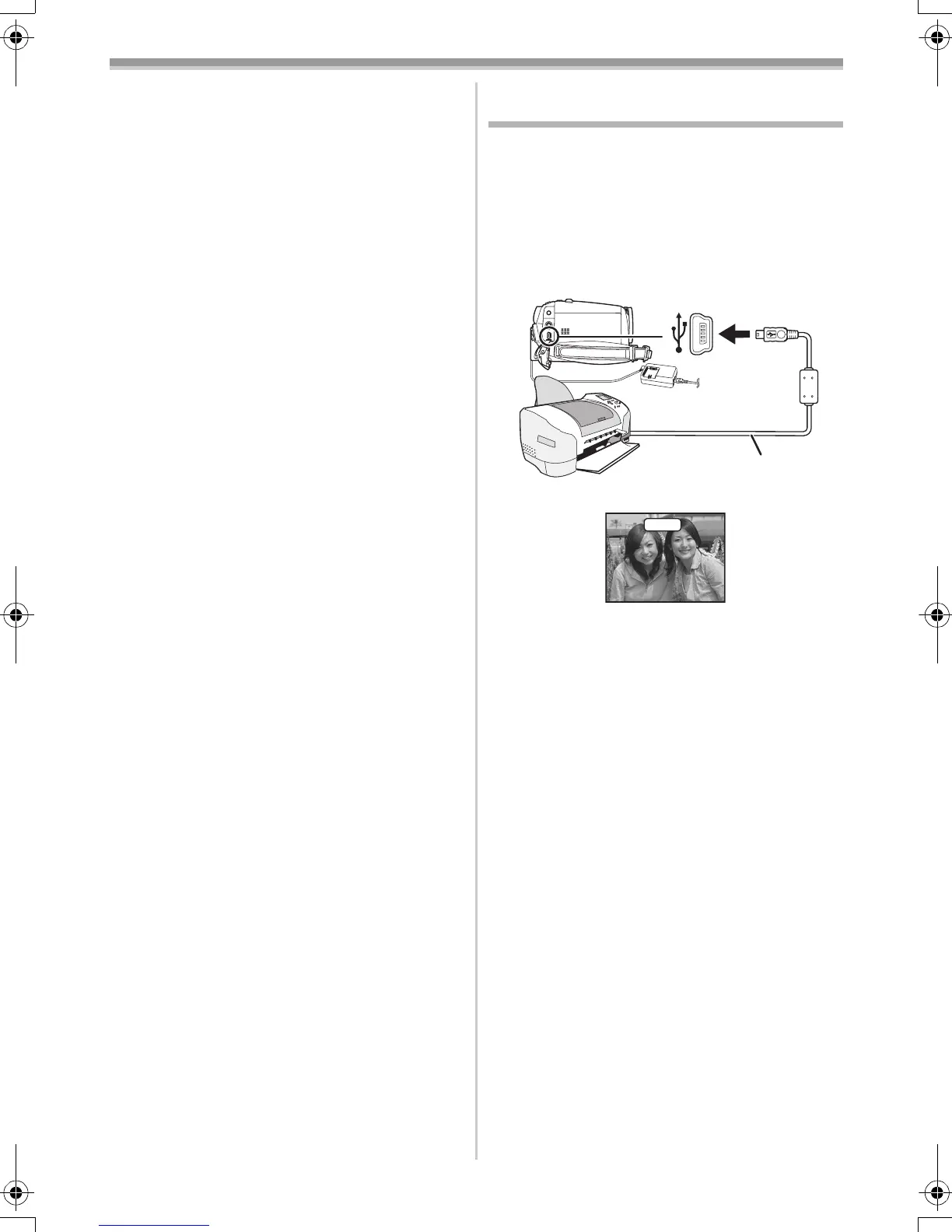
1 Connect the movie camera and the printer
with the supplied USB cable.
1 USB cable
≥The [PictBridge] indication appears on the
screen of the movie camera.
(When the printer is being recognized, the
[PictBridge] indication blinks.)
≥When no card is inserted in the movie camera,
the [PictBridge] indication does not appear.
(You cannot print any pictures.)
≥When the movie camera and the printer are not
connected properly, the [PictBridge] indication
keeps blinking. (It will blink for over approx.
1 minute.) Connect the cable or check the
printer.
≥We recommend using the AC adaptor as the
power supply.
≥When images are displayed in multi-screen,
they cannot be printed.
2 Select [SINGLE PRINT] or [DPOF PRINT].
≥If there is no file with a DPOF setting, you
cannot select [DPOF PRINT].
≥When you select [DPOF PRINT] for printing,
set the number of prints in DPOF setting.
≥When [DPOF PRINT] is selected, print after
you determine the paper size.
1
PictBridge
GS150_140EB.book 44 ページ 2004年11月27日 土曜日 午後4時55分



 To Next Page