6
Auto Tuning Using the On Screen Display
For Australia
Introduction
Auto Tuning using the On Screen Display should be
performed according to the following method if necessary.
Preparations
• Confirm that the TV is on and the VCR viewing channel is
selected.
• Turn on the VCR and select any programme position except
AV.
Operations
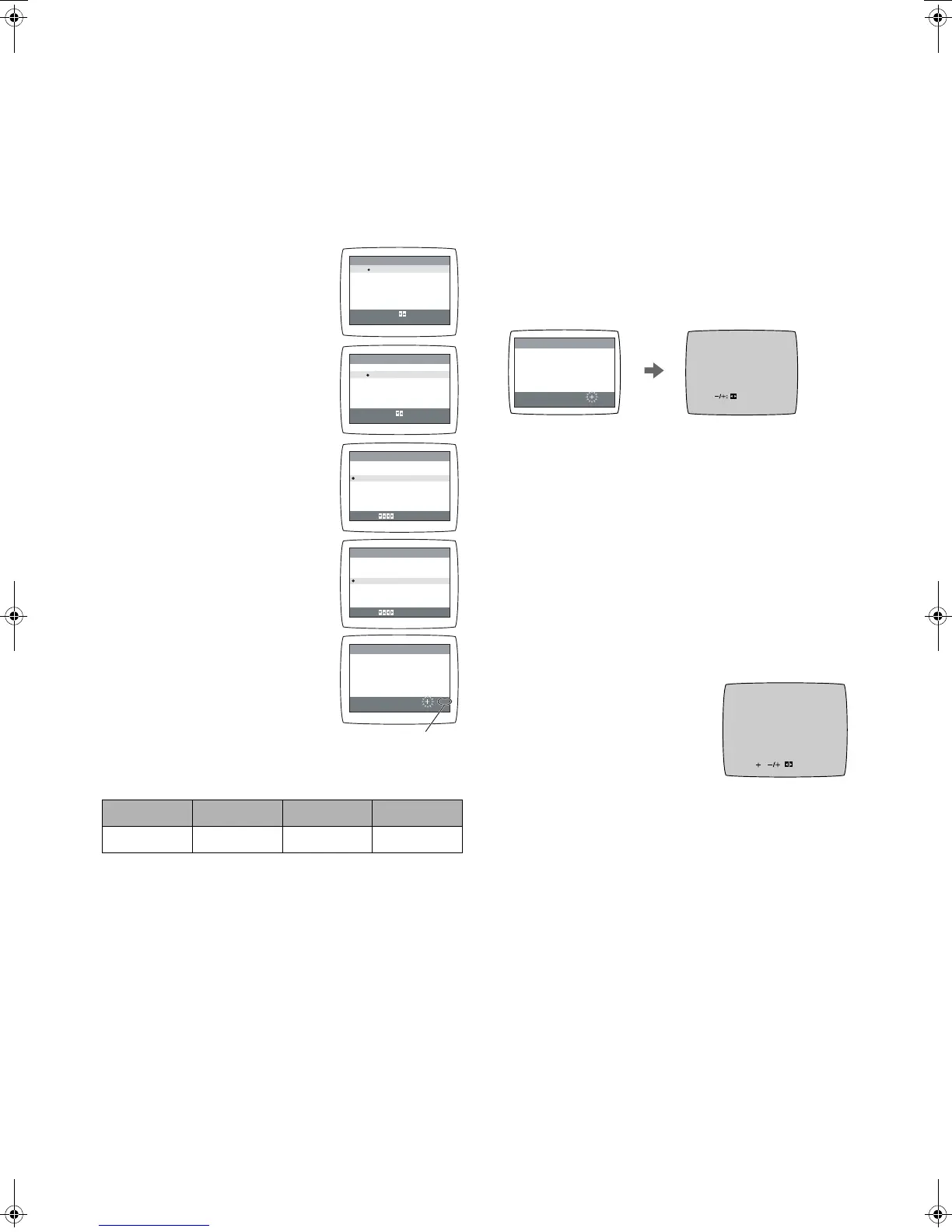
1 Press [MENU] (9) to display the
Main menu on the TV screen.
2 Press [43] (28) to select
[TUNER PRESET] then press
[ENTER] (26).
3 Confirm that [COUNTRY] is set
to [AUSTRALIA].
4 Press [43] (28) to select
[AUTO TUNE] then press [21]
(28) to start the Auto Tuning.
• When Auto Tuning is completed,
the On Screen Display
disappears and programme
position 1 is selected.
Channels that can be received
Notes:
• Auto Tuning searches for TV stations from VHF minimum to
UHF maximum and memorizes every tuned programme
position. Other programme positions are skipped.
• Auto Tuning takes 5 or more minutes to complete its search.
Manual Tuning Procedure
If the VCR is not correctly tuned by Auto Tuning, follow the
procedure below.
1 Press [MENU] (9) to display the Main menu on the TV
screen.
2 Press [43] (28) to select [TUNER PRESET] then
press [ENTER] (26).
3 Press [43] (28) to select [CH] then select the channel
number you want to tune by pressing [21] (28).
4 Confirm that [CLEAR] is set to [OFF].
5 Press [43] (28) to select [SEARCH] then press [21]
(28) to start the Manual Tuning.
• If the desired TV station has not been tuned, press
[21] (28) again.
• Press [MENU] (9) and repeat steps 3-5 for each
programme position you want to tune to a station.
6 Press [MENU] (9) three times to exit the On Screen
Display.
Direct Tuning
Follow steps 1 to 4 of Manual Tuning Procedure.
5
Press [43] (28) to select [SEARCH].
6
Press [Numeric] (3) to enter the number of the desired
programme position.
• For other channels that require tuning, repeat steps 3, 4,
5
,
6
.
7
Press [MENU] (9) twice to exit the On Screen Display.
Fine Tuning Procedure
Follow steps 1 to 4 of Manual Tuning Procedure.
5
Press [43] (28) to select
[FINE] then press [21] (28) to
obtain the best tuning condition.
• Press [ENTER] (26) to return the
tuning to its former state.
6
Press [MENU] (9) to exit the On
Screen Display.
Blanking of Unused Programme Positions
Follow steps 1 to 3 of Manual Tuning Procedure.
4 Press [43] (28) to select [CLEAR] then press
[21] (28) to select [ON].
• Repeat steps 3, 4 for other unused programme positions
to skip during the selection of programme positions.
• To cancel the blanking of a programme position, select
that programme position then set [CLEAR] to [OFF].
5 Press [MENU] (9) twice to exit the On Screen Display.
VHF UHF CATV
Australia 0-12 28-69 45-470 MHz
CH 1
SEARCH
END : MENU
100
AUTO TUNING
IN PROGRESS,
PLEASE WAIT.
MENU
SELECT
END
CLOCK SET
TUNER PRESET
SYSTEM
OPTION
TAPE REFRESH
NAVI MEMORY 0PROG.
: , ENTER
: MENU
MENU
SELECT
END
: , ENTER
: MENU
CH 1
CLEAR
COUNTRY
[AUSTRALIA]
AUTO TUNE
SEARCH
FINE
END : MENU
SELECT:
TUNER PRESET
[OFF]
[
3]
CH 1
CLEAR
COUNTRY
[AUSTRALIA]
AUTO TUNE
SEARCH
FINE
END : MENU
SELECT:
TUNER PRESET
[OFF]
[
3]
CLOCK SET
TUNER PRESET
SYSTEM
OPTION
TAPE REFRESH
NAVI MEMORY 0PROG.
The number displayed here
is the number of channels
still to be auto tuned.
CH 2
END: MENU
CH 2 SEARCH 74
END: MENU
SEARCH
CH 2 AFC: ENTER
FINE : END: MENU
NV-MV21GN.book 6 ページ 2004年2月23日 月曜日 午前9時19分




 To Next Page