-138-
ENGLISH
!"#
!"#$%&'()*+,-./01 !"#
!"#$%&'()*+$, !"#$
!"#$%&'("#$N !"Ol UMUOUQ
!" q_` !"#$%&'()*+,-.
xq_`z !"l SQ
bccb`qN N
1
jlp^f` !"#$
2
pqobq`e !"#
3
jfoolo !"#
4
pqol_b !"#
5
jriqf !"#$
6
m=fk=m !"#
7
jfu !"#
8
tfmb !"#
bccb`qO O
1
kbd^ !"#
2
pli^of !"#$%
3
pbmf^ !"#
4
_Lt !"#
5
aKc^abN !" N
6
aKc^abO !" O
7
aKc^abP !" P
1
!"#$%&'
x
bccb`qNLO
z
!
x
bccb`qN
z
N
x
bccb`qO
z
O
≥ xbccb`qNzxbccb`qOz !"# N
2
!"#
x
pbib`q
z
! !"#$%&
≥ x©z !"
≥ xpbib`qz !
1
–
8
!"#$%&
!"
!"#$%&
!"xlccLlkz
1
!"#$%&'()*+&'
!"#$%&'()*+,-./
!"#$%&
!"#xpbib`qz !"#$%&'(")*+
≥ xs`o= crk`qflkpz !"xafdfq^i
bccb`qz ! !"#$%&'($%)*
≥ !x`^jbo^LlccLs`oz !"xlccz !"#
!"xs`oz !"#$%&'()*+,-./0
≥ !"#$ % "#$&'"#()*"#%+,-.
!"#$%&'
≥ !"#$%&'()*+,-./01234$%5!
l
NSO !"#$%&'#(#%&')*%&
!"#
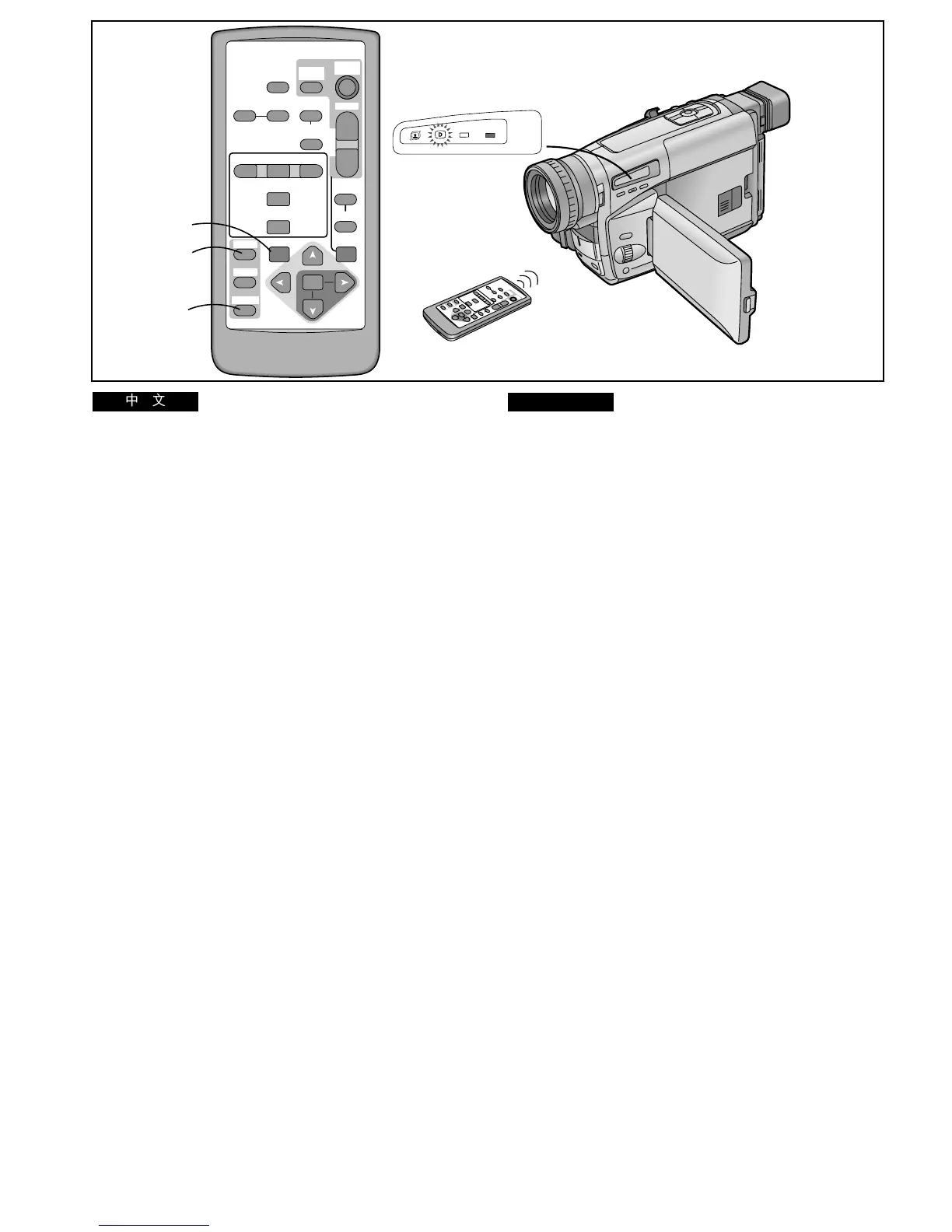
Playback Digital Effects
There are various modes available for adding special digital
picture effects to your recordings during playback. They are
identical to the Digital Effects 1 and 2 (l 80, 82, 84) that can
be used during recording.
The Playback Digital Effect Function can be used only when
the TBC Function is activated. Make sure that the [TBC]
Indication is displayed. (l 64)
EFFECT1
1 MOSAIC 2 STRETCH 3 MIRROR 4 STROBE
5 MULTI 6 P IN P 7 MIX 8 WIPE
EFFECT2
1 NEGA 2 SOLARI 3 SEPIA 4 B/W
5 D.FADE1 6 D.FADE2 7 D.FADE3
1 During playback, press the [EFFECT1/2] Button
on the Remote Controller to select [EFFECT1]
or [EFFECT2].
≥The [EFFECT1] or [EFFECT2] Indication appears for
about 1 second.
2 Press the [SELECT] Button on the Remote
Controller to select the desired digital effect.
≥The [©] Lamp lights.
≥Repeatedly pressing the [SELECT] Button changes the
selected digital effect in the order 1 to 8.
Suspending the Playback Digital Effect Temporarily
You can suspend and re-activate the digital effect by
repeatedly pressing the [OFF/ON] Button 1. When the digital
effect is temporarily suspended, the indication of the selected
effect flashes.
Cancelling the Playback Digital Effect
Press the [SELECT] Button on the Remote Controller to make
the displayed digital effect indication disappear.
≥The same setting can also be set using the [DIGITAL
EFFECT] Sub-Menu on the [VCR FUNCTIONS] Main-Menu.
≥If you set the [CAMERA/OFF/VCR] Switch to [OFF] and
then set it to [VCR] again, the previously selected Playback
Digital Effect is automatically cancelled.
≥In the Multi Image Mode, Picture-in-Picture Mode, Mix Mode
and Wipe Mode, it is not possible to use any of the Digital
Fade Modes.
≥When the Movie Camera’s Digital Still Picture Terminal is
connected to a computer by using the Personal Computer
Connection Kit (l 162), the Multi Image Mode, Picture-in-
Picture Mode, Mix Mode and Wipe Mode cannot be used.
INFO-
WINDOW
CAMERA
V C R
SELECT
STORE
STOP
∫
COUNTER
V
/REW
OFF/ON
P.B.DIGITAL
DATE/
TITLE
RESET FADE
STORE
OFF/ON
COLOUR
SET
ITEM
T
W
s
VOL
r
MULTI/
SNAP
START/
STOP
VIDEO CAMERA
D.FADE
COLOUR
PLAY
PAUSE
FF/
W
MENU
61 5
;
EFFECT
1/2
P.B.
ZOOM
ZOOM
1
2
1




 To Next Page