EasyManua.ls Logo

Panasonic PanaSync E70 - Page 12

Panasonic PanaSync E70
64 pages
Print Icon
To Next Page IconTo Next Page
To Previous Page IconTo Previous Page
Loading...
On-Screen
Adjustment
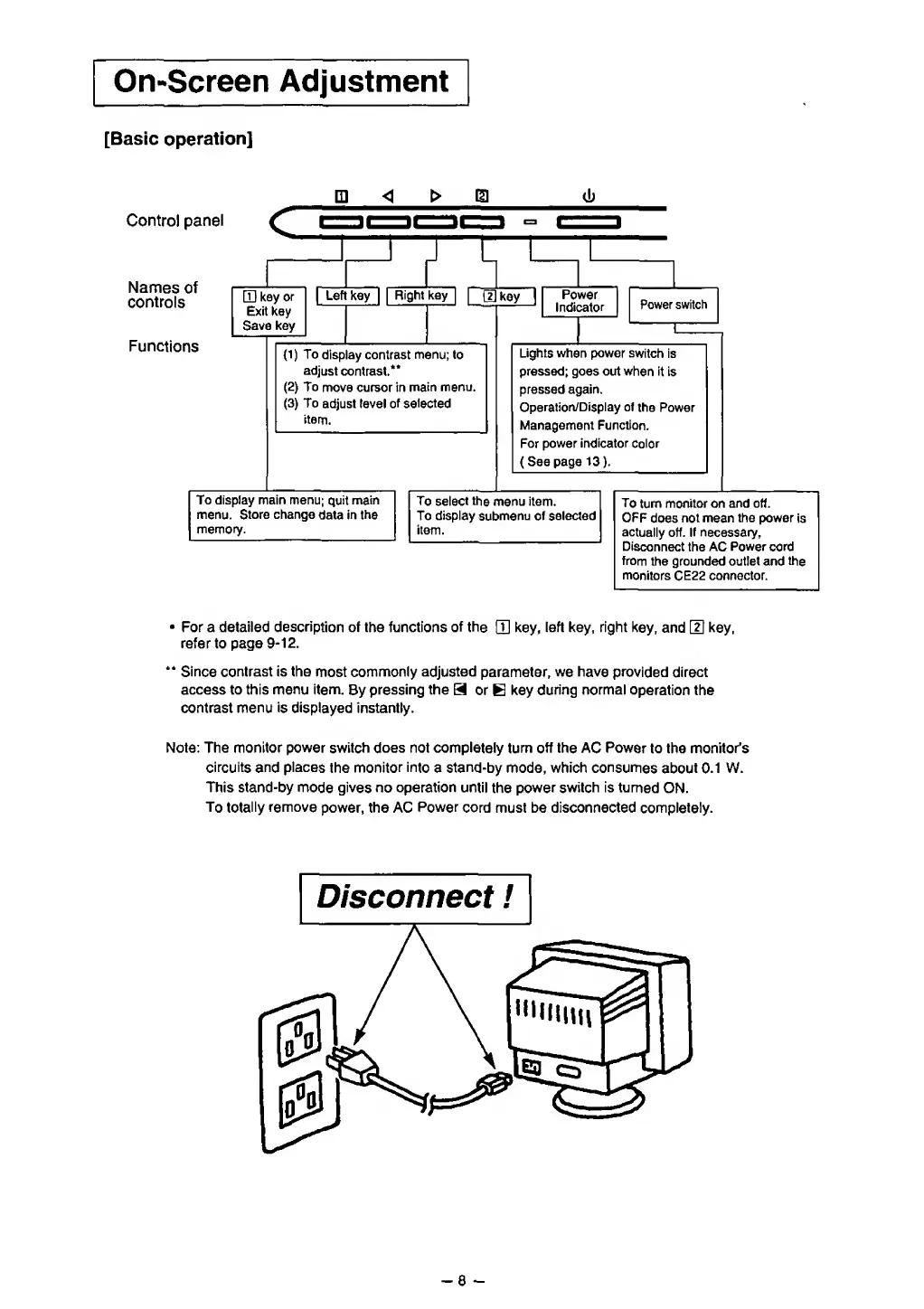
[Basic operation]
Control panel
Names
of
controls
Functions
®
Q]
key
or
Exit key
Save key
r
|
Left
key
|
|
Right key
|
Q|
{1)
To
display contrast
menu; to
adjust
contrast.**
(2)
To
move cursor in
main
menu.
(3)
To
adjust level
of selected
item.
To display main menu;
quit
main
menu.
Store change
data in
the
memory.
key
Power
Indicator
Power
switch
Lights when power
switch
is
pressed; goes out
when it
is
pressed
again.
Operation/Display of
the Power
Management Function.
For power
indicator
color
( See page
13).
To select
the menu item.
To display
submenu of
selected
item.
To
turn
monitor on and off.
OFF
does
not
mean
the power
is
actually
off.
If necessary.
Disconnect
the AC
Power
cord
from
the grounded outlet and the
monitors
CE22
connector.
For a detailed
description
of the functions
of
the
LH
key,
left key, right
key,
and
LH
key,
refer to page
9-12.
**
Since
contrast is the
most
commonly
adjusted
parameter,
we have
provided direct
access to this menu item.
By
pressing the
H or
B
key
during normal
operation
the
contrast menu
is
displayed instantly.
Note: The monitor power switch does not completely
turn
off the
AC
Power
to the monitor's
circuits and
places
the
monitor into
a
stand-by
mode, which consumes
about
0.1 W.
This stand-by
mode gives no
operation until
the
power
switch is
turned
ON.
To totally
remove
power, the AC
Power
cord
must be disconnected
completely.
Disconnect
!
-
8
-

Related product manuals