EasyManua.ls Logo

Panasonic PanaSync E70 - Page 13

Panasonic PanaSync E70
64 pages
Print Icon
To Next Page IconTo Next Page
To Previous Page IconTo Previous Page
Loading...
Operation
<
On-Screen Display>
< Function
and Operation>
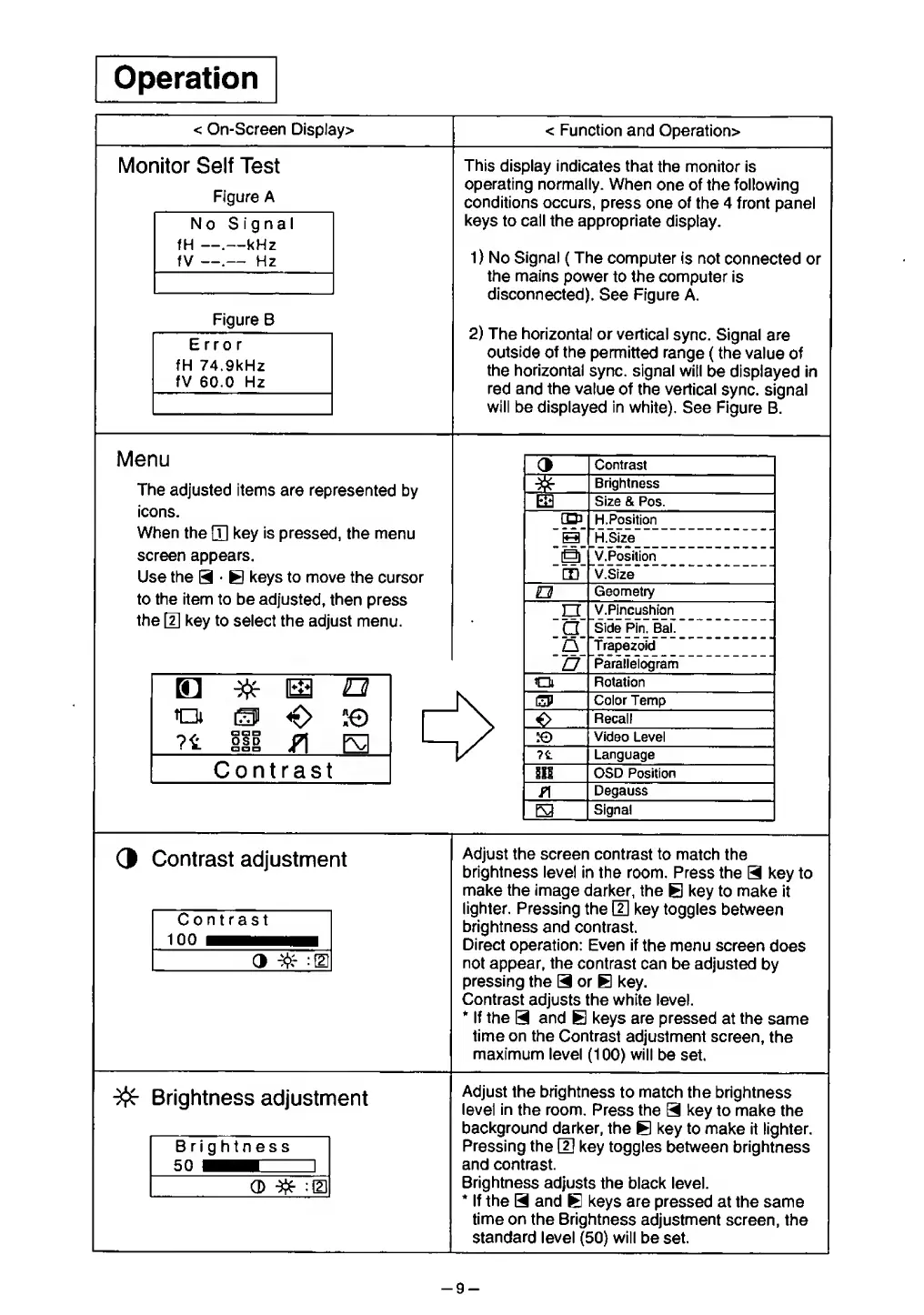
Monitor Self
Test
Figure A
No
Signal
fH —.—kHz
fV
.—
Hz
Figure B
Error
fH
74,9kHz
fV
60.0
Hz
This
display indicates
that
the monitor is
operating normally. When
one of the following
conditions
occurs,
press one of
the 4 front panel
keys
to call the appropriate
display.
1)
No
Signal (
The
computer
is
not
connected or
the mains
power
to the computer
is
disconnected).
See Figure A.
2)
The horizontal
or vertical
sync. Signal
are
outside of the
permitted range
( the value
of
the
horizontal
sync, signal will
be displayed in
red
and the
value of
the vertical
sync,
signal
will be
displayed
in
white).
See Figure
B.
Menu
The
adjusted items are
represented
by
icons.
When
the
fjj
key is
pressed, the menu
screen appears.
Use
the
9
E
keys to move the
cursor
to the item to be adjusted,
then
press
the
|T|
key to
select the adjust menu.
E2
o
m
<€>
is©
OSD
P\
Contrast
3
Contrast
*
Brightness
Size &
Pos.
H.Position
H.Size
a
V. Position
CD
V.Size
O
Geometry
EI
V.Pincushion
"a
Side
Pin. Bal.
"Trapezoid
a
Parallelogram
Q
Rotation
CP
Color
Temp
0
Recall
to
Video
Level
?t
Language
811
OSD Position
f\
Degauss
E3
Signal
3
Contrast
adjustment
Contrast
100
3
jfr
m
Adjust
the screen contrast
to match
the
brightness
level in
the
room. Press the
9
key to
make
the
image
darker, the
B
key to make
it
lighter. Pressing
the
{2}
key toggles
between
brightness
and contrast.
Direct operation: Even if
the menu screen
does
not
appear, the contrast
can
be adjusted
by
pressing
the
9
or
E
key.
Contrast
adjusts the white level.
*
If the
9
and
B
keys are pressed
at
the
same
time on the
Contrast
adjustment screen,
the
maximum level
(100)
will
be set.
Brightness
adjustment
Brightness
50
Adjust
the brightness
to
match
the brightness
level
in
the
room.
Press
the
9
key
to make the
background
darker, the
B
key to make
it lighter.
Pressing the
[U
key toggles
between brightness
and contrast.
Brightness adjusts
the
black level.
*
If the
9
and
B
keys are pressed
at the
same
time on
the Brightness
adjustment
screen, the
standard
level
(50)
will be
set.
-9-

Related product manuals