EasyManua.ls Logo

Panasonic PanaSync E70 - Page 14

Panasonic PanaSync E70
64 pages
Print Icon
To Next Page IconTo Next Page
To Previous Page IconTo Previous Page
Loading...
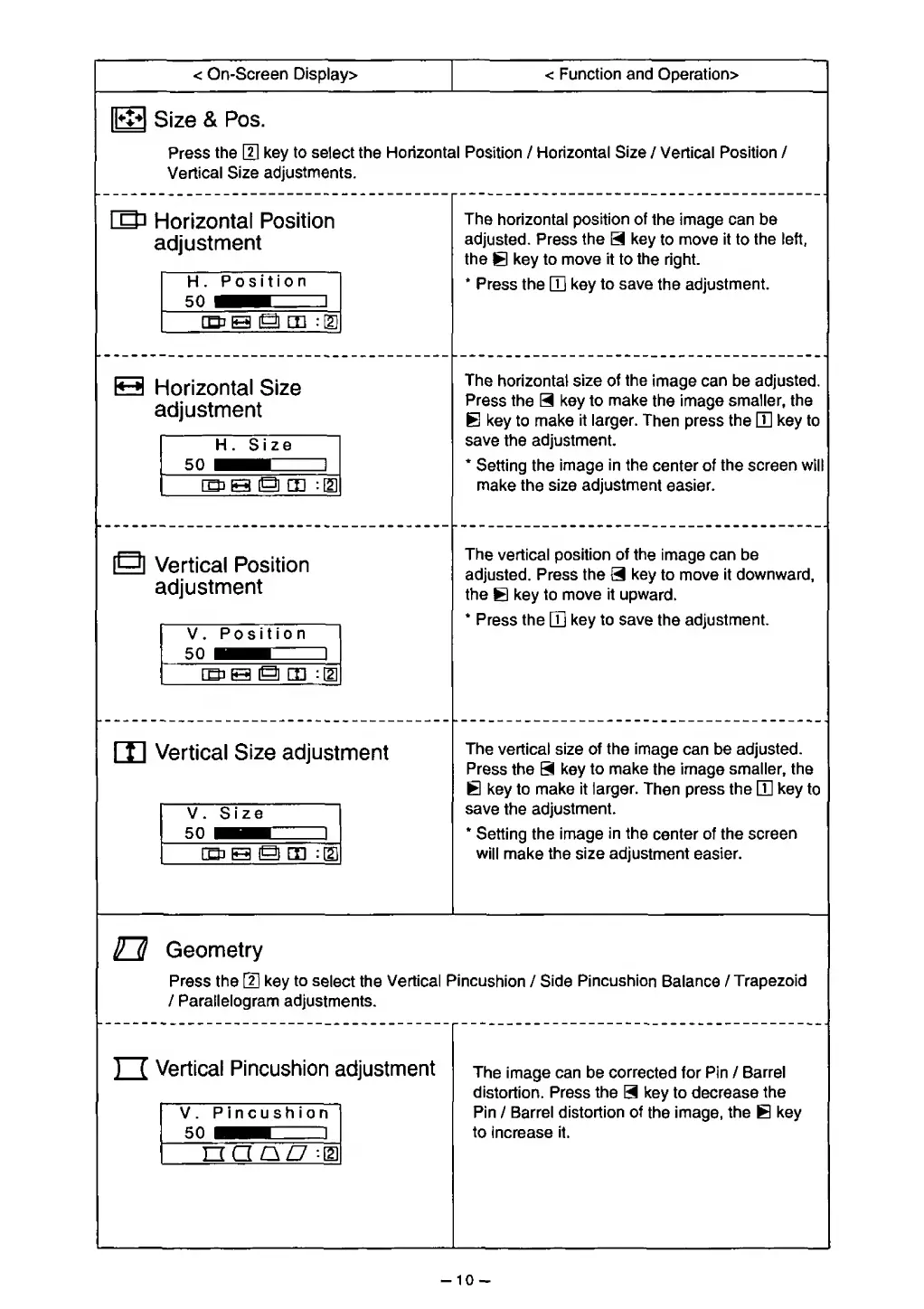
< On-Screen Display>
<
Function and Operation>
Q23
Size
&
Pos.
Press
the
[H
key to
select
the Horizontal Position
/
Horizontal
Size
/
Vertical Position /
Vertical
Size
adjustments.
ID
r
Horizontal
Position
idjustment
H
.
Position
1
[Qi0
Q EE
:
E
The
horizontal
position of
the image can be
adjusted. Press
the
3
key
to
move
it
to
the left,
the
B
key
to move
it
to
the
right.
*
Press the
[Q
key
to save
the
adjustment.
H
Horizontal Size
adjustment
H. Size
50
i^hb 1
The
horizontal size of
the
image
can
be
adjusted.
Press the
H
key to
make
the
image smaller, the
B
key to make
it
larger.
Then
press
the
E
key to
save
the
adjustment.
*
Setting the
image
in the
center of
the screen will
make
the size adjustment
easier.
S
\
c
/ertical
Position
idjustment
V .
Position
The vertical position
of
the
image
can be
adjusted. Press
the
3
key
to move
it downward,
the
B
key to
move it
upward.
*
Press
the
GQ
key to save
the
adjustment.
m
>
/ertical
Size
adjust
V. Size
sn
1
ment
The
vertical
size of
the
image
can be
adjusted.
Press the
3
key
to make
the
image
smaller, the
B
key
to make it
larger.
Then press the
D]
key
to
save
the
adjustment.
*
Setting the image
in the
center of
the screen
will make
the
size adjustment
easier.
Geometry
Press the
[J]
key
to
select
the
Vertical
Pincushion
/
Side
Pincushion
Balance /
Trapezoid
/ Parallelogram adjustments.
/ertical
Pincushion
*
V.
Pincushion
*n
1
a a
a/7 -d]
idjustment
The image can be corrected for Pin /
Barrel
distortion. Press
the
3
key to decrease
the
Pin
/
Barrel distortion
of
the
image, the
B
key
to
increase
it.
-10-

Related product manuals