< On-Screen
Display>
<
Function and Operation>
O
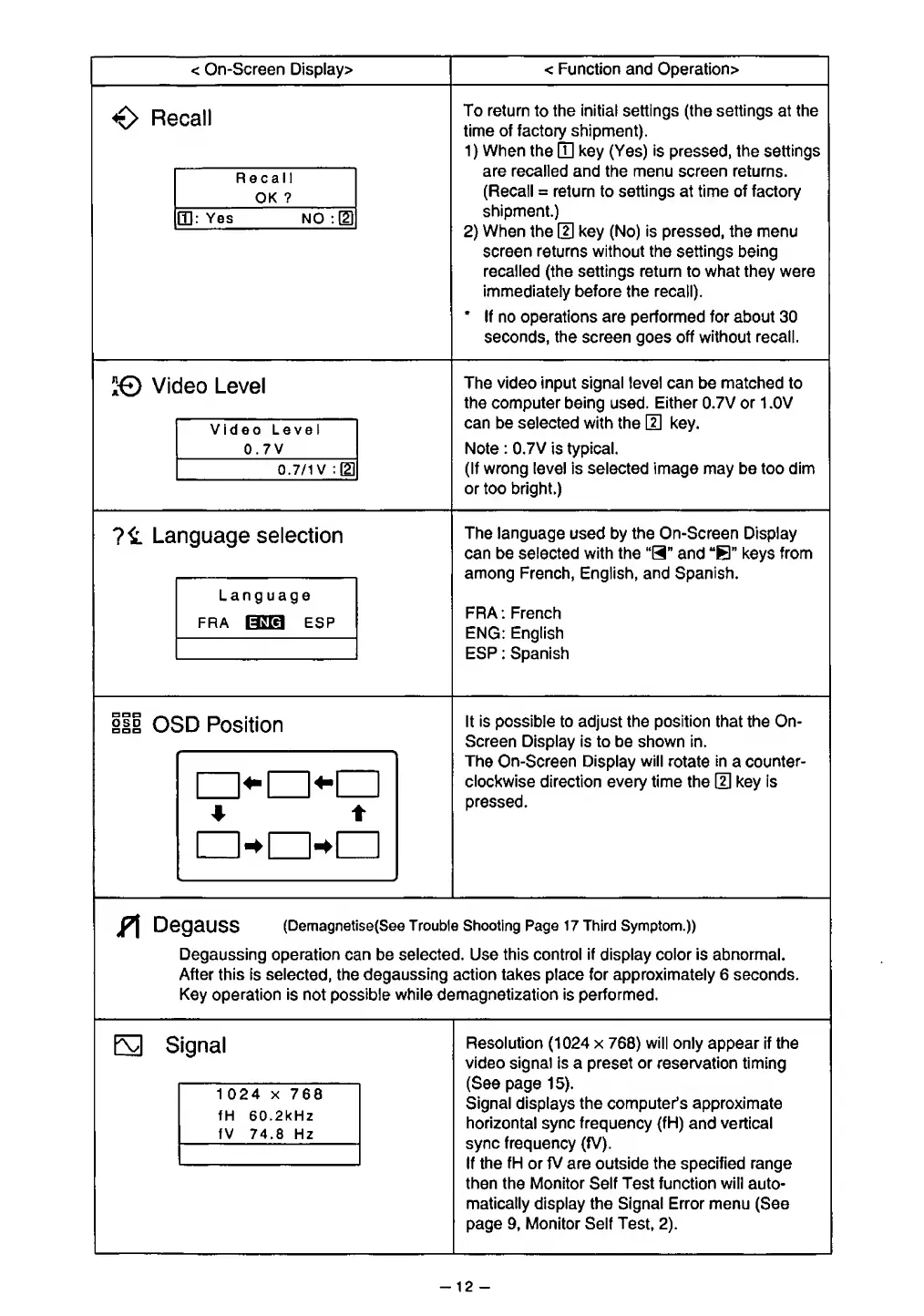
Recall
Recall
OK
?
CD:
Yes
NO
:[D
To return
to
the initial settings (the settings
at
the
time of factory shipment).
1
)
When the
HI
key (Yes) is pressed, the settings
are recalled and the menu
screen returns.
(Recall
=
return to
settings
at time of
factory
shipment.)
2)
When
the
(U
key (No)
is pressed,
the menu
screen
returns without the
settings being
recalled
(the settings return to what they were
immediately before the recall).
*
If no operations are performed for about 30
seconds,
the screen
goes
off without recall.
!©
Video
Level
Video Level
0.7V
0.7/1 V
The video input signal level can be matched to
the
computer being
used.
Either 0.7V
or
1 .0V
can
be selected
with the
{2}
key.
Note
:
0.7V
is
typical.
(If wrong level is selected image may be too dim
or too bright.)
Language
selection
Language
fra
Hna
esp
The language
used by
the
On-Screen Display
can
be
selected
with the
"H"
and
"B"
keys
from
among
French,
English, and Spanish.
FRA : French
ENG: English
ESP : Spanish
ill
OSD
Position
It is possible
to adjust
the
position that
the On-
Screen Display is to be shown in.
The
On-Screen
Display will
rotate
in
a
counter-
clockwise direction every time the
0
key is
pressed.
jf\
DegauSS
(Demagnetise(See Trouble
Shooting
Page 17 Third
Symptom.))
Degaussing operation can
be
selected.
Use
this
control
if
display color is abnormal.
After this
is
selected, the degaussing action takes place for approximately 6 seconds.
Key operation is not possible
while
demagnetization is performed.
E3
Signal
1 024
x
768
fH 60.2kHz
fV
74.8
Hz
Resolution
(1024
x
768)
will
only appear if
the
video signal is a preset or reservation timing
(See page
15).
Signal
displays the computer's approximate
horizontal
sync frequency
(fH)
and
vertical
sync
frequency (fV).
If
the fH
or fV
are outside the specified range
then
the Monitor
Self Test function
will
auto-
matically display the Signal Error menu
(See
page
9,
Monitor Self
Test,
2).
-
12
-








 To Next Page