EasyManua.ls Logo

Panasonic RC6099 - Page 11

Panasonic RC6099
20 pages
Print Icon
To Next Page IconTo Next Page
To Previous Page IconTo Previous Page
Loading...
®
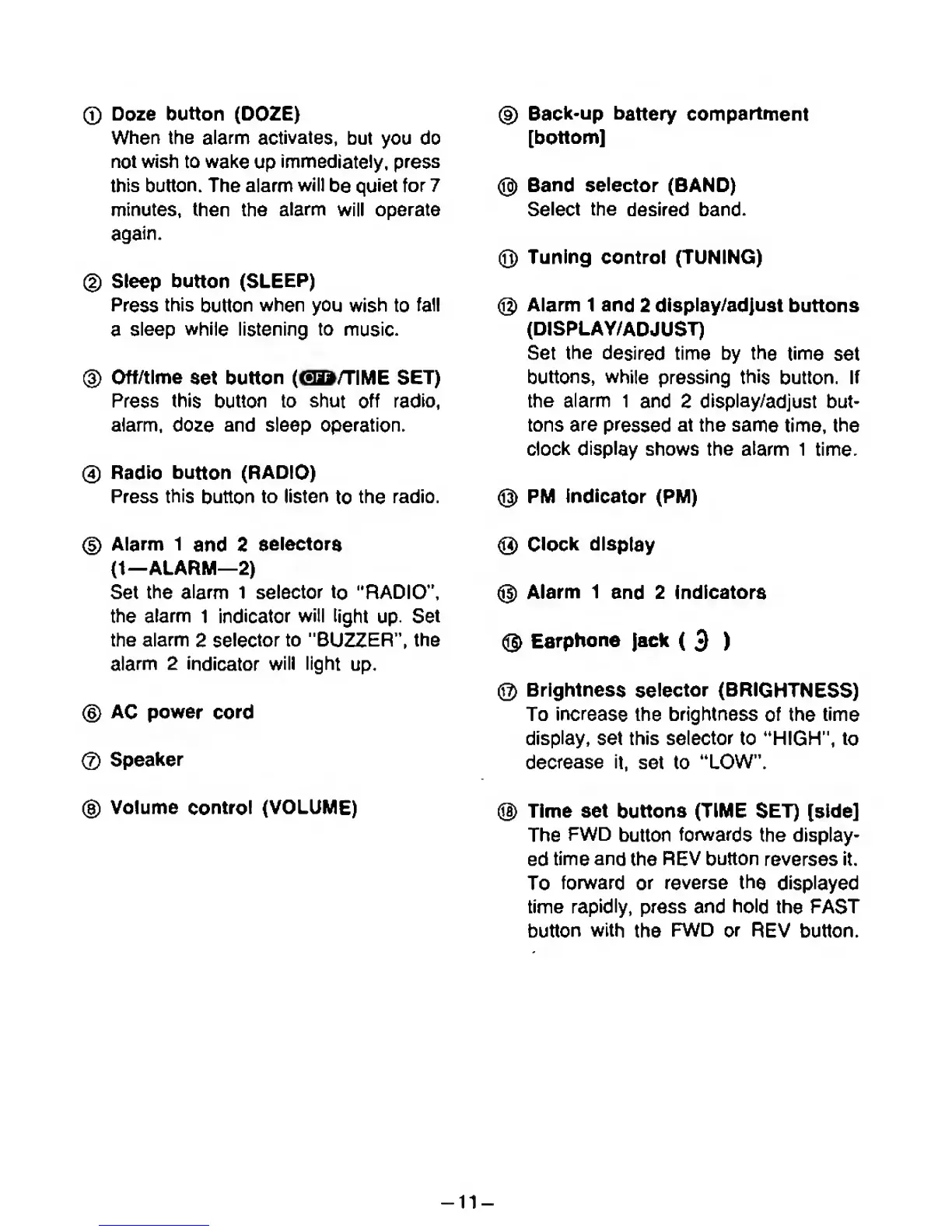
Doze
button
(DOZE)
When
the
alarm
activates,
but you do
not
wish to
wake
up
immediately, press
this
button.
The alarm
will
be
quiet
for 7
minutes, then the
alarm
will operate
again.
®
Sleep button
(SLEEP)
Press
this
button
when
you
wish
to
fall
a
sleep while listening to
music.
®
Off/time
«et
button
(GD/TIME
SET)
Press
this
button
to shut
off
radio,
alarm, doze and sleep
operation.
®
Radio
button
(RADIO)
Press
this
button
to
listen
to
the
radio.
(D
Alarm 1
and 2
selectora
(1—ALARM—
2)
Set
the
alarm 1
selector
to "RADIO",
the
alarm
1
indicator
will
light
up.
Set
the alamn
2
selector
to
"BUZZER",
the
alarm 2
indicator
will light
up.
®
AC power
cord
®
Speaker
®
Volume
control
(VOLUME)
@
Back-up
battery
compartment
[bottom]
@
Band selector
(BAND)
Select
the
desired band.
@
Tuning control (TUNING)
@
Alarm
1 and
2
display/adjust
buttons
(DISPLAY/ADJUST)
Set
the
desired
time by the
time
set
buttons, while
pressing
this
button.
If
the alann
1
and
2
display/adjust
but-
tons
are
pressed
at the
same
time,
the
clock display
shows the atanm 1
time.
®
PM Indicator (PM)
®
Clock display
@
Alarm 1
and 2 Indicators
@
Earphone jack
(
3
)
@
Brightness
selector
(BRIGHTNESS)
To
increase
the
brightness
of
the
time
display,
set
this selector
to 'HIGH",
to
decrease it,
set to
"LOW".
®
Time set
buttons
(TIME
SET)
[sMe]
The
FWD
button
fonwards
the display-
ed
time and
the
REV
button
reverses it.
To
forward
or
reverse the
displayed
time
rapidly,
press and
hold
the FAST
button
with
the
FWD
or
REV button.
-11-

Related product manuals