EasyManua.ls Logo

Panasonic RC6099 - Radio Operation

Panasonic RC6099
20 pages
Print Icon
To Next Page IconTo Next Page
To Previous Page IconTo Previous Page
Loading...
Radio
Operation
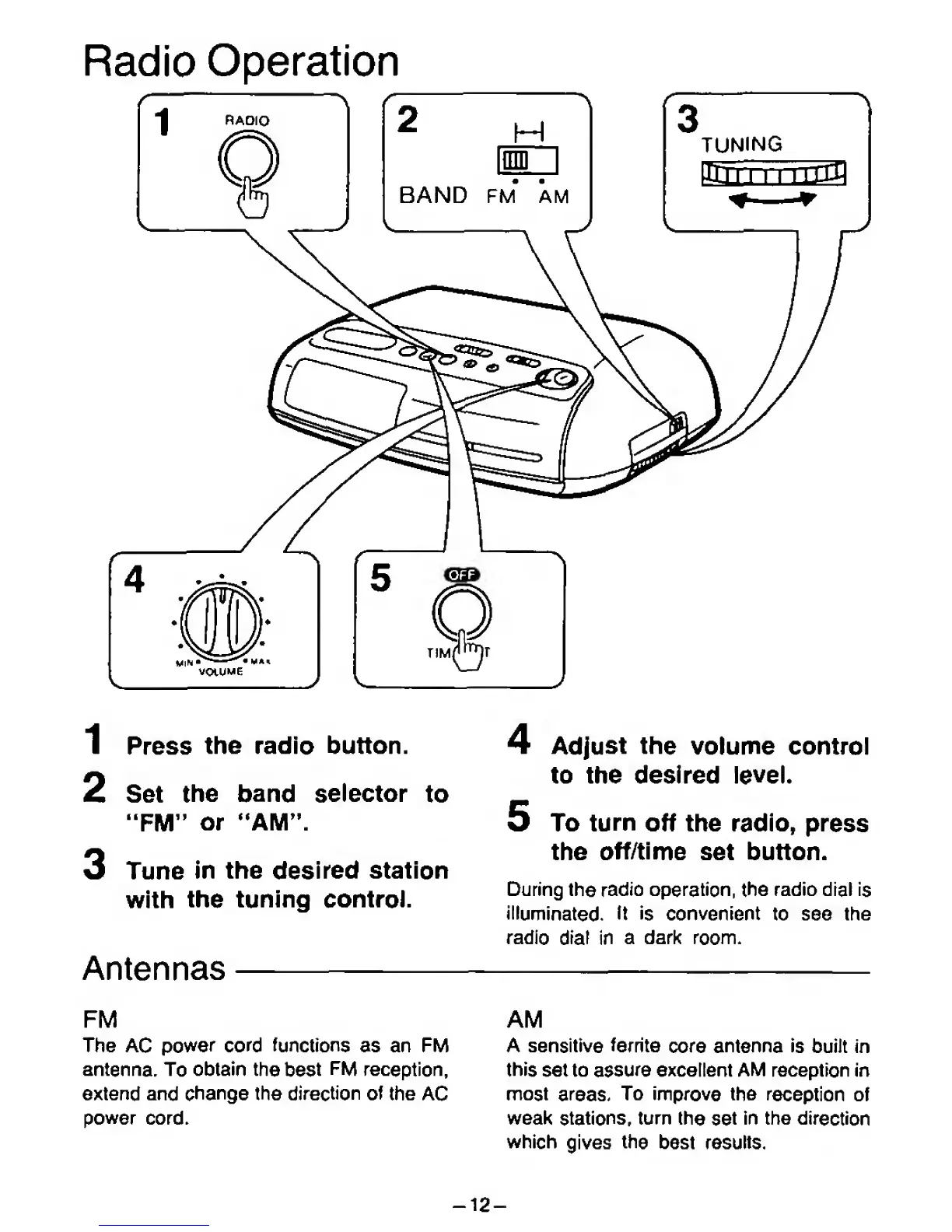
1
Press
the radio button.
2 Set
the band
selector
to
"FM"
or "AM".
3 Tune
in the
desired
station
with
the
tuning control.
Antennas
4 Adjust the
volume control
to the desired
level.
5 To
turn
off
the radio,
press
the
off/time
set button.
During the
radio
operation, the
radio dial
is
illuminated,
ft is
convenient to see the
radio
drat
in
a dark
room.
FM
The
AC
power
cord functions
as an FM
antenna.
To
obtain
the
best
FM
reception,
extend
and
change the direction
of
the
AC
power
cord.
AM
A sensitive
ferrite
core
antenna is
built in
this
set to assure excellent AM reception in
most
areas.
To
improve the
reception
of
weak
stations,
turn
the
set
in
the
direction
which
gives
the
best results.
-12-

Related product manuals