EasyManua.ls Logo

Panasonic RC6099 - Replacing the Battery

Panasonic RC6099
20 pages
Print Icon
To Next Page IconTo Next Page
To Previous Page IconTo Previous Page
Loading...
Sure
Time
Battery
Back-Up
The
back-up
battery
will
keep
the
clock
The
alarm
"memory"
is
not
affected
by a
and alarm time
during
a
power
interruption.
power interruption
so
there
is no
need
to
When
power
is resumed, the
digits
of
the
reset the
alarm,
clock
will
illuminate
and
will show
the
time.
Battery
installation
1
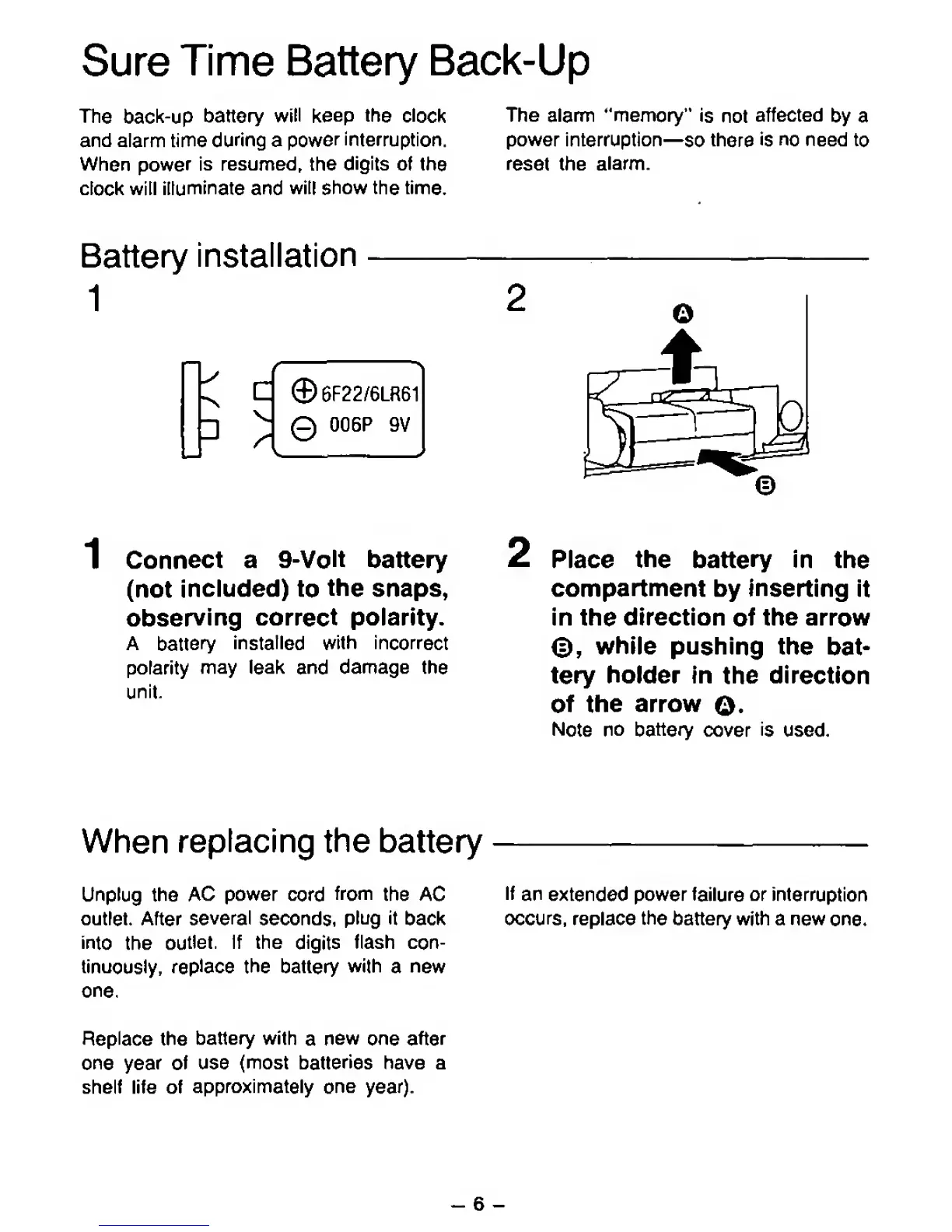
Connect
a
9-Volt
battery
(not
included)
to
the
snaps,
observing
correct polarity.
A
battery
installed
with
incorrect
polarity
may leak
and
damage
the
unit
2
Place
the
battery
In
the
compartment
by Inserting
It
In
the
direction
of
the arrow
©,
while
pushing the
bat-
tery
holder
in
the
direction
of the
arrow
O.
Note
no battery
cover
is
used.
When
replacing
the battery
Unplug
the
AC
power
cord
from
the
AC
outlet. After
several
seconds,
plug
it
back
into
the
outlet.
If the
digits
flash
con-
tinuously,
replace
the
battery
with
a
new
one.
Replace
the
battery with
a
new
one after
one year
of
use (most
batteries
have
a
shelf life of
approximately
one
year).
If
an
extended
power
failure
or
interruption
occurs,
replace
the
battery with a
new
one.
^
6
-

Related product manuals