EasyManua.ls Logo

Panasonic RC6099 - Page 18

Panasonic RC6099
20 pages
Print Icon
To Next Page IconTo Next Page
To Previous Page IconTo Previous Page
Loading...
Special
Features
(contrnued)
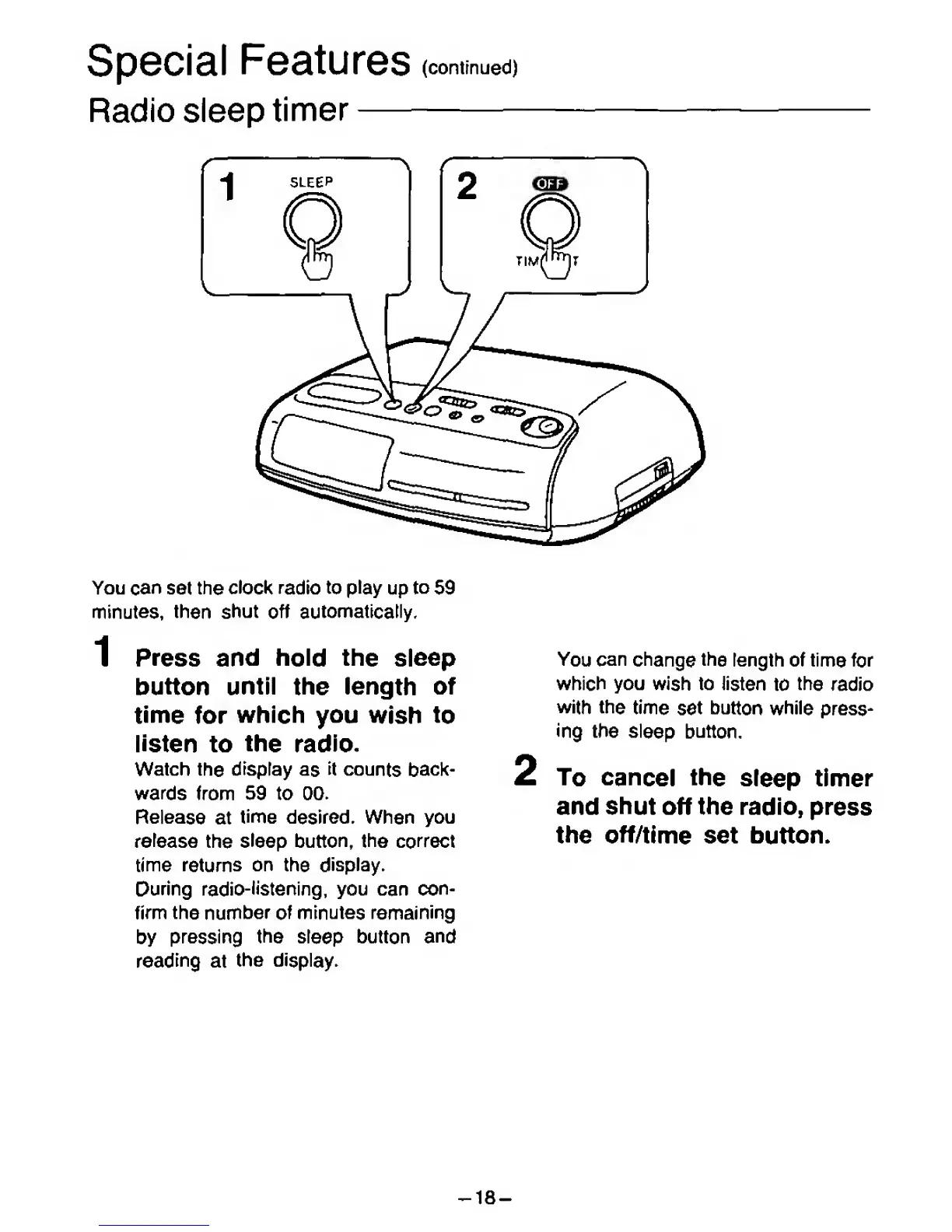
Radio sleep
timer
You
can set
the
clock radio
to play
up
to
59
minutes,
then
shut
off automatically,
1
Press and
hold the sleep
button
until
the length
of
time
for
which
you
wish
to
listen
to
the
radio.
Watch
the
display
as
it
counts
back-
wards
from 59 to
00.
Release
at
time
desired. When you
release
the
sleep
button, the correct
time returns
on
the
display.
During
radio-listening,
you
can
con-
firm the number
of minutes
remaining
by
pressing
the
sleep
button
and
reading
at
the
display.
You
can
change
the
length of time
for
which you
wish
to
listen
to
the
radio
with the
time
set
button while
press-
ing
the
sleep
button.
To
cancel
the
sleep timer
and
shut
off
the radio,
press
the
off/time
set
button.
-18-

Related product manuals