EasyManua.ls Logo

Panasonic RN-109 - Disassembly Instructions; Cassette Lid Assembly Removal; Main Case Assembly Removal; Bottom Case Assembly Removal

Panasonic RN-109
10 pages
Print Icon
To Next Page IconTo Next Page
To Previous Page IconTo Previous Page
Loading...
RN-109
RN-109
DISASSEMBLY
INSTRUCTIONS
Notes:
1.
Because
this
‘unit
is
very
small,
and
therefore
the
screws
are
also
especially
small,
be
careful
not
to
lose
any
parts
during
disassembly.
2.
Be
very
careful,
when
replacing
parts
or
checking,
not
to
damage
the
lead
wiring,
because
it
is
much
thiner
than
lead
wiring
used
in
other
sets.
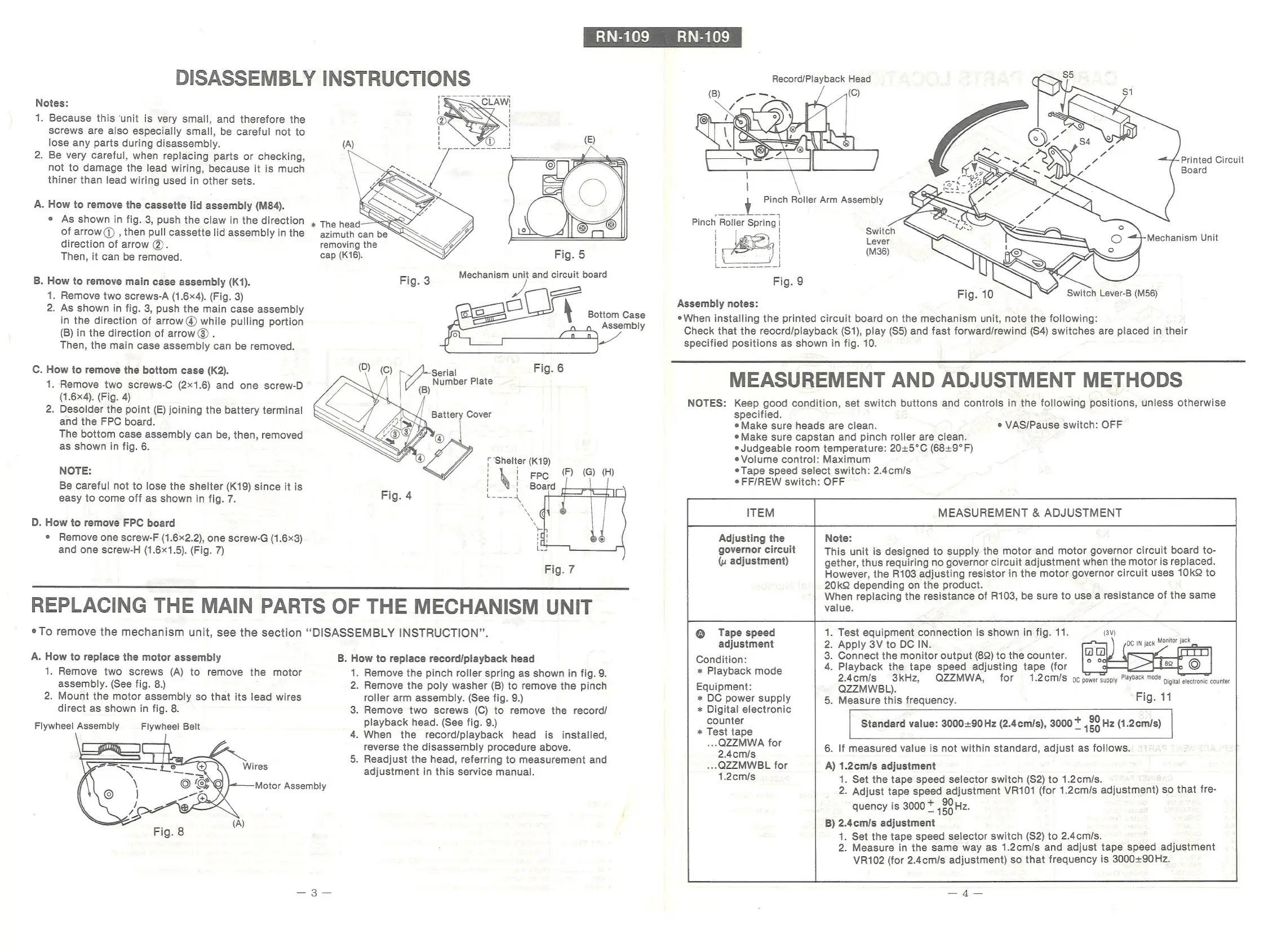
A.
How
to
remove
the
cassette
lid
assembly
(M84).
e
As
shown
in
fig.
3,
push
the
claw
in
the
direction
of
arrow)
,
then
pull
cassette
lid
assembly
in
the
direction
of
arrow
@.
Then,
it
can
be
removed.
B.
How
to
remove
main
case
assembly
(K1).
1.
Remove
two
screws-A
(1.64).
(Fig.
3)
2.
As
shown
in
fig.
3,
push
the
main
case
assembly
in
the
direction
of
arrow
@
while
pulling
portion
(B)
in
the
direction
of
arrow®
.
Then,
the
main
case
assembly
can
be
removed.
C.
How
to
remove
the
bottom
case
(K2).
1.
Remove
two
screws-C
(2x1.6)
and
one
screw-D
(1.6x4).
(Fig.
4)
2.
Desolder
the
point
(E)
joining
the
battery
terminal
and
the
FPC
board.
The
bottom
case
assembly
can
be,
then,
removed
as
shown
in
fig.
6.
NOTE:
Be
careful
not
to
lose
the
shelter
(K19)
since
it
is
easy
to
come
off
as
shown
in
fig.
7.
D.
How
to
remove
FPC
board
e
Remove
one
screw-F
(1.6x2.2),
one
screw-G
(1.6x3)
and
one
screw-H
(1.6x1.5).
(Fig.
7)
@:-
preaeren
(A)
removing
the
cap
(K16).
Fig.
5
Bottom
Case
Assembly
“Shelter
(K19)
i
Epc
(F)
(G)
(H)
eg
SF
|
1
>
REPLACING
THE
MAIN
PARTS
OF
THE
MECHANISM
UNIT
©
To
remove
the
mechanism
unit,
see
the
section
“DISASSEMBLY
INSTRUCTION”.
A.
How
to
replace
the
motor
assembly
1.
Remove
two
screws
(A)
to
remove
the
motor
assembly.
(See
fig.
8.)
2.
Mount
the
motor
assembly
so
that
its
lead
wires
direct
as
shown
in
fig.
8.
Flywheel
Assembly
Flywheel
Belt
Wires
B.
How
to
replace
record/playback
head
1.
Remove
the
pinch
roller
spring
as
shown
in
fig.
9.
2.
Remove
the
poly
washer
(B)
to
remove
the
pinch
roller
arm
assembly.
(See
fig.
9.)
3.
Remove
two
screws
(C)
to
remove
the
record/
playback
head.
(See
fig.
9.)
4.
When
the
record/playback
head
is_
installed,
reverse
the
disassembly
procedure
above.
5.
Readjust
the
head,
referring
to
measurement
and
adjustment
in
this
service
manual.
Motor
Assembly
Record/Playback
Head
Printed
Circuit
Board
Switch
Lever
(M36)
Mechanism
Unit
Assembly
notes:
eWhen
installing
the
printed
circuit
board
on
the
mechanism
unit,
note
the
following:
Check
that
the
reocrd/playback
(S1),
play
(S5)
and
fast
forward/rewind
(S4)
switches
are
placed
in
their
specified
positions
as
shown
in
fig.
10.
MEASUREMENT
AND
ADJUSTMENT
METHODS
NOTES:
Keep good
condition,
set
switch
buttons
and
controls
in
the
following
positions,
unless
otherwise
specified.
e
Make
sure
heads
are
clean.
e
Make
sure
capstan
and
pinch
roller
are
clean.
e
Judgeable
room
temperature:
20+5°C
(68+9°
F)
e
Volume
control:
Maximum
e
Tape
speed
select
switch:
2.4cm/s
e
FF/REW
switch:
OFF
ITEM
MEASUREMENT
&
ADJUSTMENT
Adjusting
the
Note:
governor
circuit
This
unit
is
designed
to
supply
the
motor
and
motor
governor
circuit
board
to-
(u
adjustment)
gether,
thus
requiring
no
governor
circuit
adjustment
when
the
motor
is
replaced.
However,
the
R103
adjusting
resistor
in
the
motor
governor
circuit
uses
10k
to
20k
depending
on
the
product.
When
replacing
the
resistance
of
R103,
be
sure
to
use
a
resistance
of
the
same
value.
e
VAS/Pause
switch:
OFF
.
Test
equipment
connection
is
shown
in
fig.
11.
.
Apply
3V
to
DC
IN.
.
Connect
the
monitor
output
(8)
to
the
counter.
.
Playback
the
tape
speed
adjusting
tape
(for
:
eds,
QZZMWA,
for
1.2cm/s
oc
power
supply
miayoackemons
Digital
electronic
counter
.
Measure
this
frequency.
Fig.
11
®
Tape
speed
adjustment
Condition:
*
Playback
mode
Equipment:
*
DC
power
supply
*
Digital
electronic
counter
*
Test
tape
..-QZZMWA
for
2.4cm/s
.--QZZMWBL
for
1.2cm/s
Standard
value:
3000:90Hz
(2.4cm/s),
3000
*
Hz
(1.2cm/s)
6.
If
measured
value
is
not
within
standard,
adjust
as
follows.
A)
1.2cm/s
adjustment
1.
Set
the
tape
speed
selector
switch
(S2)
to
1.2cm/s.
2.
Adjust
tape
speed
adjustment
VR101
(for
1.2cm/s
adjustment)
so
that
fre-
;
+
90
quency
is
3000
*
150
Hz.
B)
2.4cm/s
adjustment
1.
Set
the
tape
speed
selector
switch
(S2)
to
2.4cm/s.
2.
Measure
in
the
same
way
as
1.2cm/s
and
adjust
tape
speed
adjustment
VR102
(for
2.4cm/s
adjustment)
so
that
frequency
is
3000+90
Hz.

Related product manuals