EasyManua.ls Logo

Panasonic RS-4360DFT - Page 8

Panasonic RS-4360DFT
9 pages
Print Icon
To Next Page IconTo Next Page
To Previous Page IconTo Previous Page
Loading...
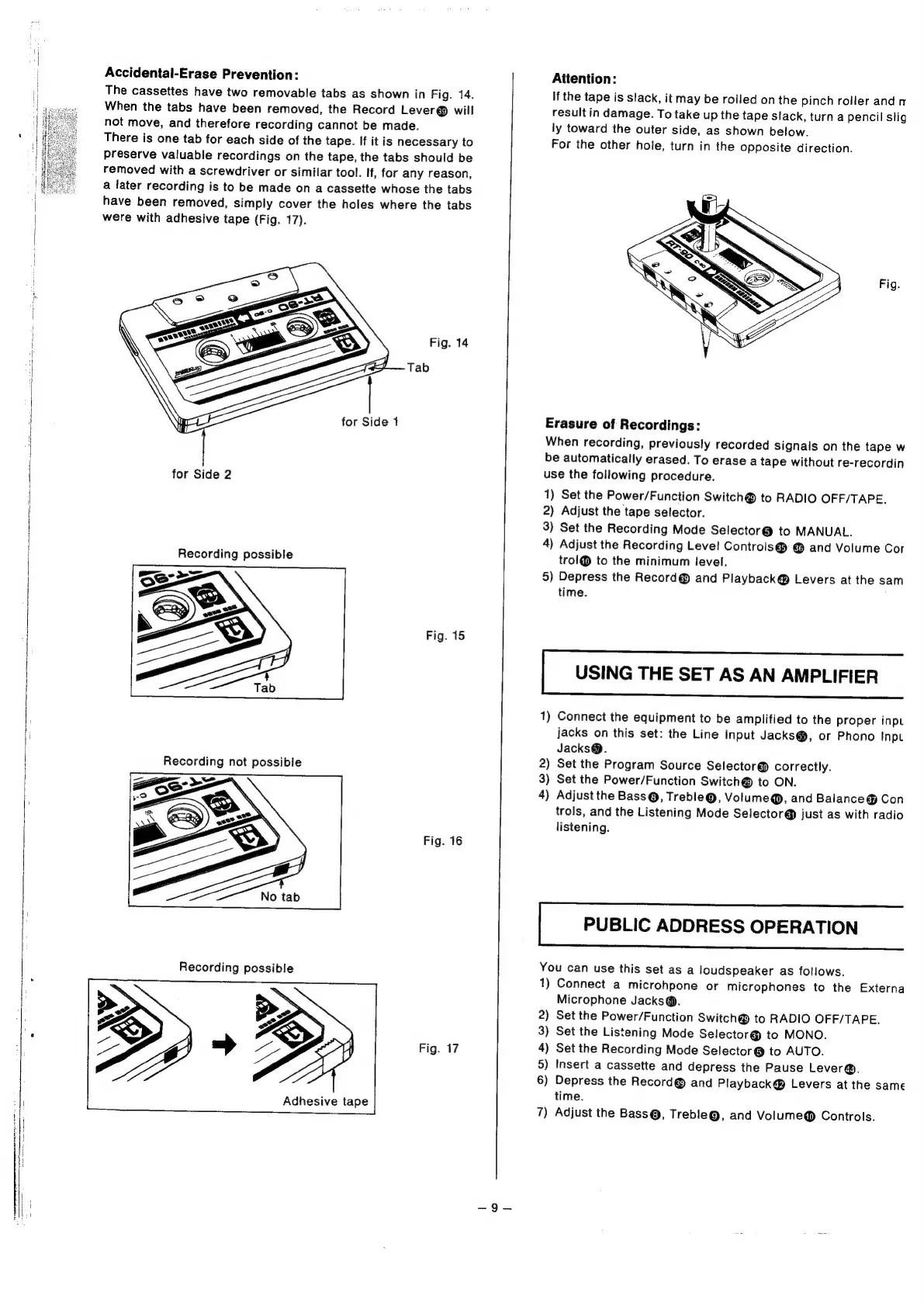
Accidental-Erase
Prevention:
The
cassettes
have
two
removable
tabs
as
shown
in
Fig.
14.
When
the
tabs
have
been
removed,
the
Record
Lever®
will
not
move,
and
therefore
recording
cannot
be
made.
There
is
one
tab
for
each
side
of
the
tape.
If
it
is
necessary
to
Preserve
valuable
recordings
on
the
tape,
the
tabs
should
be
removed
with
a
screwdriver
or
similar
tool.
If,
for
any
reason,
a
later
recording
is
to
be
made
on
a
cassette
whose
the
tabs
have
been
removed,
simply
cover
the
holes
where
the
tabs
were
with
adhesive
tape
(Fig.
17).
Fig.
14
Tab
for
Side
1
for
Side
2
Recording
possible
Fig.
15
Recording
not
possible
Fig.
16
Recording
possible
Fig.
17
Adhesive
tape
Attention:
If
the
tape
is
slack,
it
may
be
rolled
on
the
pinch
roller
and
r
result
in
damage.
To
take
up
the
tape
slack,
turn
a
pencil
stig
ly
toward
the
outer
side,
as
shown
below.
For
the
other
hole,
turn
in
the
opposite
direction.
Fig.
Erasure
of
Recordings:
When
recording,
previously
recorded
signals
on
the
tape
w
be
automatically
erased.
To
erase
a
tape
without
re-recordin
use
the
following
procedure.
1)
Set
the
Power/Function
Switch®
to
RADIO
OFF/TAPE.
2)
Adjust
the
tape
selector.
3)
Set
the
Recording
Mode
Selector@
to
MANUAL.
4)
Adjust
the
Recording
Level
Controls@
@
and
Volume
Cor
trol@
to
the
minimum
level.
5)
Depress
the
Record@
and
Playback@®
Levers
at
the
sam
time.
USING
THE
SET
AS
AN
AMPLIFIER
1)
Connect
the
equipment
to
be
amplified
to
the
proper
inpt
jacks
on
this
set:
the
Line
input
Jacks@,
or
Phono
Inpt
Jacks@.
2)
Set
the
Program
Source
Selector@
correctly.
3)
Set
the
Power/Function
Switch®
to
ON.
4)
Adjust
the
Bass@®,
Treble@,
Volume@®,
and
Balance
Con
trols,
and
the
Listening
Mode
Selector
@
just
as
with
radio
listening.
PUBLIC
ADDRESS
OPERATION
You
can
use
this
set
as
a
loudspeaker
as
follows.
1)
Connect
a
microhpone
or
microphones
to
the
Externa
Microphone
Jacks@.
2)
Set
the
Power/Function
Switch@®
to
RADIO
OFF/TAPE.
3)
Set
the
Listening
Mode
Selector@
to
MONO.
4)
Set
the
Recording
Mode
Selector@
to
AUTO.
5)
Insert
a
cassette
and
depress
the
Pause
Lever@.
6)
Depress
the
Record@
and
Playback@
Levers
at
the
same
time.
7)
Adjust
the
Bass@,
Treble@,
and
Volume@®
Controls.