EasyManua.ls Logo

Panasonic RS-4360DFT - Listening to the Radio

Panasonic RS-4360DFT
9 pages
Print Icon
To Next Page IconTo Next Page
To Previous Page IconTo Previous Page
Loading...
LISTENING
TO
THE
RADIO
1)
Set
the
Power/Function
Switch@®
to
ON,
and
the
Program
Source
Selector
to
RADIO.
2)
Setthe
Band
Selector®
to
the
desired
band:
FM,
MW,
SW1,
SW2,
or
SW3.
3)
With
FM
reception,
set
the
FM
Mode/Muting
Switch@
to
the
desired
position.
4)
Tune
in
the
desired
station
with
the
Tuning
Control®.
5)
Adjust
the
Volume@,
Balance@,
Bass@,
and
Treble@
Con-
trots.
Note:
*
For
receiving
weak
FM
stations,
keep
the
FM
Mode/Muting
Switch®
in
MONO/OFF.
Turning
the
FM
Mode/Muting
Switch@
from
FM
AUTO/ON
to
MONO/OFF
will
improve
FM
reception
and
reduce
back-
ground
noise.
Antennas:
FM:
@
Pull
out
both
the
Telescopic
Antennas@
and
adjust
their
length
and
angle
for
optimum
reception.
@
If
you
wish
to
improve
reception
or
to
receive
very
distant
stations,
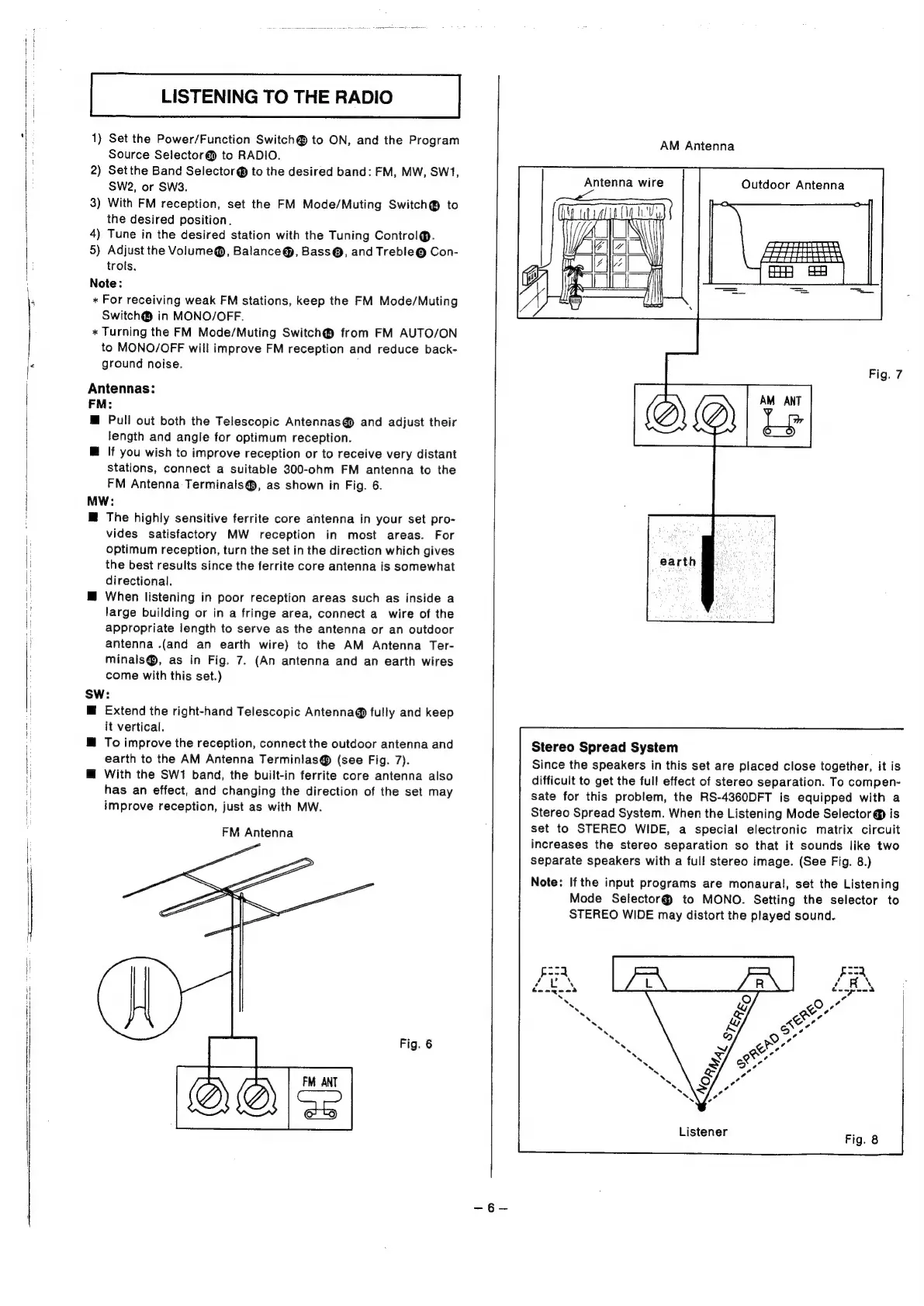
connect
a
suitable
300-ohm
FM
antenna
to
the
FM
Antenna
Terminals@,
as
shown
in
Fig.
6.
MW:
M@
The
highly
sensitive
ferrite
core
antenna
in
your
set
pro-
vides
satisfactory
MW
reception
in
most
areas.
For
optimum
reception,
turn
the
set
in
the
direction
which
gives
the
best
results
since
the
ferrite
core
antenna
is
somewhat
directional.
@
When
listening
in
poor
reception
areas
such
as
inside
a
large
building
or
in
a
fringe
area,
connect
a
wire
of
the
appropriate
length
to
serve
as
the
antenna
or
an
outdoor
antenna
.(and
an
earth
wire)
to
the
AM
Antenna
Ter-
minals@,
as
in
Fig.
7.
(An
antenna
and
an
earth
wires
come
with
this
set.)
SW:
M@
Extend
the
right-hand
Telescopic
Antenna@
fully
and
keep
it
vertical.
To
improve
the
reception,
connect
the
outdoor
antenna
and
earth
to
the
AM
Antenna
Terminlas®
(see
Fig.
7).
@
With
the
SW1
band,
the
built-in
ferrite
core
antenna
also
has
an
effect,
and
changing
the
direction
of
the
set
may
improve
reception,
just
as
with
MW.
FM
Antenna
Fig.
6
AM
Antenna
Antenna
wire
Outdoor
Antenna
Fig.
7
Stereo
Spread
System
Since
the
speakers
in
this
set
are
placed
close
together,
it
is
difficult
to
get
the
full
effect
of
stereo
separation.
To
compen-
sate
for
this
problem,
the
RS-4360DFT
is
equipped
with
a
Stereo
Spread
System.
When
the
Listening
Mode
Selector
@
is
set
to
STEREO
WIDE,
a
special
electronic
matrix
circuit
increases
the
stereo
separation
so
that
it
sounds
like
two
separate
speakers
with
a
full
stereo
image.
(See
Fig.
8.)
Note:
Ifthe
input
programs
are
monaural,
set
the
Listening
Mode
Selector@
to
MONO.
Setting
the
selector
to
STEREO
WIDE
may
distort
the
played
sound.
Listener

Related product manuals