EasyManua.ls Logo

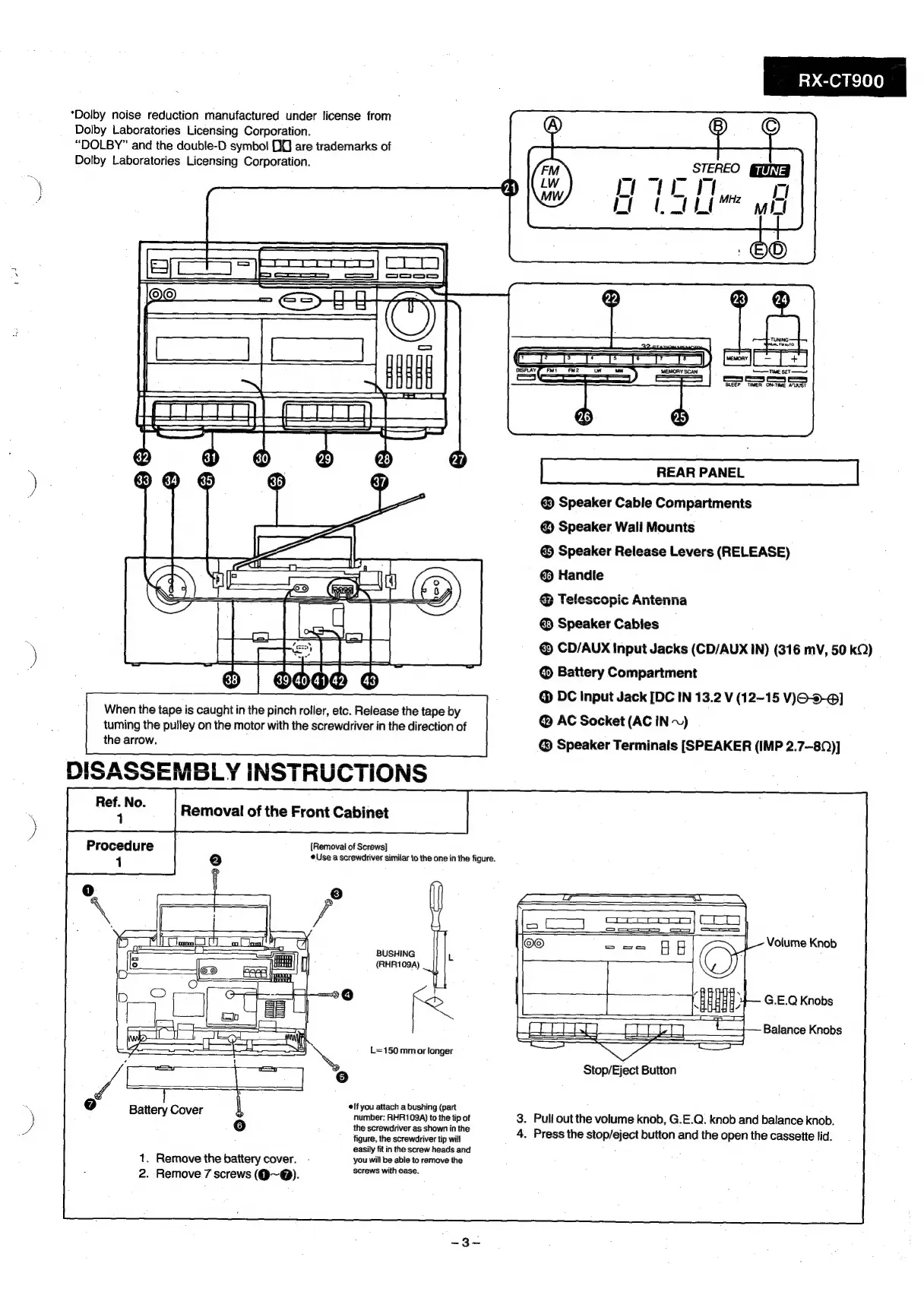
Panasonic RX-CT900 - Disassembly and Component Replacement; Front Cabinet Removal

Panasonic RX-CT900
26 pages
Print Icon
To Next Page IconTo Next Page
To Previous Page IconTo Previous Page
Loading...
“Dolby
noise
reduction
manufactured
under
license
from
Dolby
Laboratories
Licensing
Corporation.
“DOLBY”
and
the
double-D
symbol
D0
are
trademarks
of
Dolby
Laboratories
Licensing
Corporation.
i
ied
S==
ee
©)
=
Ot)
oT
When
the
tape
is
caught
in
the
pinch
roller,
etc.
Release
the
tape
by
tuming
the
pulley
on
the
motor
with
the
screwdriver
in
the
direction
of
the
arrow.
)
;
ee
Removal
of
the
Front
Cabinet
[Removal
of
Screws]
Use
a
screwdriver
similar
to
the
one
in
the
figure.
1
A)
5
he
BUSHING
|
fa
PHAIOOA
oes
no
CO
a
f
conn}
:
|
Co
ot
-
;
Ss
Ng
L=150.mm
or
longer
9
=
aol
:
1
er
16)
(7)
elf
you
attach
a
bushing
(part
Battery
Cov
number:
RHR109A)
to
the
tip
of
the
screwdriver
as
shown
in
the
figure,
the
screwdriver
tip
will
easily
fit
in
the
screw
heads
and
1.
Remove
the
battery
cover.
-
you
will
be
able
to
remove
the
2.
Remove
7
screws
(@~@).
Screws
with
ase.
RX-CT900
_
STEREO
_
rer
thie
rt
MILI
wee
SLEEP
TIMER
ON-TIME
ATUST
REAR
PANEL
Speaker
Cable
Compartments
@
Speaker
Wall
Mounts
@
Speaker
Release
Levers
(RELEASE)
@
Handle
&
Telescopic
Antenna
@
Speaker
Cables
©
CD/AUX
Input
Jacks
(CD/AUX
IN)
(316
mV,
50
kQ)
@
Battery
Compartment
@
DC
Input
Jack
[DC
IN
13.2
V
(12-15
V)JO--@]
@
AC
Socket
(AC
iN
~)
Speaker
Terminals
[SPEAKER
(IMP
2.7—80)]
Volume
Knob
G.E.Q
Knobs
Balance
Knobs
Stop/Eject
Button
3.
Pull
out
the
volume
knob,
G.E.Q.
knob
and
balance
knob.
4.
Press
the
stop/eject
button
and
the
open
the
cassette
lid.

Related product manuals