EasyManua.ls Logo

Panasonic RX-CT900 - Internal PCB and Mechanism Removal

Panasonic RX-CT900
26 pages
Print Icon
To Next Page IconTo Next Page
To Previous Page IconTo Previous Page
Loading...
RX-CT900
(ee
ee
er
a
ee
Rae
Hemnows|
of
the
Graphic
Equalizer
Procedure
|
cs502
CP510
cps
4CP512
Procedure
0
1-2
=
j
133
g
5
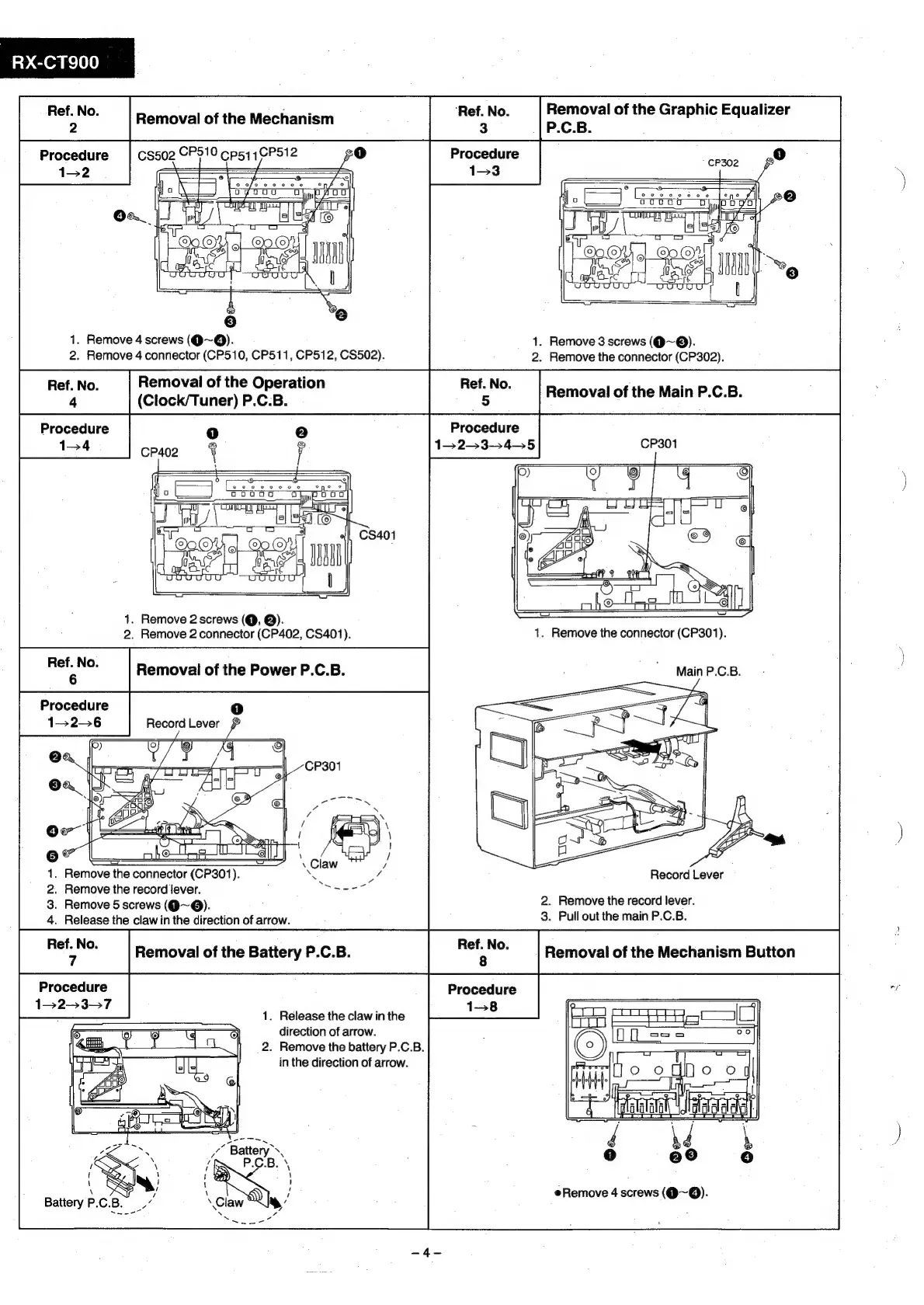
1.
Remove
4
screws
(@~Q).
1.
Remove
3
screws
(@~®).
2.
Remove
4
connector
(CP510,
CP511, CP512,
CS502).
2.
Remove
the
connector
(CP302).
Procedure
1-23-45
CP301
Procedure
1-4
1.
Remove
2
screws
(@,
@).
2.
Remove
2
connector
(CP402,
CS401).
1.
Remove
the
connector
(CP301).
\
Removal
of
the
Power
P.C.B.
_
MainP.cB.
|
.
Procedure
1)
saa
1.
Remove
the
connector
(CP301).
Se
/
Record
Lever
.
Remove
the
record
lever.
;
eal
2.
Remove
the
record
lever.
.
Remove
5
screws
(@~@).
.
Release
the
claw
in
the
direction
of
arrow.
salient
ilar
Removal
of
the
Battery
P.C.B.
Removal
of
the
Mechanism
Button
Procedure
Procedure
ca
152-37
1-8
:
1.
Release
the
claw
in
the
direction
of
arrow.
2.
Remove
the
battery
P.C.B.
in
the
direction
of
arrow.
|
—H
‘daa
aaa
Remove
4
screws
(@~@).

Related product manuals