EasyManua.ls Logo

Panasonic RX-CT900 - Power Transistor Replacement

Panasonic RX-CT900
26 pages
Print Icon
To Next Page IconTo Next Page
To Previous Page IconTo Previous Page
Loading...
RX-CT900
RX-CT900
Ref.
No.
Removal
of
the
Cassette
Holder
Ref.
No.
Removal
of
the
Speaker’s
Front
9
10
Cabinet
]
2)
Procedure
m@
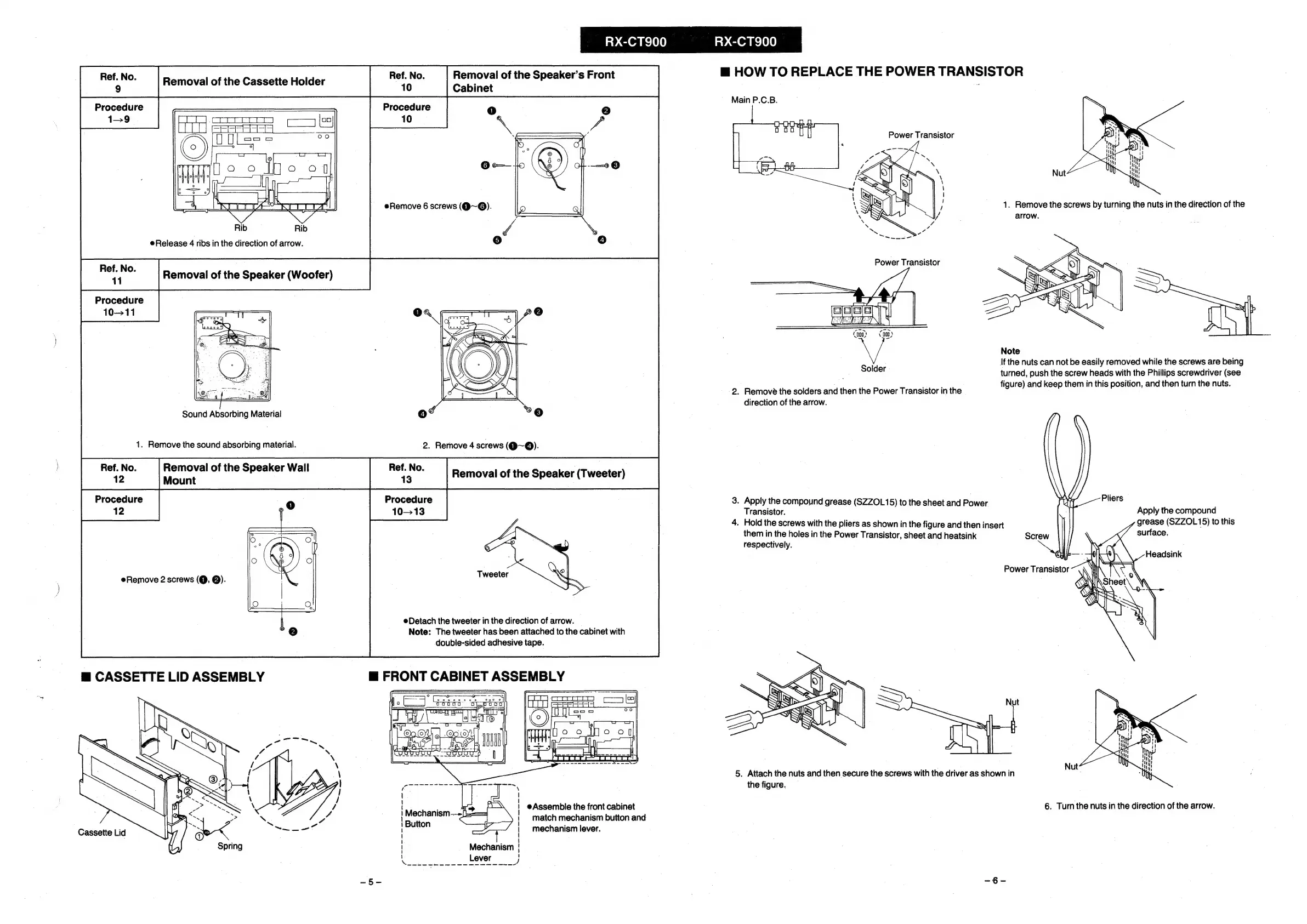
HOW
TO
REPLACE
THE
POWER
TRANSISTOR
Main
P.C.B.
Procedure
10
Power
Transistor
Nut
arrow.
Release
4
ribs
in
the
direction
of
arrow.
Removal
of
the
Speaker
(Woofer)
Procedure
10-11
Note
If
the
nuts
can
not
be
easily
removed
while
the
screws
are
being
turned,
push
the
screw
heads
with
the
Phillips
screwdriver
(see
figure)
and
keep
them
in
this
position,
and
then
turn
the
nuts.
Solder
2.
Remove
the
solders
and
then
the
Power
Transistor
in
the
direction
of
the
arrow.
Sound
Absorbing
Material
1.
Remove
the
sound
absorbing
material.
2.
Remove
4
screws
(@~@).
Procedure
12
eRemove
Cassette
Lid
Procedure
10-13
|
aoe
obthe
Speaker
Wall
eee
Removal
of
the
Speaker
(Tweeter)
jount
0
2
screws
(@,
@).
Detach
the
tweeter
in
the
direction
of
arrow.
Note:
The
tweeter
has
been
attached
to
the
cabinet
with
double-sided
adhesive
tape.
\
|
e@Assemble
the
front
cabinet
|
match
mechanism
button
and
|
mechanism
lever.
|
1
!
/
3.
Apply
the
compound
grease
(SZZOL15)
to
the
sheet
and
Power
Transistor.
4.
Hold
the
screws
with
the
pliers
as
shown
in
the
figure
and
then
insert
them
in
the
holes
in
the
Power
Transistor,
sheet
and
heatsink
respectively.
Power
Transistor
Nut
5.
Attach
the
nuts
and
then
secure
the
screws
with
the
driver
as
shown
in
the
figure.
Pliers
Apply
the
compound
grease
(SZZOL15)
to
this
surface.
Nut
.
Turn
the
nuts
in
the
direction
of
the
arrow.

Related product manuals