Connecting
the
Speaker
System
This unit can be used as a
one-piece portable
stereo system or a
three-piece component system, by attaching or detaching
the
speaker system.
Before
attaching or detaching
the
speakers,
be sure to disconnect
the speaker cables from the speaker terminals.
Be
sure
to press
POWER
to
turn the unit off before
connecting or
disconnecting the
speaker cables.
Attaching the
speakers
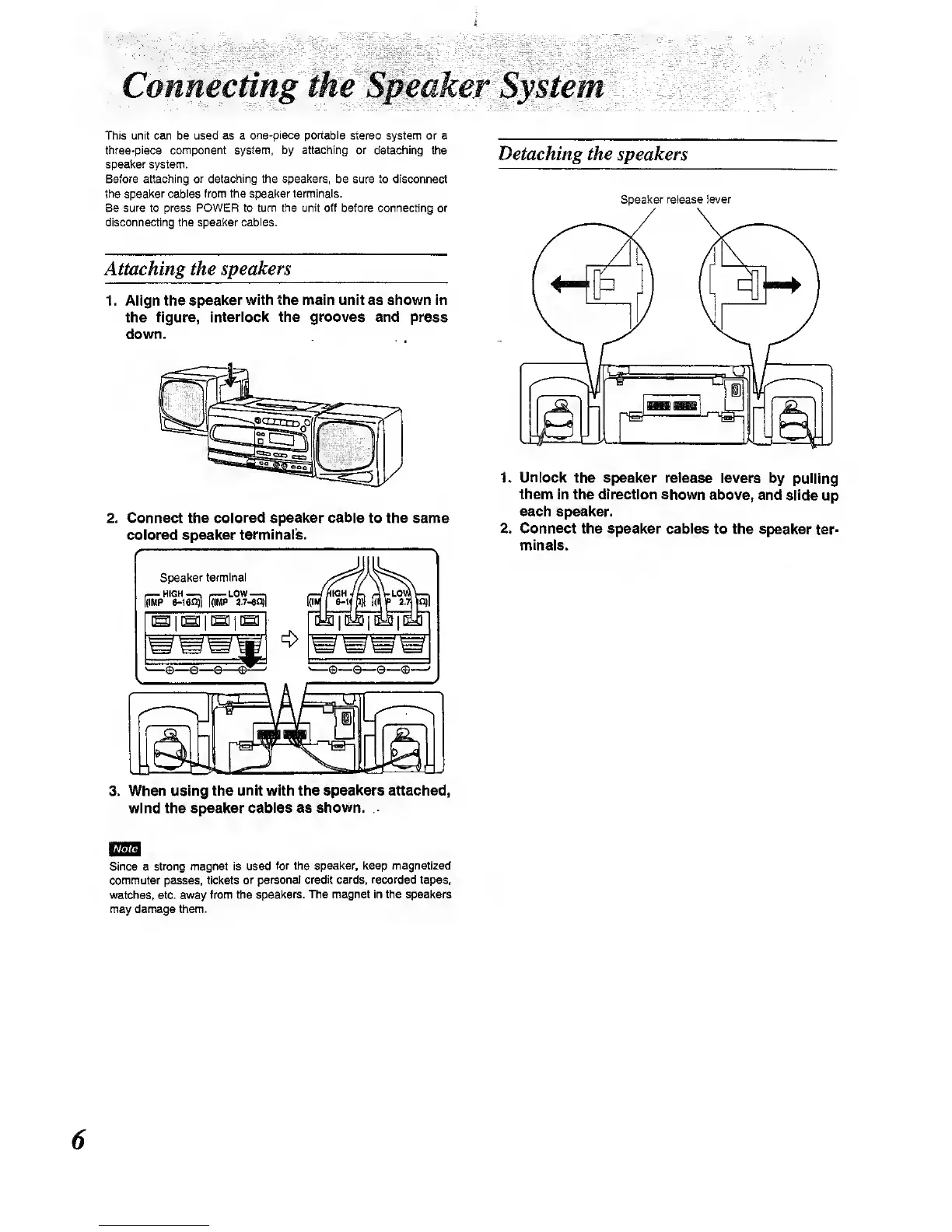
1 . Align the
speaker with the main unit as shown in
the figure, interiock the grooves and press
down.
2.
Connect the
colored speaker
cable
to the same
colored speaker
terminals.
3. When using
the unit with the speakers attached,
wind the speaker
cables as shown.
Note
Since
a
strong magnet is used
for the speaker, keep magnetlzecl
commuter passes, tickets
or personal credit
cards, recorded
tapes,
watches, etc. away from the
speakers. The magnet in the speakers
may damage them.
Detaching the speakers
Speaker release lever
1. Unlock
the speaker release levers
by pulling
them In
the direction
shown
above, and slide
up
each speaker.
2. Connect
the speaker cables to
the speaker
ter-
minals.



 To Next Page