EasyManua.ls Logo

Panasonic RX-ES23 - User Manual

Panasonic RX-ES23
29 pages
Print Icon
To Next Page IconTo Next Page
Loading...
Operating Instructions
使用说明书
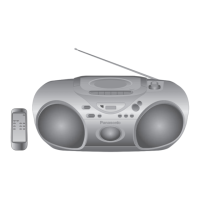
Portable Stereo CD System
便携式立体声 CD 系统
Model No. RX-ES29
RX-ES23
Table of Contents
Supplied Accessories ........................................... 2
Precautions .......................................................... 2
Maintenance......................................................... 3
CD Selection ........................................................ 3
Location of Controls ............................................. 4
Use of Batteries.................................................... 6
Power Sources ..................................................... 6
Memory Batteries ................................................. 6
The Radio............................................................. 7
CDs and MP3 ....................................................... 8
Cassette Tape Play............................................. 10
Cassette Tape Recording ................................... 10
Setting the Clock ................................................ 12
The Play and Record Timer ............................... 12
The Sleep Timer................................................. 13
Sound Quality..................................................... 14
3-D Sound with the Sound Virtualizer ................ 14
Troubleshooting .................................................. 15
Specifications ..................................................... 15
Before connecting, operating or adjusting this product, please
read these instructions completely. Please keep this manual for
future reference.
在连接、操作或调整本产品之前,请完整阅读本说明书
请妥善保管本手册,以备日后参考。
[GC] [GS]
RQT7914-2G
GC_GCS_RQT7914-G.book 1 ペー   

Questions and Answers

  • D
    Donna BeltranJul 31, 2025
    Why is my Panasonic RX-ES23 Stereo System remote control not working?
    • K
      Kimberly LynchJul 31, 2025
      If the remote control for your Panasonic Stereo System isn't working, try these steps: * First, check that the batteries are inserted correctly. * If they are, replace the batteries, as they may be worn. * If you're using batteries to power the unit, try turning it on from the main unit itself.
  • J
    Julie OwensAug 8, 2025
    What to do if my Panasonic Stereo System CD will not play?
    • A
      Adam CampbellAug 8, 2025
      If your Panasonic Stereo System CD won't play or the CD display is incorrect, try the following: 1. Ensure the CD is placed with the label facing up. 2. If there's condensation, wait about an hour for it to dry, and then try again. 3. Clean the CD. 4. If the CD is scratched, warped, or nonstandard, replace it.
  • C
    cathydoyleAug 15, 2025
    Why is my Panasonic Stereo System having a lot of noise or tuning difficulty?
    • F
      Francis WilsonAug 15, 2025
      If your Panasonic Stereo System is experiencing a lot of noise or tuning difficulty, it may be due to interference from other equipment or the use of their remote controls. Try turning off the other equipment or moving the stereo system away from them.
  • B
    Barbara ParkerAug 23, 2025
    What to do if recording is not possible or sound quality is poor on Panasonic Stereo System?
    • S
      Stacy HerringAug 23, 2025
      If recording isn't possible or the sound quality is poor on your Panasonic Stereo System, consider the following: * If the cassette's tabs have been removed, cover the holes with adhesive tape. * Clean the heads.

Summary

Supplied Accessories

Precautions

Maintenance

Cleaning the Unit Surface

Instructions for cleaning the exterior of the unit with a soft, dry cloth.

Head Cleaning for Sound Quality

Guidance on cleaning the tape heads for optimal playback and recording.

Cassette Tape Maintenance

Advice on handling cassette tapes to prevent damage or mechanism issues.

CD Selection

Location of Controls

Main Unit Controls

Identifies and describes the buttons and features on the main unit of the stereo system.

Remote Control Buttons

Lists and explains the functions of the remote control buttons.

Remote Control Operation and Power

Remote Control Usage Tips

Advice on operating the remote control, including sensor cleanliness and light interference.

Remote Control Battery Management

Instructions for inserting, removing, and replacing batteries in the remote control.

Headphone Usage

Guidelines for connecting headphones and adjusting volume to prevent hearing damage.

Panasonic RX-ES23 Specifications

General IconGeneral
BrandPanasonic
ModelRX-ES23
CategoryStereo System
LanguageEnglish

Related product manuals