RQT7914
14
Sound Quality
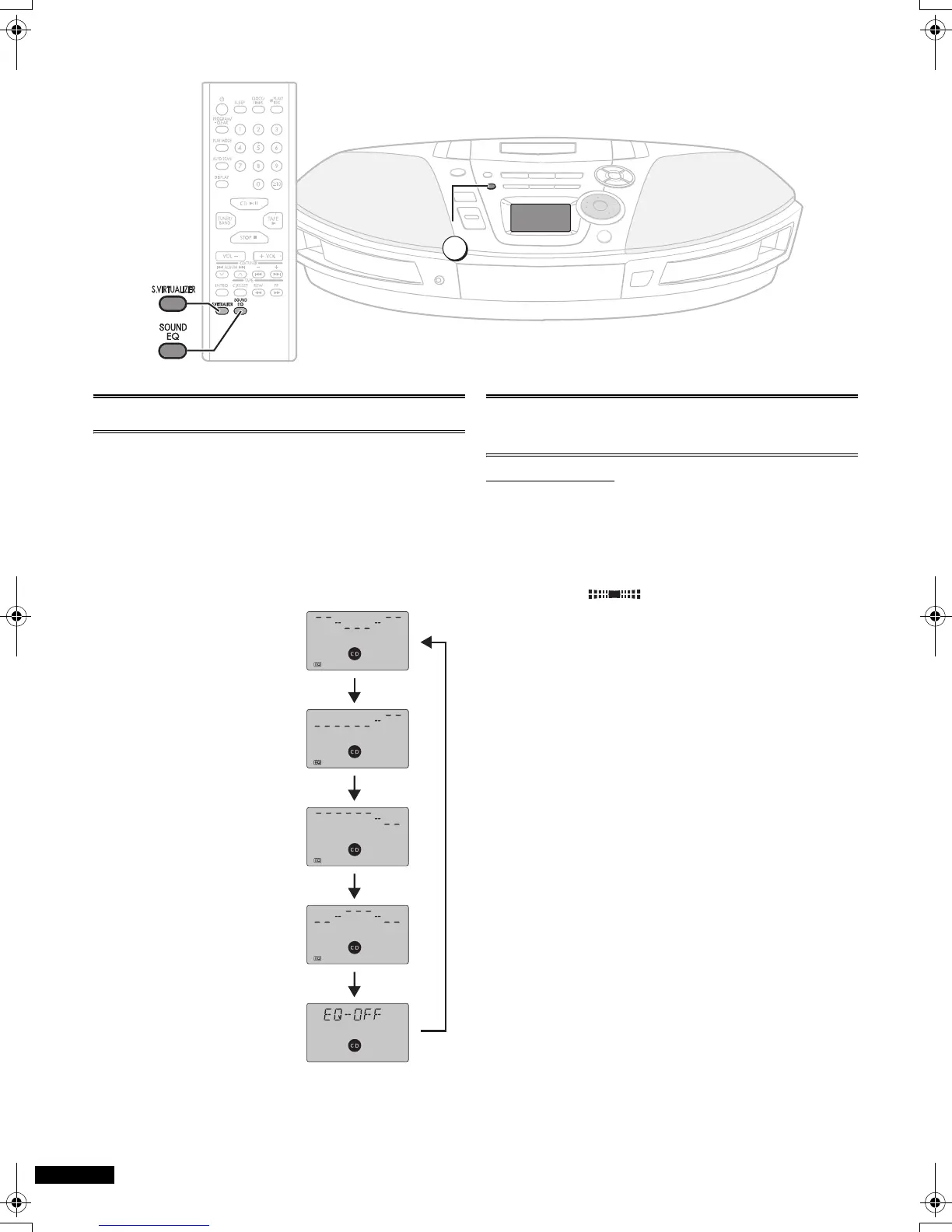
You can choose one of four types of sound quality.
1 Heavy: Adds punch to rock
2 Clear: Clarifies higher sounds
3 Soft: For background music
4 Vocal: Adds gloss to vocals
Press [SOUND EQ] to select a setting.
Each time you press the button:
1 Heavy > 2 Clear
e v
l 3 Soft
l v
l 4 Vocal
l v
EQ-OFF (cancelled)
Note:
≥ Changes to sound
quality do not affect
recordings.
3-D Sound
with the Sound Virtualizer
Remote control only
You can create a three-dimensional sound field when listening
to stereo sound.
Press [S.VIRTUALIZER].
Press again to cancel.
Notes:
≥ This feature does not affect recordings.
≥ The actual effect depends on the source played.
SOUND EQ
1
3
4
2
]
n
=====
]
n
,
=====
#
=====
ON: OFF
GC_GCS_RQT7914-G.book 14 ページ 2005年3月23日 水曜日 午後4時37分


 To Next Page