EasyManua.ls Logo

Panasonic RX-D23 - User Manual

Panasonic RX-D23
8 pages
Print Icon
To Next Page IconTo Next Page
Loading...
Before connecting, operating or adjusting
this product, please read these instructions
completely.
Please keep this manual for future reference.
Power sources
The unit can be powered with household AC power or dry cell batteries (not included).
Insert memory batteries (not included) to save stored CD programs and radio stations.
Memory back-up
Insert batteries (not included) to save CD pro-
grams and radio stations you have set. If memory
batteries are not used, memory items are erased
in the following situations:
Power failures,
The power cord is disconnected from the power
outlet,
The power cord is connected to the unit while
the unit is being powered by batteries.
(R6/LR6, AA, UM-3)
When to change the batteries
The batteries last about a year.
Connect the unit to AC power before replacing
the batteries.
Removing the batteries
Press the negative end of the number 4 battery
and remove the batteries. (Remove the power
batteries first.)
User memo:
DATE OF PURCHASE
DEALER NAME
DEALER ADDRESS
TELEPHONE NUMBER
Using a household AC outlet
Connect the power cord firmly to the unit and the
outlet.
Before connecting or disconnecting the cord,
stop the tape and switch [
] to “TAPE/
” to turn the power off. The memory bat-
teries are worn out faster if the cord is discon-
nected with the power still on.
Conserving power
The unit consumes 1W even when it is turned
off with [
]. To save power when the
unit is not to be used for a long time, unplug it
from the household AC outlet. Remember to
reset the radio stations and any other memory
items before using the unit again if you haven’t
inserted memory batteries.
Using batteries
The unit cannot be powered by batteries if the
power cord is connected.
(R20/LR20, D, UM-1)
When to change the batteries
Sound quality and operations are affected when
the batteries are running low. Replace all six
batteries. It is also a good idea to replace all the
batteries before recording.
Removing the batteries
Open the battery cover
and insert your finger in
the hole on the bottom
of the unit and push out.
RQT6742-1P
Household AC outlet
(AC 120
V, 60
Hz)
AC power cord
(included)
Inner row
Outer row
Dear customer
Thank you for purchasing this product.
For optimum performance and safety, please read these instructions
carefully.
These operating instructions fundamentally explain the operation of
RX-D23.
The model number and serial number of this product can be
found on either the back or the bottom of the unit.
Please note them in the space provided below and keep for fu-
ture reference.
MODEL NUMBER _________________________________
SERIAL NUMBER _________________________________
The illustrations show RX-D23.
Supplied accessories
Please check and identify the supplied accessories.
Use numbers indicated in parentheses when ask-
ing for replacement parts.
(Only for U.S.A.)
To order accessories contact 1-800-332-5368 or
web site (http://www.panasonic.com).
AC power supply cord (polarized) (RJA0065-1D) .................. 1pc.
Note
The included AC power supply cord is for use with this unit only. Do
not use it with other equipment.
Remote control transmitter ..................................................... 1pc.
(EUR648257)
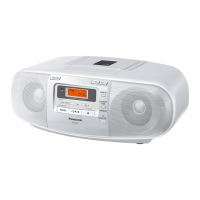
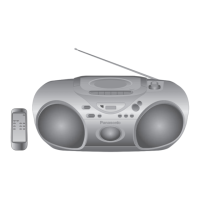
Portable Stereo
CD System
Operating Instructions
Model No.
RX-D23
RX-D20
P PC PL
D1 12/16/02, 1:19 PM1

Questions and Answers

  • B
    Bonnie HernandezAug 1, 2025
    How to fix Panasonic RX-D23 Stereo System remote control not working?
    • M
      Mary ClarkeAug 1, 2025
      If the remote control for your Panasonic Stereo System isn't working, first ensure the batteries are correctly inserted. If the issue persists, replace the batteries, as they may be worn out.
  • C
    Cynthia JohnsonAug 8, 2025
    Why does my Panasonic RX-D23 have a lot of noise?
    • R
      reyesjerryAug 8, 2025
      If you're experiencing excessive noise with your Panasonic Stereo System, it might be due to interference from another remote control nearby. Try using the other remote further away from the unit. Alternatively, the noise could stem from the unit's proximity to a TV. Attempt moving the stereo system away from the TV or turning the TV off to mitigate the noise.
  • S
    Susan CarrilloAug 15, 2025
    What to do if Panasonic Stereo System displays 'E' error?
    • T
      Terry CombsAug 15, 2025
      If your Panasonic Stereo System displays an “E”, doesn't start playing, or shows an incorrect display, read the instructions. Clean the CD. If moisture is a factor, allow an hour for condensation to dry before trying again. Ensure the CD label is facing up during insertion. Scratched, warped, or irregularly shaped CDs should be replaced.
  • B
    brittanykellyAug 23, 2025
    Why is recording not possible on my Panasonic RX-D23?
    • C
      charles97Aug 23, 2025
      If your Panasonic Stereo System isn't recording, it could be due to the cassette's tab being removed. Cover the hole with adhesive tape to enable recording. Also, clean the heads. If the issue persists, replace the batteries or connect the system to household AC power. Ensure you press [/ PLAY] and then [L/c STOP/EJECT].

Summary

Supplied Accessories

Accessory Identification

Verify all included accessories are present and identify them for potential replacement needs.

Power Sources and Battery Management

Household AC Power Connection

Connect the unit to a standard household AC outlet using the provided power cord.

Battery Power Operation

Insert batteries to power the unit when AC power is unavailable. Do not connect AC cord simultaneously.

Memory Backup Battery Function

Insert batteries to save CD programs and radio stations during power interruptions.

Battery Status and Replacement

Instructions on when and how to replace batteries for optimal unit performance.

Device Controls and Interface

Main Unit Button Layout

Details of buttons and functions on the main stereo CD system unit.

Remote Control Button Functions

Description of buttons and capabilities of the included remote control.

Remote Control Operation Guide

Remote Battery Installation Steps

Guide for correctly inserting batteries into the remote control unit.

Optimal Remote Usage Techniques

Proper methods and positioning for operating the remote control effectively.

Remote Control Handling Precautions

Notes on operation and preventing physical damage to the remote control unit.

Radio Tuning and Reception

Manual Radio Tuning Method

Step-by-step guide for tuning into radio stations manually.

Preset Station Programming

Instructions for saving and selecting favorite radio stations.

Automatic Radio Scan Features

Utilize auto scan to find and select available radio stations.

Enhancing Radio Signal Quality

Tips for improving the quality of FM and AM radio reception.

Preset Station Scan Operation

How to quickly scan through all preset radio channels.

CD Player Operations

Standard CD Playback Procedure

Instructions for playing a CD from start to finish.

Custom CD Program Playback

Guide to creating and playing custom track sequences.

CD Playback Control Functions

Details on stopping, pausing, searching, and skipping tracks during CD playback.

CD Track Playback Modes

Explanation of repeat and random playback options for CDs.

Tape Deck Functions

Cassette Tape Playback

How to insert, play, and control normal cassette tapes.

Tape Playback Controls Guide

Functions for stopping, pausing, rewinding, and fast-forwarding tapes.

Recording onto Cassette Tapes

Steps for recording radio broadcasts or CDs onto cassette tapes.

Recording Source Preparation

Steps before recording, including leader tape and source selection.

Tape Protection and Erasure Methods

How to protect tapes from accidental recording and how to erase them.

Unit Maintenance and Care

Cleaning the Tape Deck Mechanism

Regular cleaning procedures for maintaining audio quality and deck performance.

CD Player Lens Maintenance

Instructions for cleaning the CD player lens to prevent playback issues.

Service, Support, and Safety

Conditions Requiring Professional Service

Situations where unit damage necessitates professional servicing.

Servicing and Replacement Parts

Guidelines for authorized servicing and using specified replacement parts.

Product Assistance and Contact

Contact details and procedures for obtaining product support and repairs.

Critical Listening and Safety Warnings

Laser Component Safety Advisory

Warning regarding laser exposure and safe operation of the CD player.

Electrical Hazard Prevention

Precautions to prevent electric shock, fire, and product damage.

Comprehensive Safety Instructions

General Electrical and Power Safety

Covers power source, plug, cord protection, and accessory safety.

Unit Installation and Placement Guidelines

Recommendations for unit placement regarding ventilation, stability, and environment.

Environmental Operating Conditions

Advice on avoiding water, moisture, and extreme temperatures for safe operation.

Safe Battery Handling and Storage

Proper methods for inserting, mixing, and storing batteries to prevent hazards.

Audio Media and Peripherals

Handling Audio Discs Properly

Guidelines for using CDs and avoiding damage to the unit or discs.

Headphone Usage and Hearing Safety

Instructions for connecting and using headphones, including hearing protection advice.

Technical Product Specifications

Detailed Technical Data Sheet

Comprehensive technical specifications including frequency range, power, and dimensions.

Troubleshooting and Problem Resolution

Unit Power and Display Issues

Solutions for problems like unit malfunction or incorrect display messages.

CD Playback Error Resolution

Resolving issues related to CD playback, including errors and no-play scenarios.

Cassette Playback and Recording Fixes

Addressing problems with cassette playback, sound quality, and recording functions.

Radio Interference and Noise Solutions

Tips for resolving static or excessive noise during radio broadcasts.

Remote Control Connectivity Problems

Troubleshooting steps when the remote control is not functioning correctly.

Panasonic RX-D23 Specifications

General IconGeneral
CD PlayerYes
Radio TunerYes
Tuner BandsFM/AM
BluetoothNo
USB PortNo
Battery typeNot applicable
Cassette DeckYes
Power SourceAC
Speakers2 speakers
InputsAuxiliary input
OutputsHeadphone out

Related product manuals