EasyManua.ls Logo

Panasonic RZ-B110W - User Manual

Panasonic RZ-B110W
24 pages
Print Icon
To Next Page IconTo Next Page
Loading...
RZ-B310W
RZ-B110W
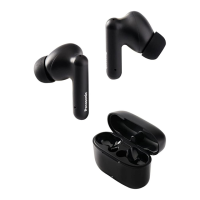
Digital Wireless Stereo Earphones
Owner’s Manual
RZ-B310W RZ-B110W
Thank you for purchasing a Panasonic product.
Please read these operating instructions before using the unit and save them for
future reference.

Other manuals for Panasonic RZ-B110W

Question and Answer IconNeed help?

Do you have a question about the Panasonic RZ-B110W and is the answer not in the manual?

Summary

Before use

Product Accessories

Lists included accessories such as USB charging cord and earpieces.

Water Resistance Information

Details IPX4 rating and precautions for use in wet conditions.

Charging the Earphones

Instructions for charging the earphones and charging cradle.

Fitting the Earphones

Guide on how to properly fit earphones for comfort and secure placement.

Part Identification

Diagrams identifying key parts of the earphones and charging cradle.

Powering Earphones On and Off

Procedures for turning the earphones on/off manually and automatically.

Connecting to a Bluetooth Device

Steps for pairing and connecting the earphones to a Bluetooth device.

Pairing Additional Devices

Instructions for pairing additional Bluetooth devices beyond the first.

Operation

Listening to Music

How to play music via Bluetooth and use remote control functions.

Making and Receiving Phone Calls

Guidance on using the earphones for phone calls via Bluetooth.

External Sound Control (RZ-B310 W)

How to use noise cancelling and ambient sound modes.

Activating Voice Assistants

Steps to activate voice assistants like Siri or Google Assistant.

Game Mode (RZ-B310 W)

Enabling game mode to reduce audio delay for gaming.

Operating with Touch Sensors

Detailed functions controlled by touching the earphone sensors.

Using a Single Earphone

How to use one earphone independently for calls or music.

Other

Restoring Factory Settings

Procedure to reset the earphones to their original factory settings.

Troubleshooting Common Issues

Solutions for common problems like connection or charging issues.

Product Specifications

Technical details including operating time, battery, and connectivity.

Water Resistance Details

Reiteration of water resistance specifications and limitations.

Trademarks and Copyright

Information on trademarks, logos, and copyright notices.

Earpiece Cleaning Guide

Instructions for cleaning the earphone earpieces to maintain hygiene and performance.

Cleaning Charging Contacts

How to clean charging contacts on earphones and cradle for optimal charging.

Disposal of Old Equipment

Guidelines for proper disposal of the product and batteries in EU countries.

Summary

Before use

Product Accessories

Lists included accessories such as USB charging cord and earpieces.

Water Resistance Information

Details IPX4 rating and precautions for use in wet conditions.

Charging the Earphones

Instructions for charging the earphones and charging cradle.

Fitting the Earphones

Guide on how to properly fit earphones for comfort and secure placement.

Part Identification

Diagrams identifying key parts of the earphones and charging cradle.

Powering Earphones On and Off

Procedures for turning the earphones on/off manually and automatically.

Connecting to a Bluetooth Device

Steps for pairing and connecting the earphones to a Bluetooth device.

Pairing Additional Devices

Instructions for pairing additional Bluetooth devices beyond the first.

Operation

Listening to Music

How to play music via Bluetooth and use remote control functions.

Making and Receiving Phone Calls

Guidance on using the earphones for phone calls via Bluetooth.

External Sound Control (RZ-B310 W)

How to use noise cancelling and ambient sound modes.

Activating Voice Assistants

Steps to activate voice assistants like Siri or Google Assistant.

Game Mode (RZ-B310 W)

Enabling game mode to reduce audio delay for gaming.

Operating with Touch Sensors

Detailed functions controlled by touching the earphone sensors.

Using a Single Earphone

How to use one earphone independently for calls or music.

Other

Restoring Factory Settings

Procedure to reset the earphones to their original factory settings.

Troubleshooting Common Issues

Solutions for common problems like connection or charging issues.

Product Specifications

Technical details including operating time, battery, and connectivity.

Water Resistance Details

Reiteration of water resistance specifications and limitations.

Trademarks and Copyright

Information on trademarks, logos, and copyright notices.

Earpiece Cleaning Guide

Instructions for cleaning the earphone earpieces to maintain hygiene and performance.

Cleaning Charging Contacts

How to clean charging contacts on earphones and cradle for optimal charging.

Disposal of Old Equipment

Guidelines for proper disposal of the product and batteries in EU countries.

Panasonic RZ-B110W Specifications

General IconGeneral
TypeIn-Ear
Bluetooth Version5.0
Water ResistanceIPX4
MicrophoneYes
Charging PortUSB-C
Battery Life6 hours (earbuds), 20 hours (with charging case)

Related product manuals