
 Need help?
Do you have a question about the Panasonic RZ-B310W and is the answer not in the manual?
Lists included accessories like USB charging cord and earpiece sets.
Details IPX4 rating and cautions for use in wet conditions.
Instructions on how to charge the earphones and charging cradle.
Instructions on correctly fitting the earphones for comfort and stability.
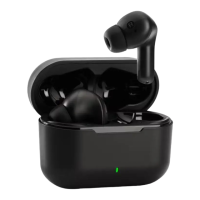
Identifies and labels the components of the earphones and charging cradle.
Describes methods for powering the earphones on and off, including manual and auto options.
Guides users through pairing and connecting the earphones to a Bluetooth device.
Explains how to connect the earphones to a second or subsequent Bluetooth device.
Instructions on playing music via Bluetooth and supported profiles (A2DP, AVRCP).
Details on using the earphones for phone calls with supported HFP profile.
How to switch between Active Noise Cancelling and Ambient Sound modes.
Steps to activate voice assistants like Siri or Google Assistant using the earphones.
How to enable Game Mode for reduced audio delay during gaming.
Explains all touch sensor controls for music playback, calls, and modes.
Instructions for using a single earphone independently.
Procedure to reset earphones to original factory default settings.
Common issues like connection problems and their solutions.
Technical details and performance data of the earphones.
Reiteration of water resistance rating (IPX4) for earphones.
Instructions for cleaning the earphone earpieces for hygiene and performance.
Guide on cleaning charging contacts on earphones and cradle for proper charging.
Information on proper disposal of the product and batteries for environmental compliance.
 General
| Control type | Touch |
|---|---|
| Product type | Headset |
| Product color | Black |
| Wearing style | In-ear |
| Recommended usage | Calls/Music |
| Bluetooth | Yes |
| Frequency band | 2.402 - 2.48 GHz |
| Wireless range | 10 m |
| Bluetooth version | 5.3 |
| Bluetooth profiles | A2DP, AAC, AVRCP, HFP, SBC |
| Connectivity technology | True Wireless Stereo (TWS) |
| Battery type | Built-in battery |
| Battery voltage | 3.7 V |
| Charging source | USB |
| Fast charging time | 15 min |
| Battery recharge time | 2.5 h |
| Input voltage (charging case) | 5 V |
| Right earpiece battery capacity | 40 mAh |
| Continuous audio playback time (with ANC) | 5 h |
| Continuous audio playback time (without ANC) | 6 h |
| Continuous audio playback time (with charging case/with ANC) | 16 h |
| Continuous audio playback time (with charging case/without ANC) | 20 h |
| Microphone type | Built-in |
| Quantity | 1 |
| Cables included | USB Type-A to USB Type-C |
| Charging case connector type | USB Type-C |
| Ear coupling | Intraaural |
| Headphone frequency | 20 - 20000 Hz |
| Intraaural headphones type | Earbuds |
| Battery life | 360 min |
 Weight and Dimensions
| Depth | 25 mm |
|---|---|
| Width | 22 mm |
| Height | 33 mm |
| Charging case weight | 40 g |
| Left earpiece weight | 4.7 g |
| Charging case dimensions (W x D x H) | 61 x 29 x 37 mm |


 To Next Page
