EasyManua.ls Logo

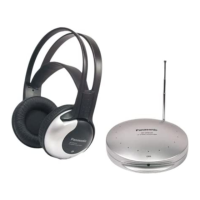
Panasonic RP-WF910 - User Manual

Panasonic RP-WF910
10 pages
Print Icon
To Next Page IconTo Next Page
Loading...
EBE
RF Wireless Stereo Headphones System
RP-WF910
Operating Instructions
Before connecting, operating or adjust-
ing this product, please read these in-
structions completely. Please keep this
manual for future reference.
RQT6634-E

Questions and Answers

  • H
    Hunter BlairAug 2, 2025
    How to fix no sound on my Panasonic Headphone?
    • S
      scott12Aug 2, 2025
      If there's no sound from your Panasonic Headphones, here's what you can check: * Ensure the unit the transmitter is connected to is turned on. * Verify the unit and transmitter are correctly connected, and the plugs are properly inserted. * If connected to the headphone jack, increase the volume of the connected unit. * Also, make sure the headphone volume itself isn't set too low; turn it up.
  • E
    Elizabeth ObrienAug 12, 2025
    What to do if my Panasonic Headphone has excessive noise?
    • C
      Cassandra WaltonAug 12, 2025
      If your Panasonic Headphones are producing excessive noise, consider the following: 1. Check for any obstructions between the transmitter and the headphones. Remove any obstructions, try moving the transmitter, or change your position. 2. Ensure that other radio waves are not interfering with the transmitter’s signals and that the transmission and receiver frequencies are correctly tuned. You can change the transmission frequency using the transmitter's [CHANNEL] switch and then tune the headphones using the [TUNING] dial. 3. Adjust the rod antenna. 4. If the transmitter is connected to the headphone jack, verify that the input level of the audio signal is not too low. If it is, turn up the volume of the connected unit.
  • M
    Melissa LeAug 21, 2025
    Why is the sound distorted on my Panasonic Headphone?
    • J
      James JordanAug 21, 2025
      Sound distortion in your Panasonic Headphones could be due to a high input level of the audio signal. If the transmitter is connected to the headphone jack, try turning down the volume of the connected unit.

Summary

Detailed Precautions

AC Adaptor Safety

Handle the AC adaptor carefully. Improper handling is dangerous.

Battery Handling and Disposal

Information on handling, charging, and replacing rechargeable batteries.

Unit Placement and Care

Warnings about altering, impacts, and unsuitable locations for the unit.

Power Sources

Operation

Basic Operation Steps

Instructions for extending the antenna, turning on, adjusting volume, and tuning.

Troubleshooting Guide

No Sound Issues

Probable causes and remedies for lack of sound.

Sound Distortion Issues

Probable causes and remedies for distorted sound.

Excessive Noise Issues

Probable causes and remedies for excessive noise.

Combined Sound Problems

Causes and remedies for no sound, distortion, or excessive noise.

Specifications

Panasonic RP-WF910 Specifications

General IconGeneral
Driver Size40 mm
Impedance32 ohms
Battery Life20 hours
Foldable DesignNo
MicrophoneNo
Color OptionsBlack
ConnectivityWireless
Frequency Response22 kHz
Operating Distance100 meters

Related product manuals