ADDRESS
AUTOAUT
O
TIMER
ON
MODE
MODE
AIR SW
ING
FAN SPEED
OFF/ON
SET AC
RESET
RC RESET ADDRES
S
AIR SWING
TIMER
SET
CANCEL
SELECT
CLOCK
FAN SPEED
FILTER RESET
MANUAL
MODE
AUTO
6
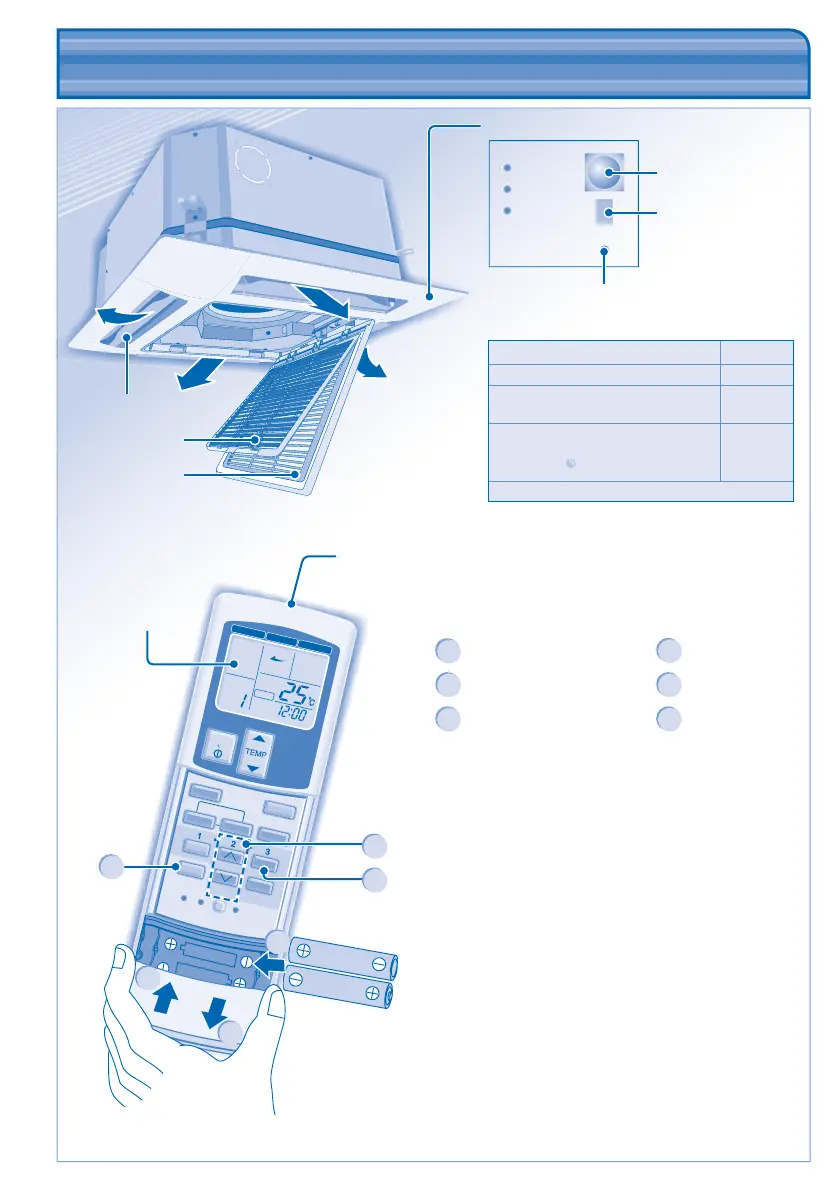
Air fi lter
Airfl ow direction louver
Intake grille
Control Panel
POWER
TIMER
FILTER
AUTO
Ray receiver
Remote control
display
Air is discharged
evenly
Remote Control Preparation
1
Press and pull out
4
Set time
2
Insert AAA or R03 batteries
(can be used ~ 1 year)
5
Confi rm
3
Press CLOCK
6
Close the cover
5
Auto OFF/ON button
• To operate the unit if the wireless remote control
is misplaced or malfunctioning.
Action Mode
Press once. Auto
Press and hold until you hear 1 beep,
then release.
Cooling
1. Press and hold until you hear 2
beeps then release.
2. Press the
SET
button for 5 seconds.
Heating
Press the button to turn off.
PRODUCT OVERVIEW & OPERATIONS
(WIRELESS REMOTE CONTROL)
PRODUCT OVERVIEW & OPERATIONS
(WIRELESS REMOTE CONTROL)
4
3
1
2
6
Transmitter
Maximum distances: 8m
Error Code Display
(For servicing used
only)
CZ-RWS1 (Heat-pump model)
CZ-RWC1 (Cooling model)



 To Next Page