EasyManua.ls Logo

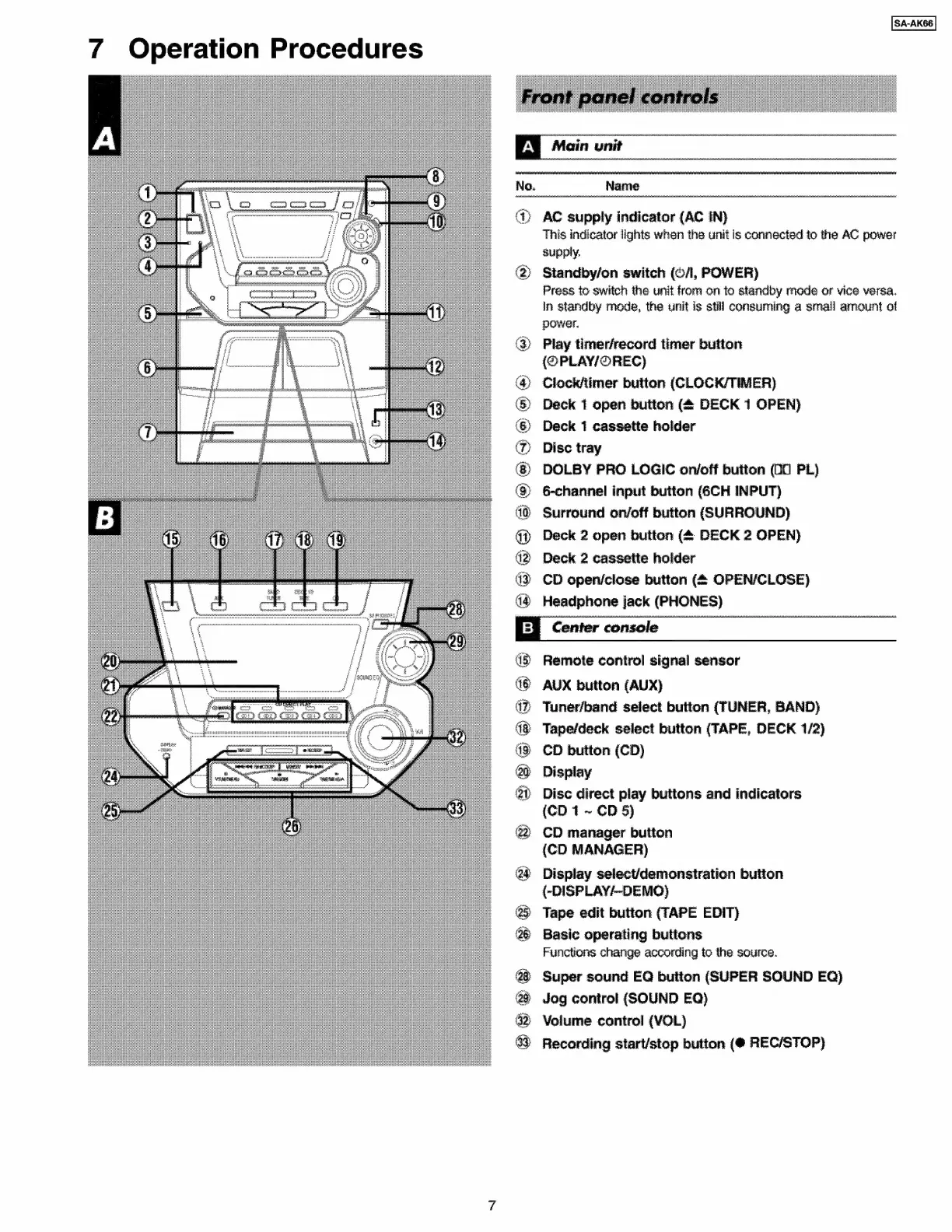
Panasonic SA-AK66 - Operation Procedures; Front Panel Controls (Main Unit); Center Console Controls

Panasonic SA-AK66
79 pages
Print Icon
To Next Page IconTo Next Page
To Previous Page IconTo Previous Page
Loading...
7
Operation
Procedures
ia
Main
unit
No.
Name
@)
AC
supply
indicator
(AC
IN)
This
indicator
lights
when
the
unit
is
connected
to
the
AC
power
supply,
>
Standby/on
switch
(©/,
POWER)
Press
to
switch
the
unit
from
on
to
standby
mode
or
vice
versa.
In
standby
mode,
the
unit
is
still
consuming
a
small
ammount
of
power.
@
Play
timerfrecord
timer
button
(@PLAY/@REC)
@)
Clocktimer
button
(CLOCK/TIMER)
®
Deck
1
open
button
(4
DECK
1
OPEN)
©)
Deck
1
cassette
holder
Disc
tray
@)
DOLBY
PRO
LOGIC
on/off
button
(00
PL)
@
6-channel
input
button
(6CH
INPUT)
Surround
on/off
button
(SURROUND)
i)
Deck
2
open
button
(&
DECK
2
OPEN)
42
Deck
2
cassette
holder
43
CD
open/close
button
(4
OPEN/CLOSE)
4@
Headphone
jack
(PHONES)
Ey
Center
console
48
Remote
control
signal
sensor
G8
AUX
button
(AUX)
4%
Tunerfband
select
button
(TUNER,
BAND)
4
Tapefdeck
select
button
(TAPE,
DECK
1/2)
4%
CD
button
(CD)
0
Display
@?
Disc
direct
play
buttons
and
indicators
{CD
1
~
CD
§)
@@
CD
manager
button
(CD
MANAGER)
@
Display
select/demonstration
button
(-DISPLAY/~DEMO}
25
Tape
edit
button
(TAPE
EDIT)
@
Basic
operating
buttons
Functions
change
according
to
the
source.
@8
Super
sound
EQ
button
(SUPER
SOUND
EQ)
@
Jog
control
(SOUND
EQ)
@
Volume
control
(VOL)
8
Recording
start/stop
button
(@
REC/STOP)