Slide # 11
Models:
SA-PT660
SA-PT760
SA-PT960
SA-PT1060
SH-FX67, 85
Outline
Wireless
Mech
Pwr Supply
Protection
Audio
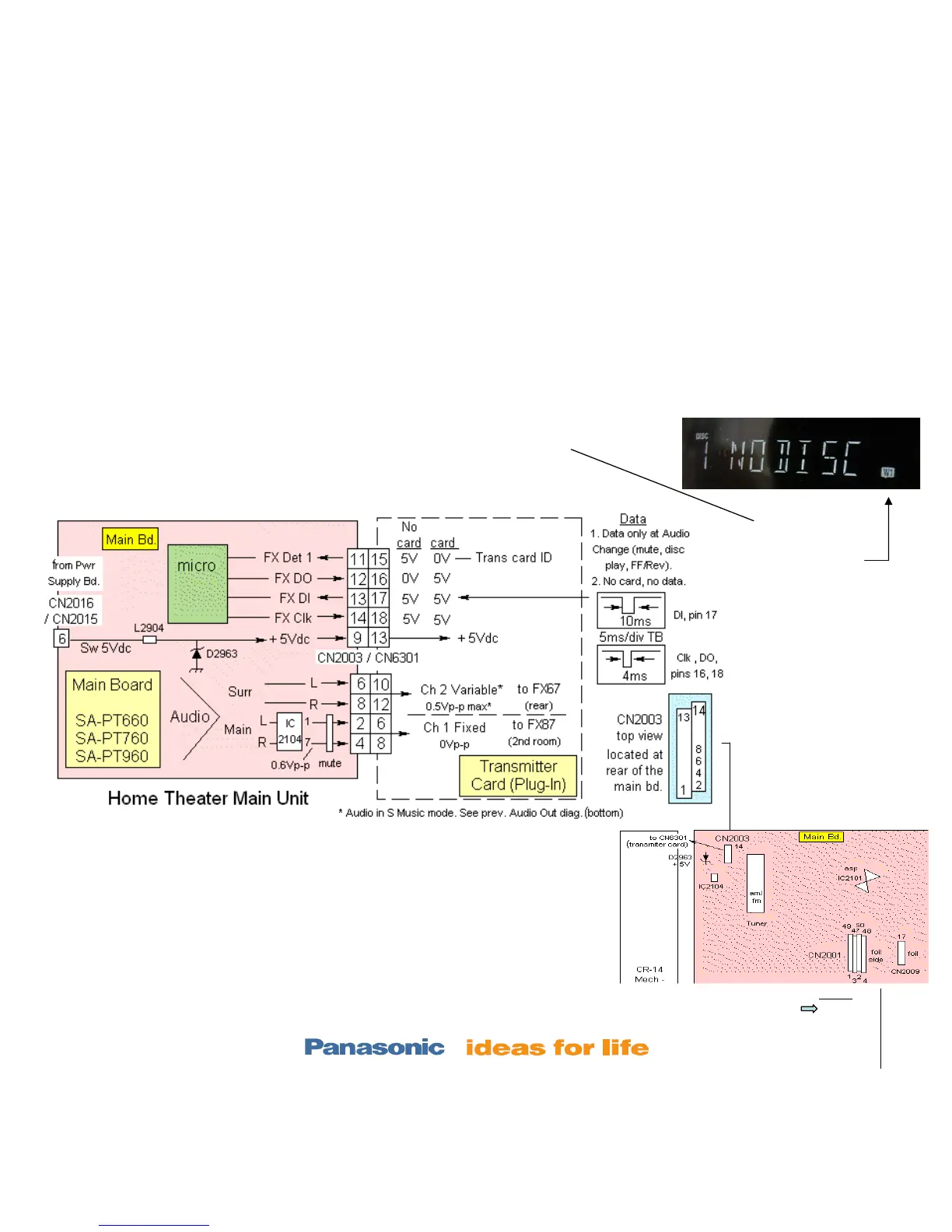
Wireless - Troubleshooting Information ½ - Transmitter part
Use this diagram to:
Prove that the T card is recognized (CN2003/pin 11).
Power is getting to the T card (CN2003/pin 9).
Audio is getting to the T card (CN2003/ pin 2-8).
Notes:
1. Measure the voltages at the CN2003 main board with the Transmitter
card / Bd. plugged in.
2. Channel 2 audio is present with a surround sound DVD or if the S
Music is turned ON. See the previous slide, step 7 for access S Music.
3. Channel 1 audio is only present when its 2
nd
room accessory
transmitter card is plugged in. Otherwise channel 1 is muted.
4. Data is only present when the T card is in.
Rear of Main Unit
When the T card is
inserted, the micro
blinks a W1 icon
Transmitter card – REPX 0644b
Receiver card - REPX 0645b







 To Next Page