EasyManua.ls Logo

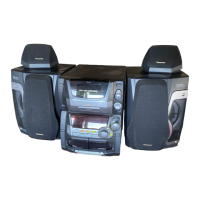
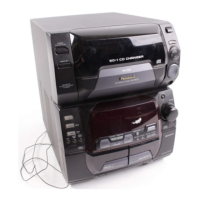
Panasonic SC-AK750 - User Manual

Panasonic SC-AK750
28 pages
Print Icon
To Next Page IconTo Next Page
Loading...
RQTV0200-1P
PPC
For U.S.A.
As an ENERGY STAR
®
Partner,
Panasonic has determined that this
product meets the ENERGY STAR
®
guidelines for energy ef ciency.
Table of contents
Listening caution .....................................2
IMPORTANT SAFETY INSTRUCTIONS ..3
Handling of the disc trays and discs .....3
Placement of speakers ............................3
Getting started .........................................4
Overview of controls ...............................6
Discs .........................................................7
Cassette tape – Play and record ..........10
FM/AM radio ...........................................11
XM
®
Satellite Radio ................................12
Timer .......................................................14
Sound adjustment .................................15
External unit ...........................................15
Troubleshooting guide ..........................18
Specifi cations ........................................19
Limited Warranty
(ONLY FOR U.S.A.) ............................20
Limited Warranty
(ONLY FOR CANADA) .......................21
Product Service .....................................21
Maintenance ........................... Back cover
When moving the unit ........... Back cover
Español
Español
Preparativos iniciales ............................22
Colocación de los altavoces ................23
Controles ................................................24
Discos .....................................................25
Cintas de casete –
reproducción y grabación ................25
Radio FM/AM .........................................26
Temporizador .........................................27
SUPPLIED ACCESSORIES
Please check and identify the supplied accessories.
Use numbers indicated in parentheses when asking for
replacement parts. (As of January 2007)
In the U.S.A. to order accessories, refer to “Accessory
Purchases” on page 20.
1 x AC power supply cord
(K2CB2CB00018)
1 x Remote control
(N2QAYB000137)
1 x FM indoor antenna
(RSA0007-L)
2 x Remote control
batteries
1 x AM loop antenna
(N1DAAAA00001)
Operations in these instructions are described mainly using
remote control, but you can perform the operations on the
main unit if the controls are the same.
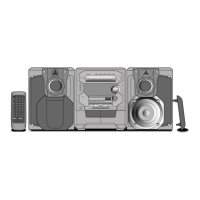
Your unit may not look exactly the same as illustrated.
La guía rápida en español se encuentra en la página 22 - 27.
Before connecting, operating or adjusting this product,
please read the instructions completely.
Please keep this manual for future reference.
Operating Instructions
CD Stereo System
Model No. SC-AK750
Dear customer
Thank you for purchasing this product.
For optimum performance and safety, please read these
instructions carefully.
These operating instructions are applicable to the following
system.
System
SC-AK750
Main unit
SA-AK750
Front speakers
SB-AK750
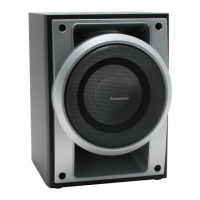
Subwoofer
SB-WAK750
If you have any questions contact
In the U.S.A.: 1-800-211-PANA (7262)
In Canada: 905-624-5505
RQTV0200-P_1EN.indd 1RQTV0200-P_1EN.indd 1 2/16/07 10:10:03 AM2/16/07 10:10:03 AM

Questions and Answers

  • S
    swalkerSep 23, 2025
    What does “CHGR ERR” displayed on Panasonic SC-AK750 Stereo System mean?
    • M
      Mary SandersSep 23, 2025
      Press [y/I, POWER] to release the jammed tray(s) as the unit will switch off.

  • A
    Ashley OconnellAug 23, 2025
    How to clear and reset the memory contents of Panasonic SC-AK750 Stereo System?
    • D
      David WilliamsAug 23, 2025
      While pressing and holding down [y/I, POWER] on the main unit, reconnect the AC power supply cord.
  • F
    frank97Aug 25, 2025
    What to do if “– –:– –” appears on the display of my Panasonic Stereo System at standby mode?
    • G
      Gina CohenAug 26, 2025
      This usually happens when you plug in the AC power supply cord for the first time or after a recent power failure. You should set the time on your Panasonic Stereo System.
  • K
    Kyle ScottAug 27, 2025
    What does it mean when “ANTENNA” is flashing on my Panasonic Stereo System?
    • J
      Juan HoffmanAug 27, 2025
      This indicates that the XM Passport Mini-Tuner and Home Dock is not properly connected. Check the connection and ensure the antenna cable is not damaged.
  • M
    mfernandezAug 27, 2025
    What to do if sound stops on my Panasonic Stereo System?
    • M
      Michael WarrenAug 27, 2025
      Turn the volume up.
  • G
    gestradaSep 18, 2025
    What does “VBR–” displayed on Panasonic Stereo System mean?
    • D
      Dominic GarciaSep 18, 2025
      The unit cannot display the remaining play time for variable bit rate (VBR) tracks.
  • M
    Melissa MyersSep 15, 2025
    What to do if unusual sound is heard on Panasonic SC-AK750 Stereo System?
    • T
      Timothy BrownSep 15, 2025
      The disc may be scratched, or its data may be defective. Replace the disc.
  • S
    stokesrebeccaSep 16, 2025
    Why can't CD-RW be read by Panasonic SC-AK750 Stereo System?
    • N
      Nancy EstradaSep 16, 2025
      The disc was incompletely formatted. Use the recording equipment to fully format the disc before recording.
  • R
    Richard ShawSep 6, 2025
    What does “ERROR” displayed on Panasonic Stereo System mean?
    • R
      Rodney RangelSep 6, 2025
      Read the instructions and try again.
  • D
    David ChenSep 3, 2025
    Why is sound distorted on my Panasonic SC-AK750 Stereo System?
    • L
      laurencainSep 4, 2025
      Separate the antenna from other cables and cords.

Summary

Listening Caution

Important Safety Instructions

Handling of Disc Trays and Discs

Instructions for safely inserting and removing discs to prevent unit damage.

Speaker Placement Guidelines

Guidance on positioning speakers for optimal sound and safety.

Getting Started: Making Connections

Connecting System Components

Step-by-step guide for connecting speakers, antennas, and power supply.

Overview of System Controls

Main Unit Controls

Identification and function of buttons and indicators on the main stereo unit.

Remote Control Functions

Description of buttons and their functions on the remote control.

Disc Playback Operations

Basic Disc Playback

Instructions for inserting, playing, stopping, and pausing discs.

Disc Playback Modes

Explanation of playback modes like 1-DISC, ALL-DISC, RANDOM, and TRACK selection.

Panasonic SC-AK750 Specifications

General IconGeneral
BrandPanasonic
ModelSC-AK750
CategoryStereo System
LanguageEnglish

Related product manuals