EasyManua.ls Logo

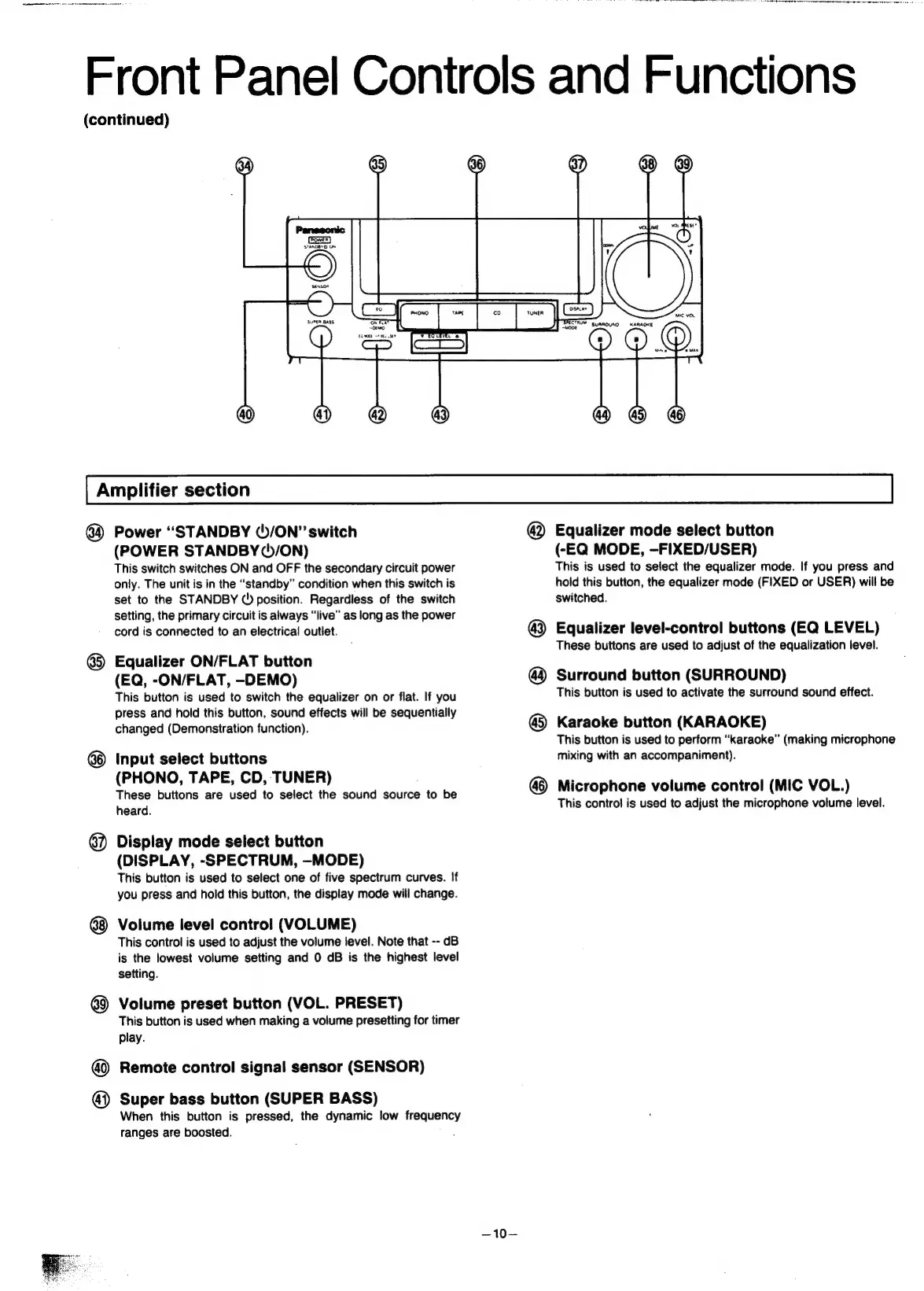
Panasonic SC-CH55 - Front Panel Controls and Functions (continued); Amplifier section

Panasonic SC-CH55
60 pages
Print Icon
To Next Page IconTo Next Page
To Previous Page IconTo Previous Page
Loading...
PS
es
eee
eet
Front
Panel
Controls
and
Functions
(continued)
Amplifier
section
©
©
Power
“STANDBY
(/ON’
switch
(POWER
STANDBY
(/ON)
This
switch
switches
ON
and
OFF
the
secondary
circuit
power
only.
The
unit
is
in
the
“standby”
condition
when
this
switch
is
set
to
the
STANDBY
()
position.
Regardless
of
the
switch
setting,
the
primary
circuit
is
always
“live”
as
long
as
the
power
cord
is
connected
to
an
electrical
outlet.
Equalizer
ON/FLAT
button
(EQ,
-ON/FLAT,
-DEMO)
This
button
is
used
to
switch
the
equalizer
on
or
flat.
If
you
press
and
hold
this
button,
sound
effects
will
be
sequentially
changed
(Demonstration
function).
Input
select
buttons
(PHONO,
TAPE,
CD,
TUNER)
These
buttons
are
used
to
select
the
sound
source
to
be
heard.
Display
mode
select
button
(DISPLAY,
-SPECTRUM,
—-MODE)
This
button
is
used
to
select
one
of
five
spectrum
curves.
If
you
press
and
hold
this
button,
the
display
mode
will
change.
Volume
level
control
(VOLUME)
This
control
is
used
to
adjust
the
volume
level.
Note
that
--
dB
is
the
lowest
volume
setting
and
0
dB
is
the
highest
level
setting.
Volume
preset
button
(VOL.
PRESET)
This
button
is
used
when
making
a
volume
presetting
for
timer
play.
Remote
control
signal
sensor
(SENSOR)
Super
bass
button
(SUPER
BASS)
When
this
button
is
pressed,
the
dynamic
low
frequency
ranges
are
boosted.
-10—
@
©
@
Equalizer
mode
select
button
(-EQ
MODE,
-FIXED/USER)
This
is
used
to
select
the
equalizer
mode.
If
you
press
and
hold
this
button,
the
equalizer
mode
(FIXED
or
USER)
will
be
switched.
Equalizer
level-control
buttons
(EQ
LEVEL)
These
buttons
are
used
to
adjust
of
the
equalization
level.
Surround
button
(SURROUND)
This
button
is
used
to
activate
the
surround
sound
effect.
Karaoke
button
(KARAOKE)
This
button
is
used
to
perform
“karaoke”
(making
microphone
mixing
with
an
accompaniment).
Microphone
volume
control
(MIC
VOL.)
This
control
is
used
to
adjust
the
microphone
volume
level.

Related product manuals