EasyManua.ls Logo

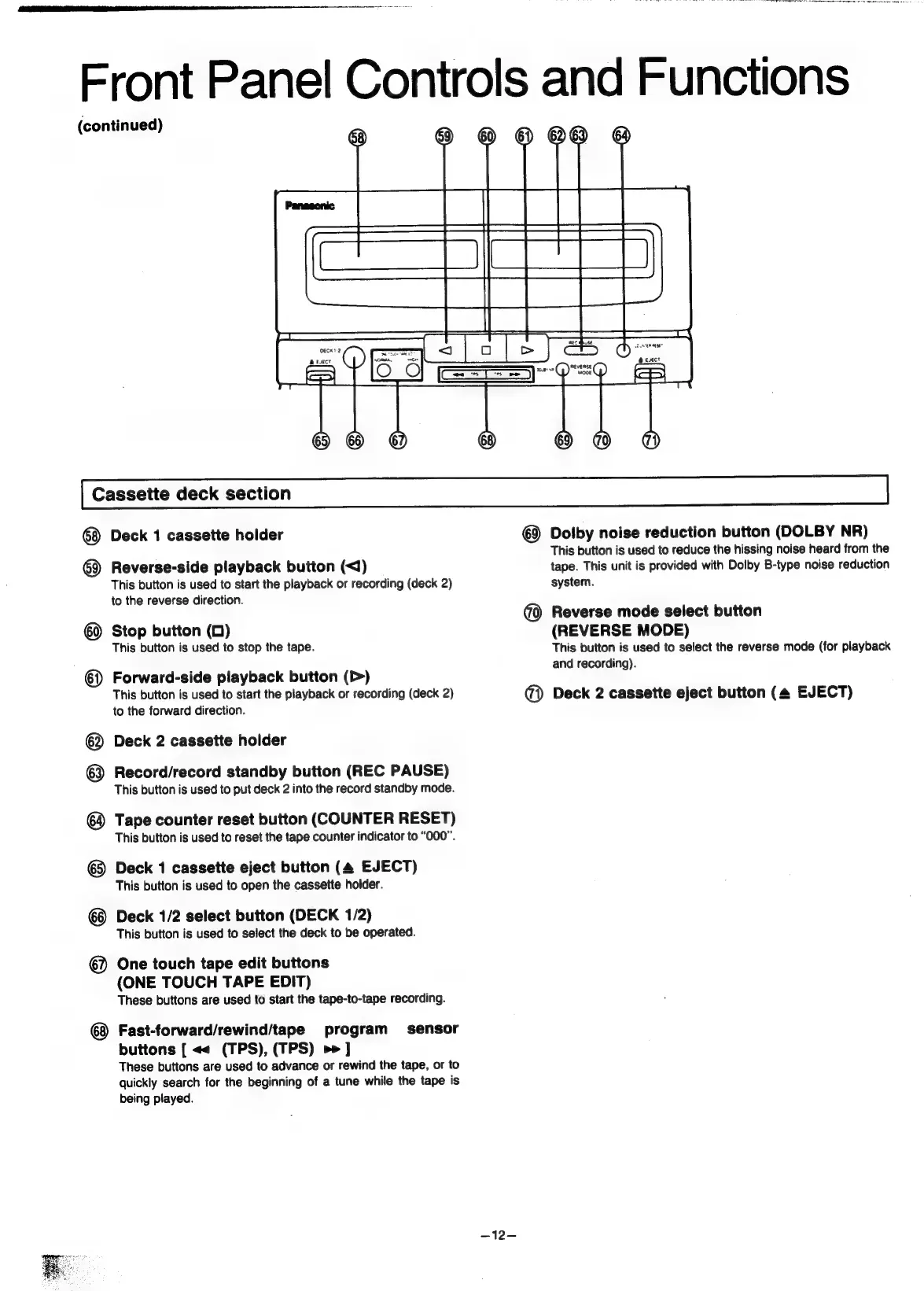
Panasonic SC-CH55 - Front Panel Controls and Functions (continued); Cassette deck section

Panasonic SC-CH55
60 pages
Print Icon
To Next Page IconTo Next Page
To Previous Page IconTo Previous Page
Loading...
Front
Panel
Controls
and
Functions
(continued)
Cassette
deck
section
Deck
1
cassette
holder
Reverse-side
playback
button
(<1)
This
button
is
used
to
start
the
playback
or
recording
(deck
2)
to
the
reverse
direction.
®
۩@
Stop
button
(0)
This
button
is
used
to
stop
the
tape.
©
Forward-side
playback
button
(>)
This
button
is
used
to
start
the
playback
or
recording
(deck
2)
to
the
forward
direction.
Deck
2
cassette
holder
®
®
Record/record
standby
button
(REC
PAUSE)
This
button
is
used
to
put
deck
2
into
the
record
standby
mode.
Tape
counter
reset
button
(COUNTER
RESET)
This
button
is
used
to
reset
the
tape
counter
indicator
to
“000”.
@}
Deck
1
cassette
eject
button
(4
EJECT)
This
button
is
used
to
open
the
cassette
holder.
Deck
1/2
select
button
(DECK
1/2)
This
button
is
used
to
select
the
deck
to
be
operated.
@)
One
touch
tape
edit
buttons
(ONE
TOUCH
TAPE
EDIT)
These
buttons
are
used
to
start
the
tape-to-tape
recording.
¢8
Fast-forward/rewind/tape
program
sensor
buttons
[
««
(TPS),
(TPS)
>>]
These
buttons
are
used
to
advance
or
rewind
the
tape,
or
to
quickly
search
for
the
beginning
of
a
tune
while
the
tape
is
being
played.
—12—
@
Dolby
noise
reduction
button
(DOLBY
NR)
This
button
is
used
to
reduce
the
hissing
noise
heard
from
the
tape.
This
unit
is
provided
with
Dolby
B-type
noise
reduction
system.
@
Reverse
mode
select
button
(REVERSE
MODE)
This
button
is
used
to
select
the
reverse
mode
(for
playback
and
recording).
@)
Deck
2
cassette
eject
button
(4
EJECT)

Related product manuals