Memory
Presetting Preajusie
en
la memoria
•If broadcast frequencies
are preset in the memory, you can
easily
tune in
any of these
frequencies from the system or
remote
control
unit.
•Up
to
12
stations can
each be set
in the FM,
MW and SW (For
China,
Australia and
New
Zealand:
FM
and AM) bands
with the
automatic
or
manual
memory
presetting.
I
For China,
Auatraila and
New
Zealand
I
Note that
for
China,
Australia and New Zealand, there are two bands
of
"FM". "AM", Instead
of TM", -MW",
"SW".
Press "AM"
button when it is
written, "Press MW/SW."
Automatic
memory
presetting
This
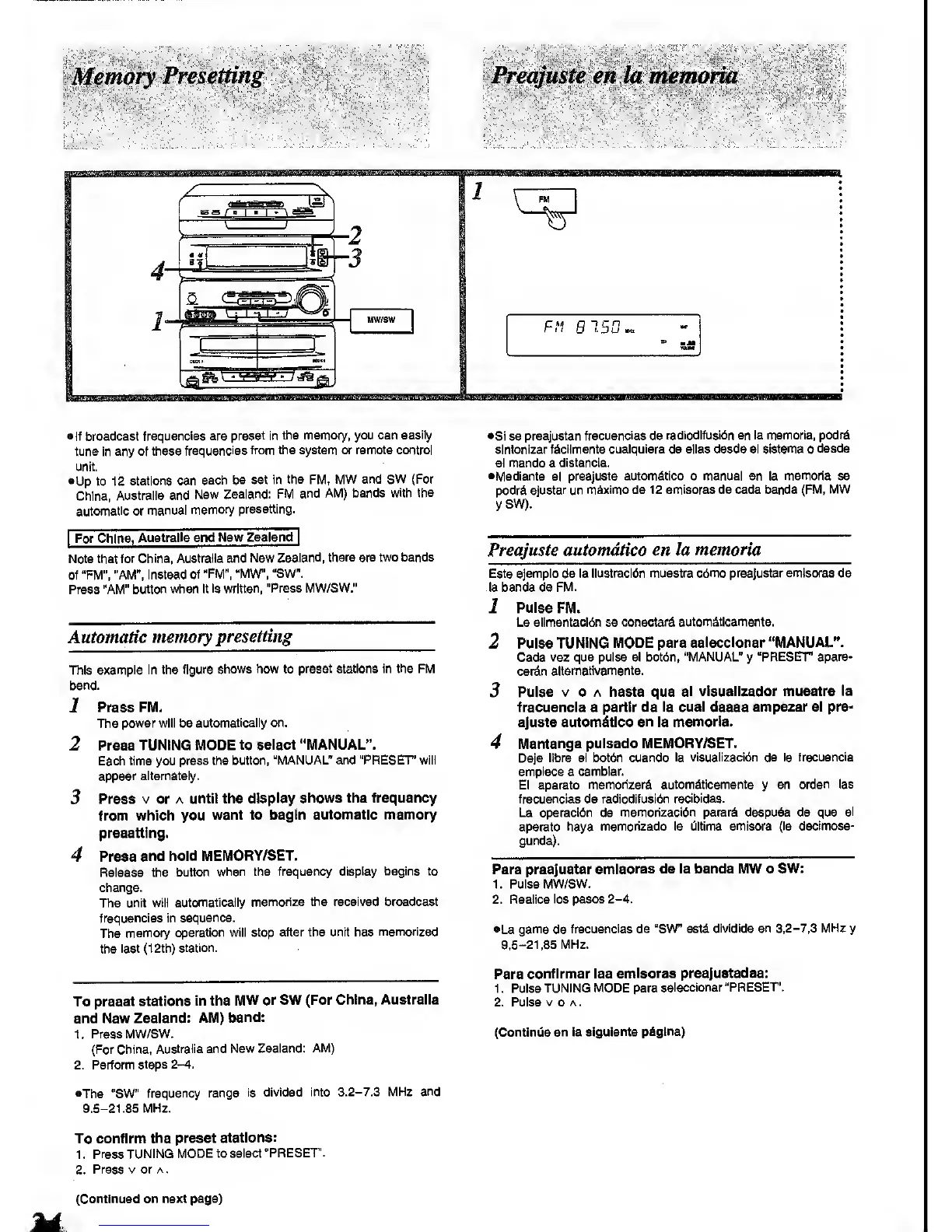
example In the
figure shows how to
preset stations in the FM
band.
1
Press FM.
The
power
will be automatically on.
2 Press
TUNING MODE
to select "MANUAL".
Each time you
press the button,
"MANUAL" and "PRESET' will
appear
alternately.
3
Press V or A
until the display
shows the frequency
from which you
want to begin
automatic memory
presetting.
4 Press
and hold
MEMORY/SET.
Release the
button
when the frequency
display begins to
change.
The unit will
automatically
memorize the received broadcast
frequencies in
sequence.
The
memory
operation wiil stop
after the unit has
memorized
the
last (12th)
station.
To
preset stations
in the
MW or SW (For
China, Australia
and New
Zealand: AM)
band:
1.
Press
MW/SW.
(For China,
Australia and
New Zealand:
AM)
2. Perform
steps
2-4.
•The
"SW"
frequency range
Is
divided Into
3.2-7.3
MHz
and
9.5-21.85 MHz.
To confirm
the preset
stations:
1 .
Press TUNING
MODE to select
"PRESET'.
2.
Press V or A
.
•Si se
preajustan frecuencias
de
radiodifusi6n en la memoria,
podrd
sintonizar
fdciimente cualquiera
de alias desde
el sistema
o
desde
el mando
a
distancia.
•Mediants el
preajuste automdtico o manual en la memoria
se
podrd
ajustar un maximo de 12 emisoras de cada banda
(FM, MW
ySW).
Preajuste automdtico
en la
memoria
Este
ejempio
da la llustracldn
muestra cdmo preajustar emisoras de
la banda de FM.
1 Pulse FM.
La allmentaci6n se
conectar^ autom^ticamente.
2
Pulse
TUNING MODE para selecclonar "MANUAL".
Cada
vez que pulse el bot6n,
"MANUAL"
y
"PRESET apare-
cerdin
aiternativamente.
3
Pulse V 0 A hasta que
el visuallzador muestre la
frecuencia a partir de
la cual
desee
empezar el pre-
ajuste automdtico
en
la memoria.
4
Mantenga pulsado MEMORY/SET.
Deje
libra el botdn cuando
la visuallzacibn de la frecuencia
emplece
a
camblar.
El aparato
memorizard autom^tlcamente
y
en
orden las
frecuencias de radlodlfusl6n
recibidas.
La operacldn de
memorizacidn parard despu^s de que
el
aparato haya
memorizado la Oltlma emisora
(la decimose-
gunda).
Para preajustar
emisoras de la banda MW o
SW:
1. Pulse
MW/SW.
2. Reallce
los pesos
2-4.
•La
gama
de
frecuencias de "SW" est^
divldlda en 3,2-7.3 MHz
y
9.5-21,85 MHz.
Para
confirmar las
emisoras preajustadas:
1 . Pulse
TUNING MODE para
selecclonar
"PRESET.
2, Pulse
V
0
A
.
(ContinOe
en la
sigulante pAglna)
(Continued on
next page)









 To Next Page