Listening
to Compact
Discs
Escucha de discos
compactos
c
)
\
f
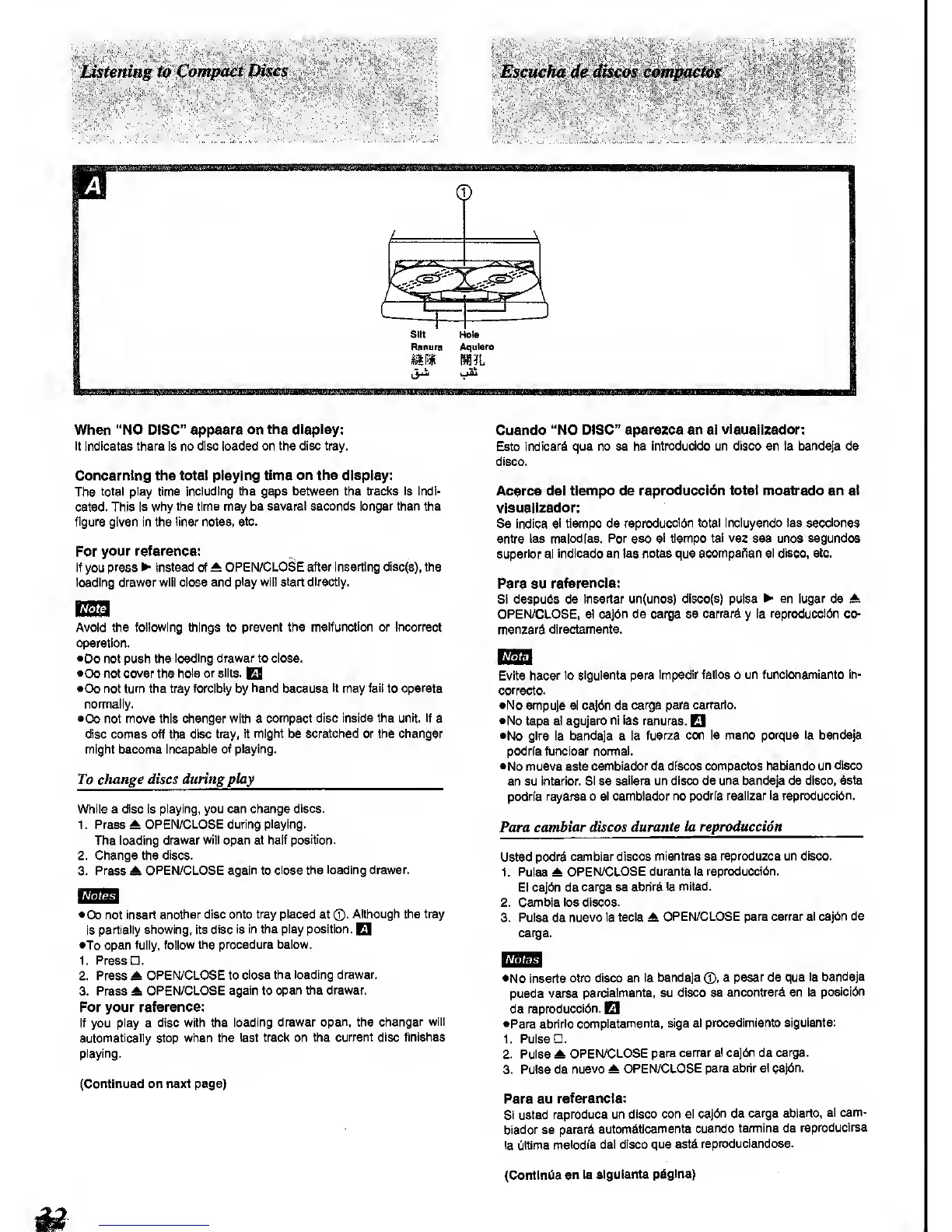
Silt
Hole
Ranura
Aqulero
When "NO DISC" appears on
the display:
It Indicates there Is no
disc loaded on the disc tray.
Concerning the total playing
time on the display:
The
total play time including the
gaps
between
the
traol<s is Indi-
cated. This Is
why the time may be
several seconds longer than the
figure given in the iiner notes,
etc.
For your referencs:
If
you
press
>
Instead of A
OPEN/CLO^E after Inserting disc(s), the
loading drawer will close and
play will start directly.
Avoid the following
things to prevent the malfunction or Incorrect
operation.
•Do not push the
loading
drawer to close.
•Do not cover the
hole or
silts.
E9
•Do not turn the tray
forcibly
by
hand
because
it
may
fail
to
operate
normally.
•Do not move this changer with a
compact disc Inside the unit. If
a
disc comes off the disc tray,
it might be scratched or the changer
might become
Incapable of playing.
To cliange discs during play
While a
disc
Is
playing, you can change
discs.
1 . Press ^
OPEN/CLOSE during playing.
The loading
drawer will open at half
position.
2. Change the
discs.
3.
Press
A
OPEN/CLOSE
again
to
close the loading drawer.
•Do not
insert another disc onto
tray
placed at
®.
Although the tray
Is
partially showing, Its
disc is In the play position.
El
•To
open fully,
follow the procedure below.
1. Press .
2. Press ^
OPEN/CLOSE to
close the loading drawer.
3. Press A
OPEN/CLOSE
again
to
open the drawer,
For your
reference:
If you
play
a
disc with the
loading drawer
open,
the
changer will
automatically stop when the
last track on the
current disc finlBhes
playing.
(Continued on next page)
Cuando
"NO DISC" aparezca en
el visuaiizador:
Esto
Indlcard que no se ha
Introducldo un
disco
en ta bandeja
de
disco.
Acerca
del tiempo de
reproduccibn
total mostrado en
e)
visuaiizador:
Se
Indica el tiempo de
reproduccldn total Incluyendo las secclones
entre las melodras.
Por
eso
el tiempo tal vez sea unoa segundos
superior al Indlcado en las notes que
acompaf^an el disco, etc.
Para su referenda:
Si despuds de
insertar un(unos) dl8co(s) pulsa ^ en lugar de A
OPEN/CLOSE, el cajdn de carga se cerrard
y
la reproduccldn co-
menzard directamente.
Evite
hacer lo sigulente para
impedir fallos
o
un funclonamlento In-
correcto.
•No empuje el ca]dn de
carga para cerrario.
•No tape el
agujero nl las
ranuras.
El
•No
gire la bandeja a la
fuerza con la mano porque la bandeja
podrfafuncloar nonnal.
•No mueva este
cambiador de discos compactos
habiendo un disco
en su Interior.
Si
se
saliera un
disco de
una
bandeja de
disco, date
podrla rayarse o el cambiador
no podria reallzar la repraduccidn.
Para
cambiar discos
durante la reproduccidn
Usted
podrd cambiar discos
mientras se reproduzca un
disco.
1. Pulse A
OPEN/CLOSE durante
la reproduccldn.
El cajdn de
carga se
abriri la mitad.
2. Gamble los discos.
3. Pulse de
nuevo la tecia A
OPEN/CLOSE para cerrar el
cajdn de
carga.
•No Inserte
otro disco en
la bandeja
0,
a
pesar
de
que la
bandeja
pueda verse
parcialmente, su
disco se encontrar^ en la
posicidn
de
reproduccldn.
EI
•Para abrlrlo
completamente, stga el
procedlmlento sigulente:
1. Pulse .
2. Pulse A
OPEN/CLOSE
para cerrar
el cajdn
de
carga.
3. Pulse de
nuevo A
OPEN/CLOSE
para abrir el
cajdn.
Para su
referenda:
SI usted
reproduce un
disco con el
cajdn de carga abierto.
el
cam-
biador se
pararA
autom^ticamente
cuando termlne de
reproduclrse
la Ciltima
melodia del
disco que estd
reproduclendose.
(ContlnCia
en la
sigulente
piigina)


 To Next Page
 Loading...






