Recording
from
Radio Broadcasts
Grabacion
de
radiodifusiones
7
DOLBY
NH REV MODE
•You can use normal and
chrome
tapes.
•Check that the tape's tabs (see page 100} are
Intact.
•The leader tape must be
wound up beforehand.
(See page 52.)
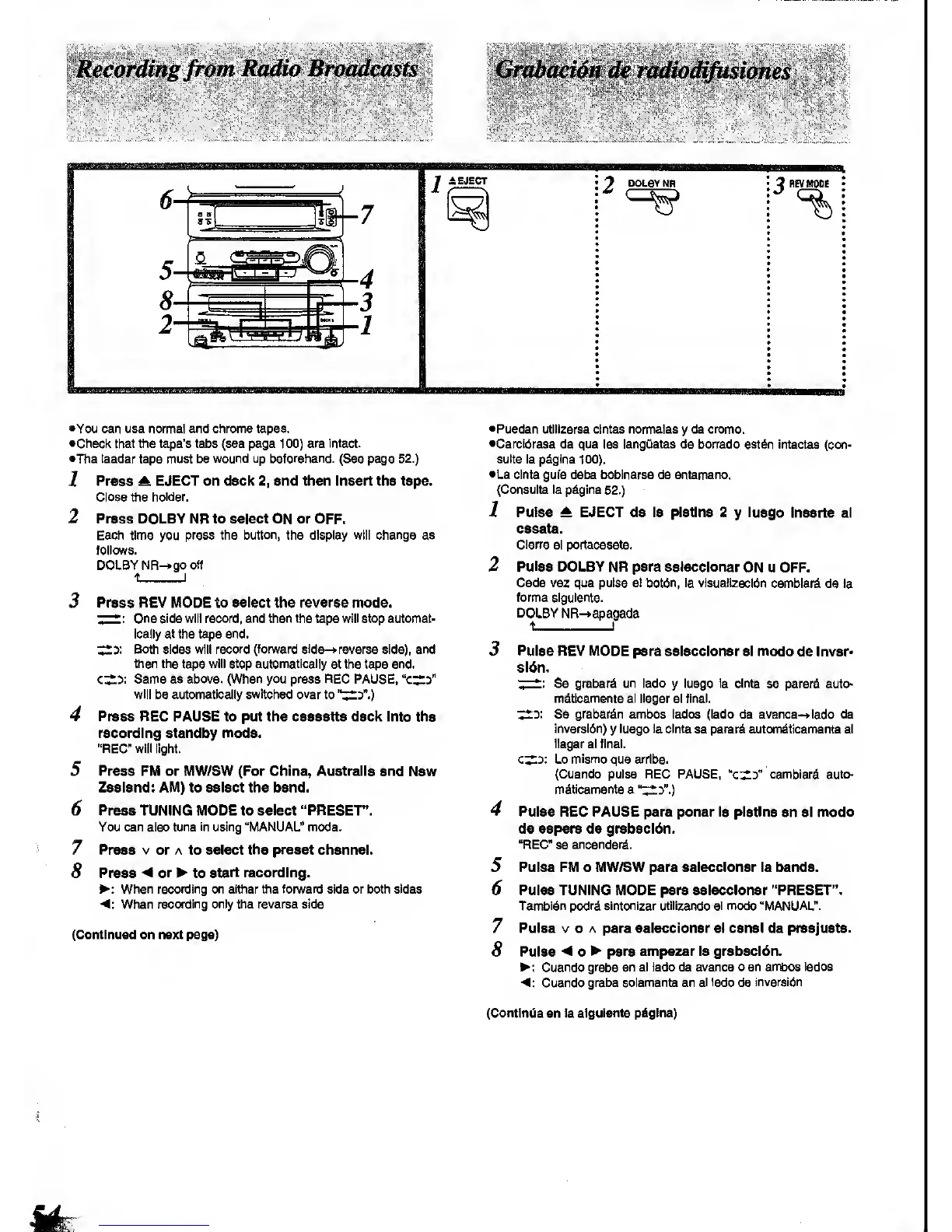
1
Press ^ EJECT
on deck
2,
and then insert the tape.
Close the holder.
2
Press
DOLBY NR to select ON or OFF.
Each
time
you
press ths button, the display will change
as
follows.
DOLBY NR->go off
7
8
Press REV MODE to select the reverse mode.
T~*"
One side will record, and then the tape will stop automat-
ically at the tape end.
Both sides will
record (fonvard slde-»reverse
side), and
then the
tape
will stop automatically
at the tape end.
Same as above. (When you press REG PAUSE,
"c^d"
will
be
automatically
switched over
to
"i^3".)
Press REC PAUSE to put the cassette deck Into the
recording standby mode.
"REC"
will
light.
Press FM or MW/SW (For China, Australia and
New
Zealand: AM) to select the band.
Press TUNING MODE to select "PRESET".
You can also
tune in
using "MANUAL" mode.
Press V or A to select
the preset
channel.
Press
-4
or
^ to
start recording.
>: When recording on either the
fonArard
side or both sides
<:
When
recording only the reverse side
(Continued on next page)
•Pueden utillzarse cintas normates
y
de cromo.
•Cerclbrese de que las lengUetas de bon'ado estdn
Intactas (con-
suite la pdglna
100).
•La
cinta
gufa debe boblnarse
de antemano.
(Consults la p^gina
52.)
1 Puise A EJECT de la platina 2
y
luego
Inserte el
casete.
Clerre
el portacasete.
2 Pulse
DOLBY NR para sslecclonar
ON u OFF.
Cede vez que pulse et bot6n, la vlsualizacldn
camblard
de
la
forma siguiente.
DOLBY
NR-»apagada
5
6
7
8
Pulse
REV MODE para sslecclonar si modo
de Inver-
sl6n.
•;
—
Se grabard un lado
y
luego
la cinta
se parard auto-
mdticamente
al llegar
al final.
Z^y.
Se
grabar^n
ambos lados (lado de avance->lado de
Inversion)
y
luego la cinta
se parard automdtioamente el
llegar al final.
c^y. Lo
mismo
que arrlba.
(Cuando puise REC PAUSE,
"c^s"
cambiard auto-
mitlcamente a
"^y.)
Pulse REC PAUSE para ponor la platina
en el
modo
de espera de grabacl6n.
"REC
se
encander^.
Pulse FM o MW/SW para sslsccionar la banda.
Pulse TUNING MODE para seleccionar "PRESET".
Tambldn podrd sintonizar utilizando el modo "MANUAL".
Pulse V o A para sslecclonar el canal de preajuste.
Pulse
-4
0^ para empszar la grabacldn.
Cuando
grabe en al lado de avance o en ambos
lados
<:
Cuando
grabe solamente en
el lado
de
inversltin
(Continua
en la
siguiente pdglna)









 To Next Page