Using the
Play Timer
Vtilizacion
del
temporizador
de
reproduccion
•Make sure that you have completed
"Setting the Time" on page 22.
•Select this timer when you want to use the timer
as
an alann
ciocl<.
You can wake up with listening to music (CD, tuner,
tape) at a
desired volume
level
and time.
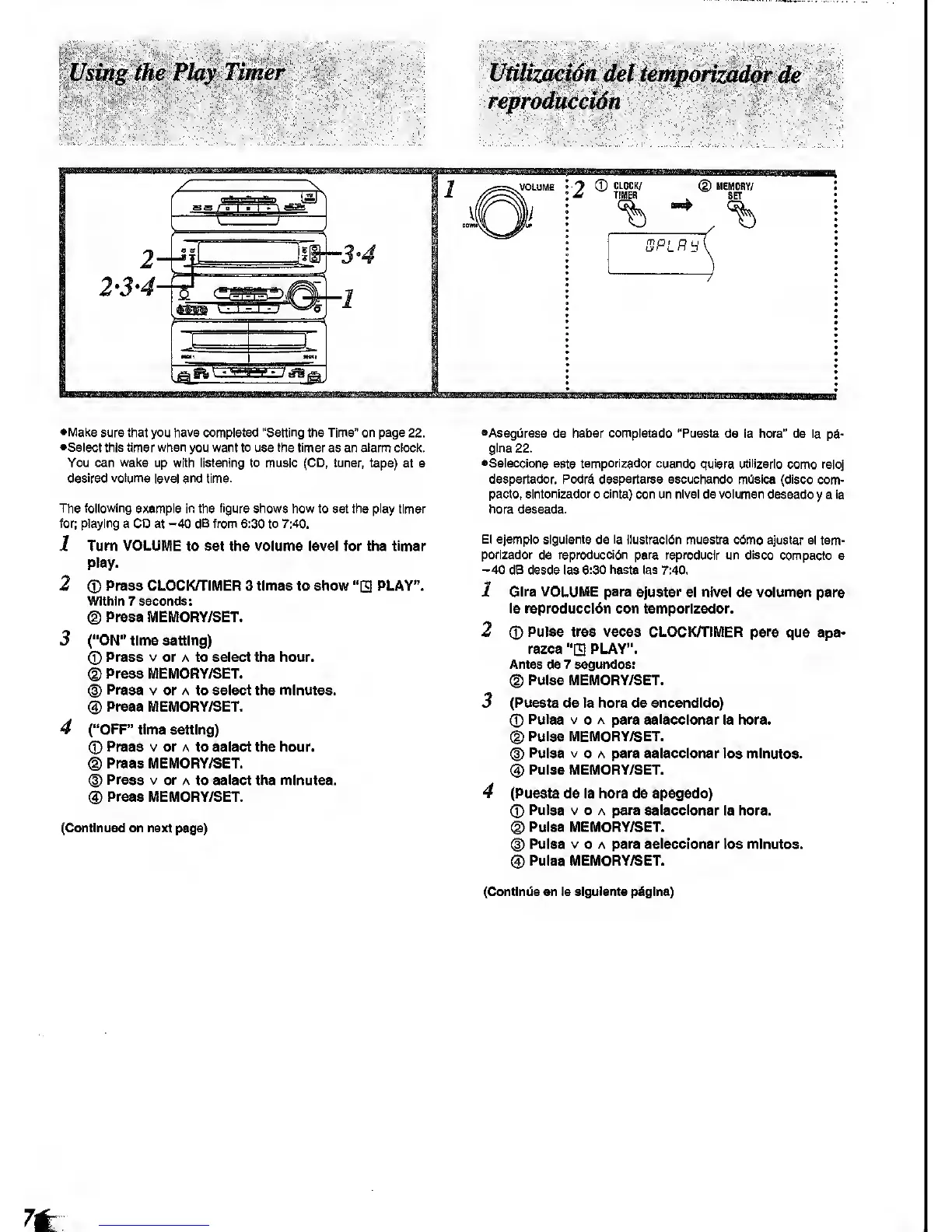
The following
example in the
figure shows
how to set the play timer
for;
playing
a
CD
at
-40
dB from 6:30
to
7:40.
1 Turn VOLUME to set the volume level for the timer
play.
2
(D
Press CLOCKH'IMER 3 times to show
"Q
PLAY".
Within 7 seconds:
®
Press MEMORY/SET.
3 ("ON"
time setting)
CD
Press
V
or A to select the hour.
(D
Press MEMORY/SET.
®
Press
V or A to sslect the minutes.
(3)
Press MEMORY/SET.
4 ("OFF"
time setting)
0
Press V or A
to
select the hour,
d)
Press MEMORY/SET.
d)
Press V or
A to
select
the minutes.
(S)
Press MEMORY/SET.
(Continued on next page)
•AsegOrese
de
haber completado "Puesta
de la hora" de la
pd*
gina 22.
•Seleccione este temporizador cuando quiera utilizarlo
como reloj
despertador.
Podrd despertarse escuchando mOsica (disco
com-
pacto,
slntonlzador
o
cinta)
con un nivel de volumen
deseado
y
a la
hora
deseada.
El ejempio sigulsnte
de
la ilustracldn
muestra c6mo
ajustar el tem-
porizador
de
reproduccl6n para reproducir
un disco compacto
a
-40
dB desde las
6:30 hasta
las 7:40.
1 Gire VOLUME para ajustar
el nivel de volumen para
!a reproduccl6n con
temporizador.
2
(D
Pulse tree veces CLOCK/TIMER
para que apa-
rezca
"E
PLAY".
Antes
de
7 segundos;
(g)
Pulse MEMORY/SET.
3 (Puesta ds la hora de encendldo)
Pulse V
0
A para aelecclonar
la hora.
(D
Pulse MEMORY/SET.
(^
Pulse V
o A para aelecclonar los minutes.
®
Pulse MEMORY/SET.
4 (Puesta de la hora de apagado)
(?)
Pulse V o
A
para selecclonar
la hora.
©
Pulse MEMORY/SET.
(D
Pulse
V
0 A
para
selecclonar (os minutos.
(g)
Puiss MEMORY/SET.
(Contlnda sn la sigulsnts pliglna)









 To Next Page