Using
the
Sleep
Timer
Utilizacidn del temporizador para
dormir
Select
this timer
when you
want to use the timer to stop
the music
automatically so
you
can fall asleep
while listening. The
system will
go
into
power standby mode
after assigned time has
passed (within
1-120 minutes).
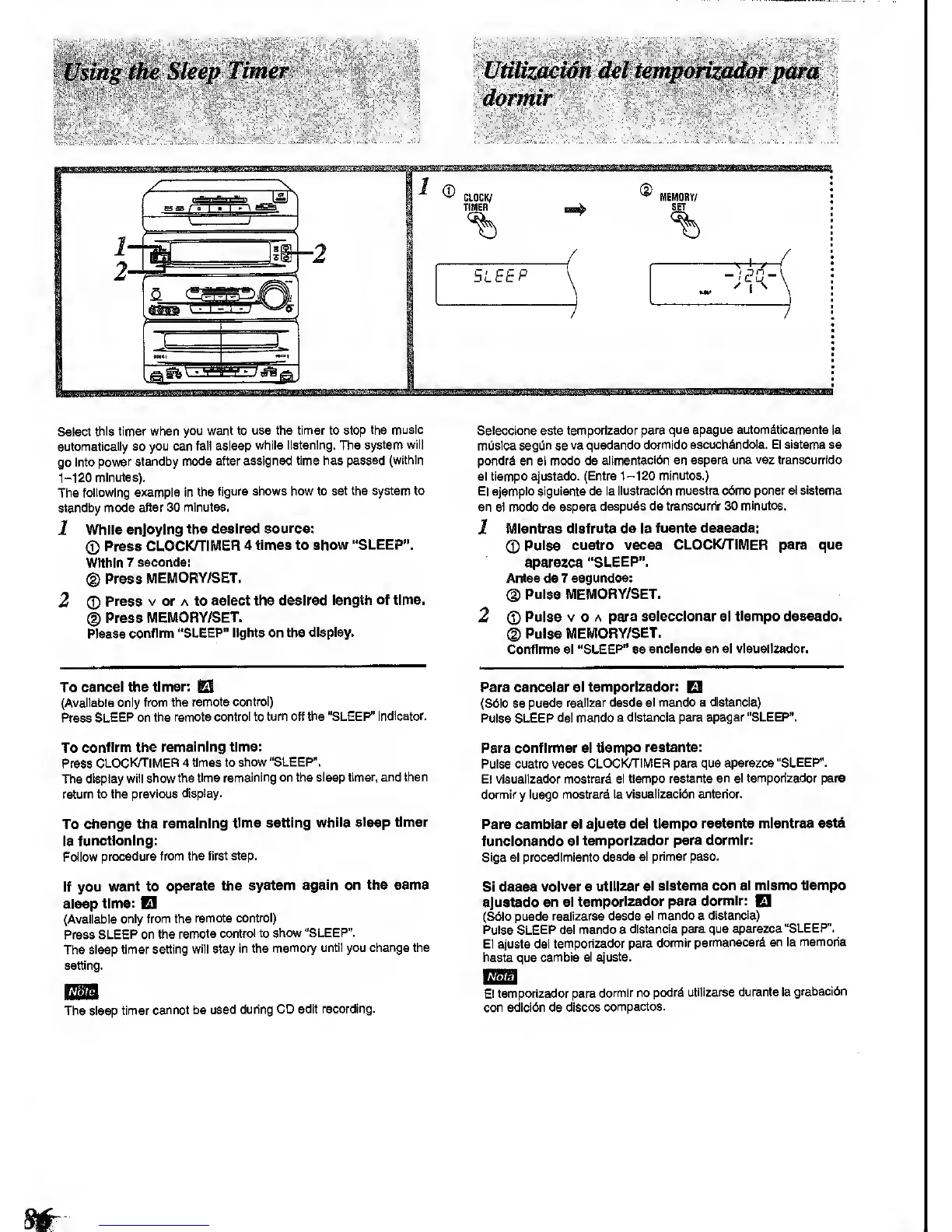
The
following
example in the
figure shows how
to set the system to
standby
mode after 30
minutes.
1
While
enjoying
the desired
source:
<S)
Press
CLOCKH'IMER 4 times to
show "SLEEP".
Within
7
seconds:
(g)
Press
MEMORY/SET.
2
0
Press
V or A to
select
the
desired
length
of time.
®
Press
MEMORY/SET.
Please
confirm
"SLEEP" lights on the
display.
Selecclone este temporizador
para que apague automdticamente la
mOsica
segi^n
se
va quedando
dormido escuchdndola. El siatema se
pondrd en el modo de
allmentacidn en
espera
una
vez
transcurrldo
el tiempo ajustado.
(Entre
1-120 minutos.)
El ejempio
siguisnte de la
ilu8tracl6n
muestra c6mo poner el sistema
en e)
modo de espera
despuds de
transcurrir
30
minutos.
1
MIentras disfruta
de la fuente deseada:
(T)
Pulse cuatro veces CLOCK/TIMER para que
aparezca "SLEEP".
Antes de 7
segundos:
®
Pulse
MEMORY/SET.
2
Pulse V o A
para selecclonar
el
tiempo
deseado.
(D
Pulse MEMORY/SET.
Conflrme el
"SLEEP"
se
anclsndc en el vlsuallzadcr.
To
cancel the timer:
El
(Available only
from
the
remote control)
Press
SLEEP on the
remote
control
to
turn off the "SLEEP"
indicator.
To
confirm the
remaining time:
Press
CLOCKH'IMER
4 times to
show "SLEEP".
The
display will
show the time
remaining on the sleep
timer, and then
return to the
previous
display.
To
change the
remaining
time setting
while sleep timer
Is
functioning:
Follow
procedure from the
first step.
If you
want to
operate the
system
again on the sams
sleep
time:
El
(Available
only from the
remote
contro!)
Press
SLEEP on the
remote
control to show
"SLEEP".
The
sleep timer
setting will stay
in the
memory until you
change
the
setting.
Nbic
The sleep
timer
cannot be used
during CD
edit recording.
Para
cancelar el
temporizador:
El
(S6lo se
puede reaiizar desde
el mando a distancia)
Pulse SLEEP del mando
a distancia
para apagar "SLEEP".
Para conflrmar el tiempo
restante:
Pulse cuatro veces
CLOCK/TIMER para que
aparezca "SLEEP".
Ei vieuaiizador
mostrard el tiempo
restante en el temporizador para
dormir
y
luego mostrard
la visuaiizacl6n
anterior.
Para camblar
si ajuste del
tiempo restante mientras esta
funclonando
el
temporizador para dormir:
Siga el procedlmiento
desde ei primer peso.
Si desea
volver a utlUzar
el sistema
con el mlsmo tiempo
ajustado
en el
temporizador para
dormir:
El
(S6lo puede
reallzarse desde
el mando a
distancia)
Pulse SLEEP del mando a
distancia
para que aparezca
"SLEEP.
El ajuste del
temporizador
para dormir
permanecerfi
en
la
memoria
hasta que
cambie el
ajuste.
Nota
El temporizador para
domnir no
podr^
utilizarse durante la
grabacl6n
con edlcl6n de discos
compactos.









 To Next Page