Enjoying the
Microphone
Mixing
Disfrute
de la
mezcla
microfonica
For areas except Australia and New Zaaland
|
To adjust the reverberation sound
EI
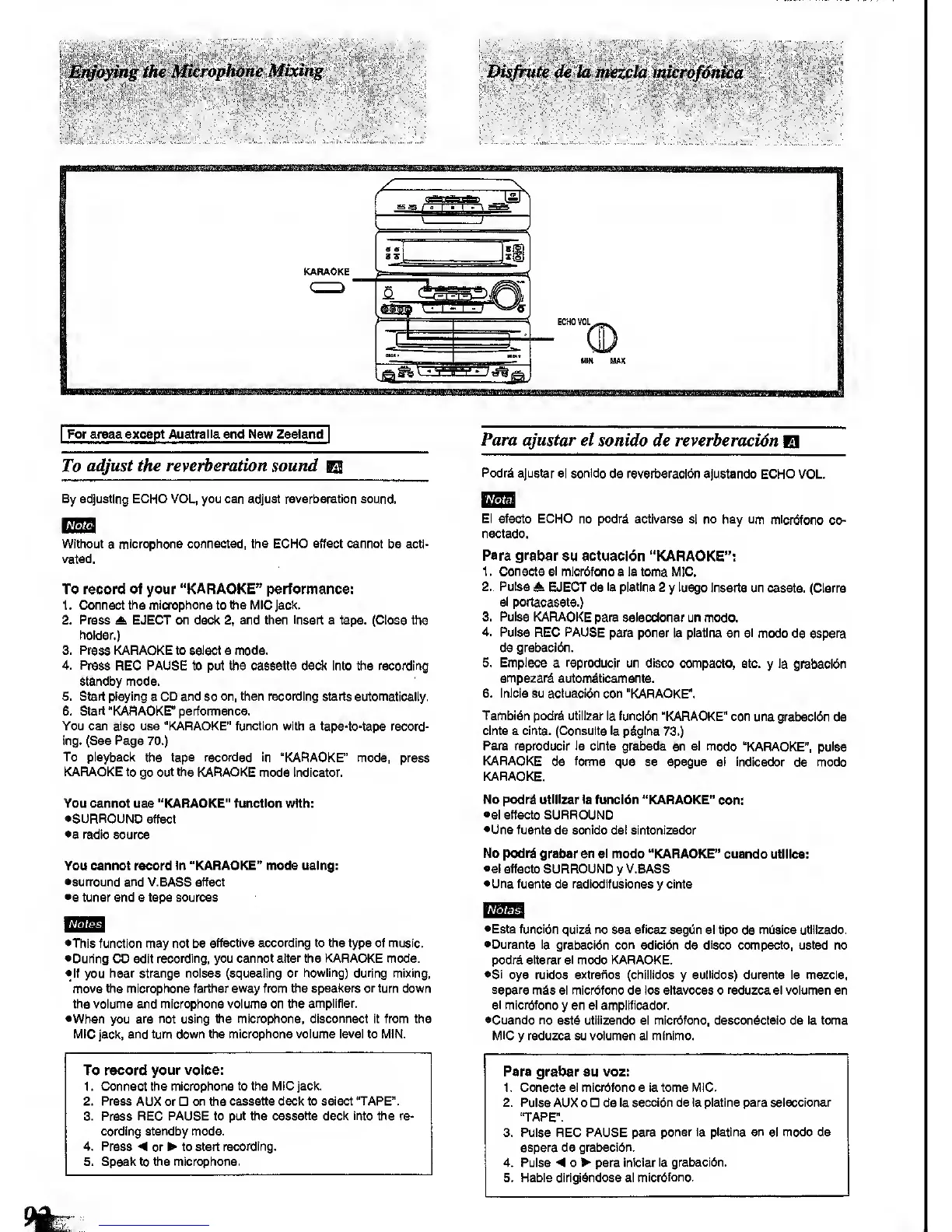
By adjusting
ECHO VOL, you can adjust
reverberation
sound.
Note
Without
a
microphone connected, the ECHO effect cannot be acti-
vated.
To record of your
"KARAOKE" performance:
1 . Connect the
microphone
to
the MIC
Jack.
2. Press EJECT on deck
2,
and then
Insert
a tape. (Close the
holder.)
3. Press KARAOKE to select a mode.
4. Press
REG PAUSE to put the cassette deck Into the recording
standby mode.
5. Start playing
a
CD and
so
on, then recording starts automatically.
6. Start "KARAOKE" perfomiance.
You can also use "KARAOKE" function with
a
tape-to-tape
record-
ing. (See Page
70.)
To playbacl<
the
tape
recorded
in "KARAOKE"
mode, press
KARAOKE to
go
out the KARAOKE
mode Indicator.
You cannot use "KARAOKE" function with:
•SURROUND
effect
ea
radio source
You cannot record
in "KARAOKE" mode ualng:
esurround and V.BASS effect
•a tuner and a tape sources
Notes
•This function may not be
effective according to the type
of music.
•During
CD edit
recording, you cannot
alter
the KARAOKE mode.
•
If you
hear strange noises (squealing
or howling) during
mixing,
move the microphone farther away from the
speakers or turn
down
the volume and microphone volume on
the amplifier.
•When you
are not using the microphone, disconnect it from the
MIC
jack,
and turn down the microphone volume
level
to IVIIN.
To record
your voice:
1 . Connect the microphone
to the M\C jack.
2. Press
AUX or
on
the
cassette deck to select "TAPE".
3.
Press
REC PAUSE to put the
cassette
deck
Into
the re-
cording standby mode.
4. Press
<
or to start
recording.
5. Speak to the microphone,
Para ajustar
el sonido de reverberacidn
El
Podrd
ajustar el sonido
de reverberacidn ajustando
ECHO VOL
El efecto
ECHO no pcdrS activarse
si no hay urn mlcrbfono
co-
nectado.
Para grabar
eu actuacldn "KARAOKE":
1
.
Conecte el
micrdfono a la toma MIC.
2.
Pulse
A EJECT de
la piatlna 2
y
luego
Inserts un casete.
(Clerre
el portacasete.)
3. Pulse KARAOKE
para seieccionar un mode.
4. Pulse REC PAUSE
para poner
la piatlna
en
el
modo de espera
de grabacidn.
5. Emplece
a reproducjr un disco compacto,
stc.
y
la
grabacldn
empezard
automdtlcamente.
6. Inicie su acluaci6n con
"KARAOKE".
Tambj6n
podri utilizer la funcidn
"KARAOKE" con
una grabacWn de
cinta a cinta. (Consulte la p^glna
73.)
Para reproduclr la
cinta grabada en el modo
"KARAOKE",
pulse
KARAOKE
de
forma
que se apague el Indlcador
de
modo
KARAOKE.
No podrd utiiizar ia
funci6n "KARAOKE"
con:
•el effecto SURROUND
•Una fuente
de
sonido
del sintonizador
No podrd
grabar en el modo "KARAOKE" cuando
utiiica:
•el effecto
SURROUND
y
V.BASS
•Una
fuente
de
redlodlfuslones
y
cinta
I
Notas\
•Esta funcidn quizd
no sea
eficaz
segOn el tlpo
de
mijsica utlllzado.
•Durante la
grabacion con ediclon de
disco
compacto, usted no
podr^ atterar el modo KARAOKE.
•Si
oye rutdos extrafios (chillldos
y
aullldos) durante la mezcla,
separe
m^s el microfono de los altavoces o
reduzca
el volumen en
el micrbfono
y
en
el amplificador.
•Cuando no
estd utillzando el microfono, descondctelo de la toma
MIC
y
reduzca su volumen al minlmo.
Para grabar su voz:
1. Conecte el micrbfono a la toma IVIIC.
2. Pulse
AUX 0 de
la seccibn de la piatlna para seieccionar
'TAPE".
3. Pulse REC PAUSE
para poner la piatlna en
el
modo de
espera de grabacidn.
4. Pulse o para
iniciar la grabacidn.
5. Hable dirigidndose al
micrdfono.


 To Next Page
 Loading...






