EasyManua.ls Logo

Panasonic SC-CH72 - Page 88

Panasonic SC-CH72
89 pages
Print Icon
To Next Page IconTo Next Page
To Previous Page IconTo Previous Page
Loading...
1
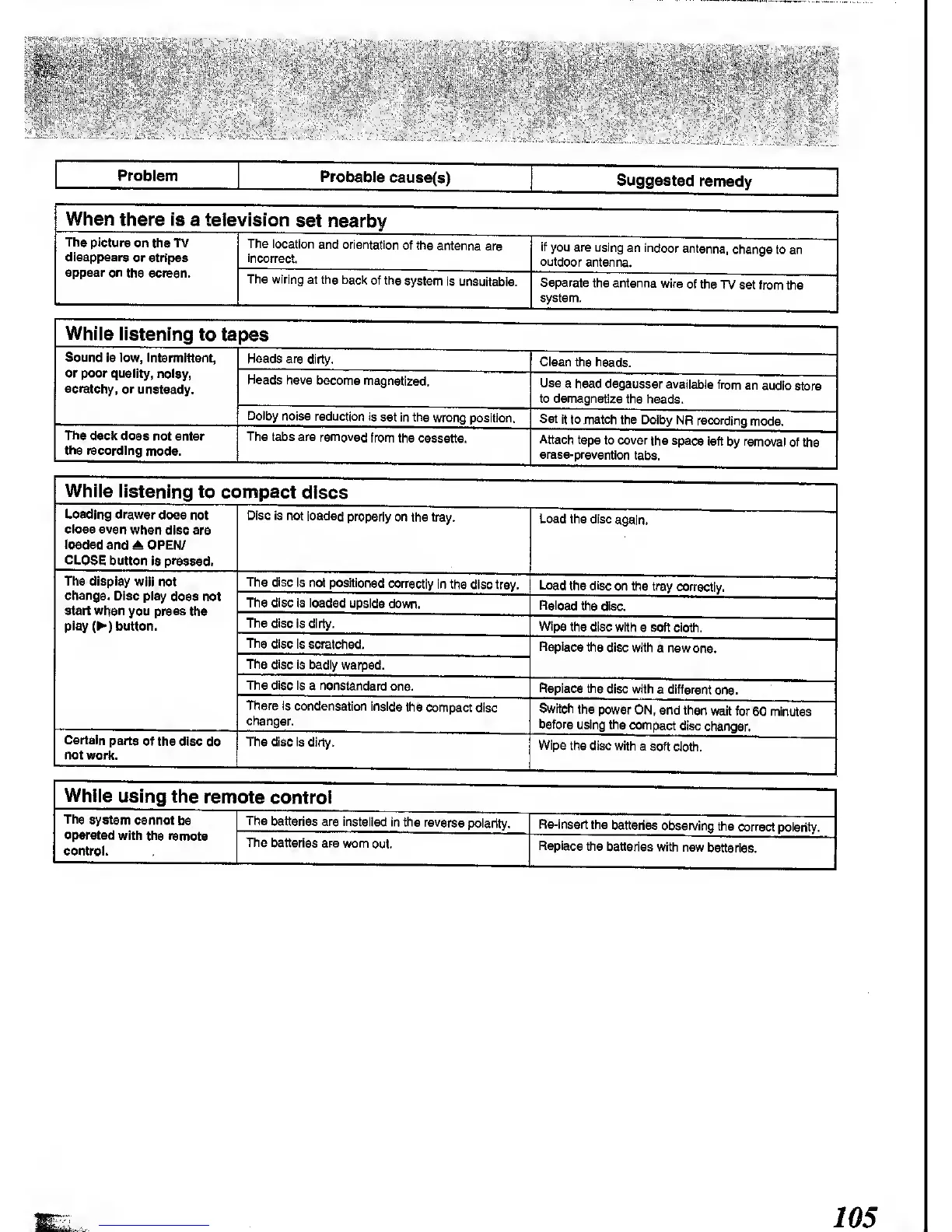
Problem
Probable
cause(s)
Suggested
remedy
When
there is
a television
set nearby
The picture
on the TV
disappears
or stripes
appear
on
the screen.
The
location
and orientation
of the
antenna
are
incorrect.
If
you are using
an
indoor
antenna,
change to an
outdoor
antenna.
The wiring
at the bacl<
of the
system
is unsuitable.
Separate
the
antenna
wire
of the
TV set from
the
system.
Whiie
iistening
to
tapes
Sound
is low, Intermittent,
or
poor
quality, noisy,
scratchy,
or
unsteady.
Heads are
dirty.
Clean
the heads.
Heads
have
become
magnetized.
Use
a head degausser
avaiiabie from
an
audio
store
to demagnetize
the heads.
Dolby
noise reduction
Is set in
the wrong
position. Set it
to match
the
Dolby NR
recording mode.
The
decif does not
enter
the recording
mode.
The
tabs are removed
from
the cassette.
Attach
tape
to cover
the space
left
by
removal of
the
erase-prevention
tabs.
Whiie
iistening
to compact
discs
Loading
drawer
does not
close even
when disc
are
loaded
and OPEN/
CLOSE
button Is pressed.
Disc
is not
loaded properly
on
the tray.
Load the
disc
again.
The
display
will not
change.
Disc play
does not
start whsn
you press ths
play
(^)
button.
The
disc Is not
positioned
correctly
in the
disc tray. Load
the disc
on the tray
correctly,
The disc Is loaded
upside
down.
Reload
the disc.
The disc
is dirty.
Wipe
the disc with
a soft cloth.
The
disc is scratched.
Replace
ths disc
with
a new
one.
The disc is badly
warped.
The disc Is
a nonstandard
one.
Replace the
disc with
a different
one.
There Is
condensation
inside
the
compact disc
changer.
Switch
the
power ON,
and then
wait for
60 minutes
before
using the
compact
disc
changer.
Csrtsln
parts
of the disc
do
not work.
The
disc is
dirty.
Wipe
the disc with
a soft
cloth.
Whiie
using the
remote
controi
The
system
cannot
bs
operated
with ths remote
control.
The
batteries are installed
in the
reverse
polarity.
Re-insert
the
batteries
obsen/ing
the
correct polarity.
The
batteries
are wom
out.
Replace
the batteries
with
new
batteries.
105

Other manuals for Panasonic SC-CH72

Related product manuals