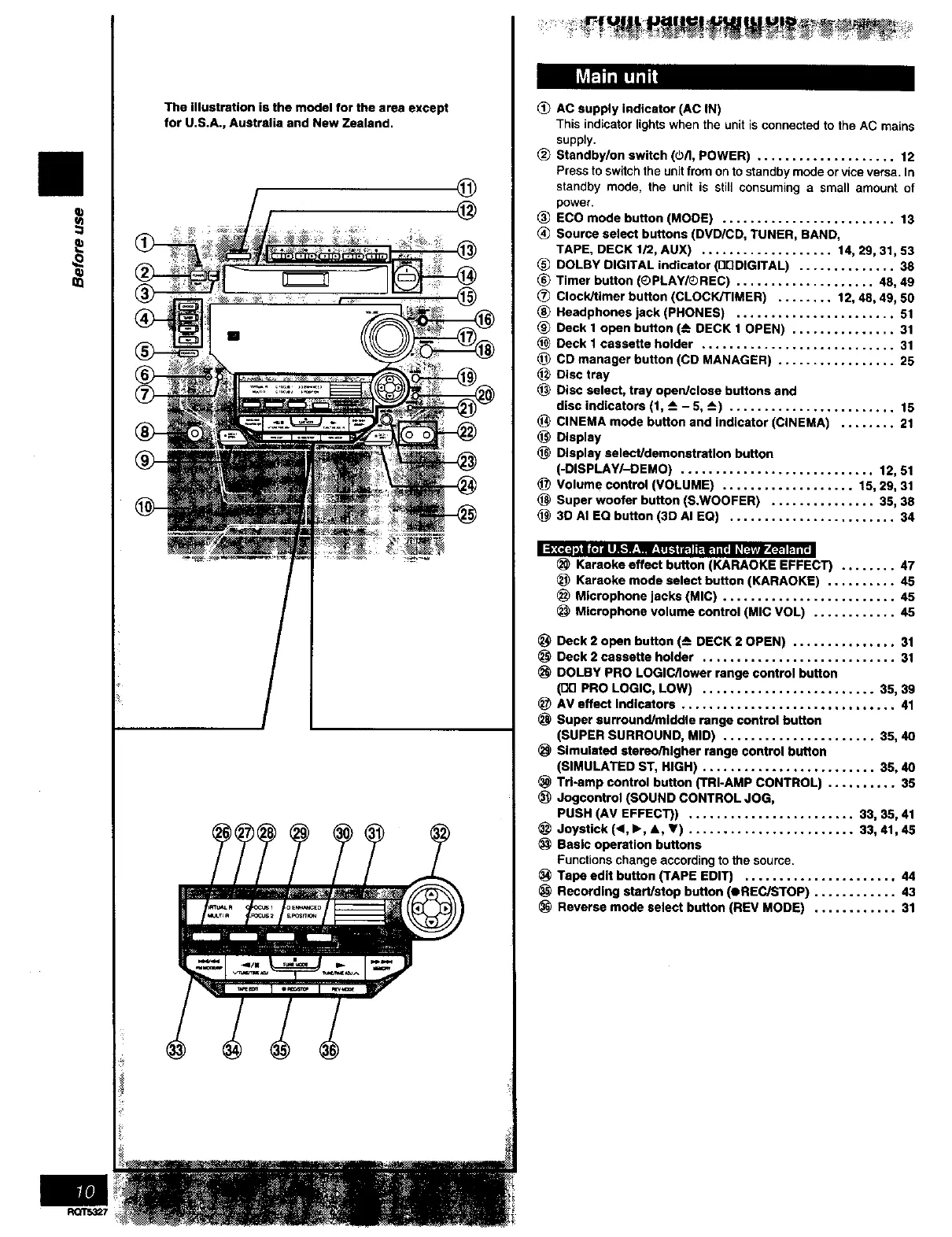
The illustration is the model for the area except
for U.S.A., Australia and New Zealand.
@
@
AC supply Indicator (AC IN)
This indicator lights when the unit is connected to the AC mains
supply.
(_ Standby/on switch ((_/l, POWER) .................... 12
Press to switch the unit from on to standby mode or vice versa. In
standby mode, the unit is still consuming a small amount of
power.
ECO mode button (MODE) ......................... 13
Source select buttons (DVD/CD, TUNER, BAND,
TAPE, DECK 1/2, AUX) ................... 14, 29, 31,53
DOLDY DIGITAL indicator (Dr]DIGITAL) .............. 38
Timer button (QPLAY/_REC) .................... 48, 49
CIock/Umer button (CLOCK/TIMER) ........ 12, 48, 49, 50
Headphones jack (PHONES) ....................... 51
Deck 1 open button (-_ DECK 1 OPEN) ............... 31
Deck I cassette holder ............................ 31
_) CD manager button (CD MANAGER) ................. 25
Disc tray
Disc select, tray open/close buttons and
disc indicators (1, --_-5, -_) ........................ 15
(_ CINEMA mode button and indicator (CINEMA) ........ 21
Display
(_ Display select/demonstration button
(-DISPLAY/-DEMO) ............................ 12, 51
Volume control (VOLUME) ................... 15, 29, 31
Super woofer button (S.WOOFER) ............... 35, 38
3D AI EQ button (3D AI EQ) ........................ 34
Karaoke effect button (KARAOKE EFFECT) ........ 47
_) Karaoke mode select button (KARAOKE) .......... 45
Microphone jacks (MIC) ......................... 45
(_ Microphone volume control (MIC VOL) ............ 45
Deck 2 open button (_ DECK 2 OPEN) ............... 31
Deck 2 cassette holder ............................ 31
DOLBY PRO LOGIC/lower range control button
(D[] PRO LOGIC, LOW) ......................... 35, 39
AV effect Indicators ............................... 41
(_ Super surround/middle range control button
(SUPER SURROUND, MID) ...................... 35, 40
_) Simulated stereo/higher range control button
(SIMULATED ST, HIGH) ......................... 35, 40
Trl-amp control button (TRI-AMP CONTROL) .......... 35
Jogcontrol (SOUND CONTROL JOG,
PUSH (AV EFFECT)) ........................ 33, 35, 41
Joystick (_1,I_, &, V) ........................ 33, 41,45
Basic operation buttons
Functions change according to the source.
Tape edit button (TAPE EDIT) ...................... 44
Recording start/stop button (OREC/STOP) ............ 43
Reverse mode select button (REV MODE) ............ 31



 To Next Page