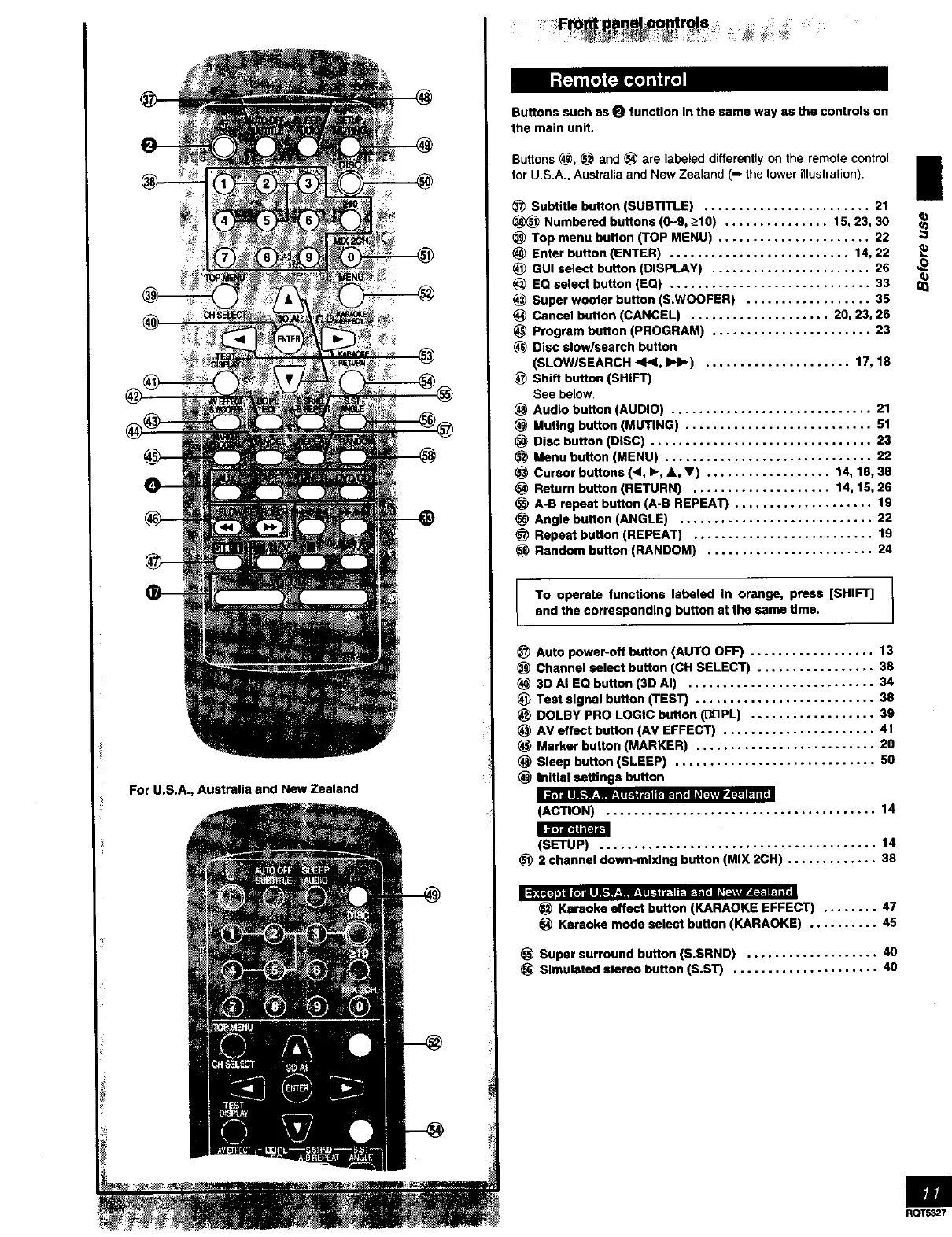
ForU.S.A.,AustraliaandNewZealand
ButtonssuchasO function in the same way as the controls on
the main unit.
Buttons (_, _ and _ are labeled differently on the remote control
for U.S.A., Australia and New Zealand (-' the lower illustration).
!
Subtitle button (SUBTITLE) ........................ 21
_ Numbered buttons (0-9, >-10) ............... 15, 23, 30
(_ Top menu button (TOP MENU) ...................... 22
Enter button (ENTER) .......................... 14, 22
GUI select button (DISPLAY) ....................... 26
EQ select button (EQ) ............................. 33
Super woofer button (S.WOOFER) .................. 35
Cancel button (CANCEL) .................... 20, 23, 26
Program button (PROGRAM) ....................... 23
(_ Disc slow/search button
(SLOW/SEARCH <l_l, I_1_) ..................... 17, 18
Shift button (SHIFT)
See below.
Audio button (AUDIO) ............................. 21
Muting button (MUTING) ........................... 51
Disc button (DISC) ................................ 23
Menu button (MENU) .............................. 22
Cursor buttons (4, I_, A, V) .................. 14, 18, 38
Return button (RETURN) .................... 14, 15, 26
A-B repeat button (A-B REPEAT) .................... 19
Angle button (ANGLE) ............................ 22
Repeat button (REPEAT) .......................... 19
Random button (RANDOM) ........................ 24
To operate functions labeled In orange, press [SHIFT]
and the corresponding button st the same time.
Auto power-off button (AUTO OFF) .................. 13
Channel select button (CH SELECT) ................. 38
3D Ai EQ button (3D AI) ........................... 34
Test signal button (TEST) .......................... 38
_) DOLBY PRO LOGIC button (DDPL) .................. 39
AV effect button (AV EFFECT) ...................... 41
Marker button (MARKER) .......................... 20
Sleep button (SLEEP) ............................. 50
initial settings button
il'.'TJ I JJ,."W__IlI!I I I_.'lI _ I I r. It=l i (* l _ J?l't_tir/_-_'l F-Ti _
(ACTION) ....................................... 14
J2;T&'_h'FJ'Ct
(SETUP) ........................................ 14
_) 2 channel down-mixing button (MIX 2CH) ............. 38
Karaoke effect button (KARAOKE EFFECT) ........ 47
Ksraoke mode select button (KARAOKE) .......... 45
Super surround button (S.SRND) ................... 40
Simulated stereo button (S.ST) ..................... 40
RQT5327



 To Next Page