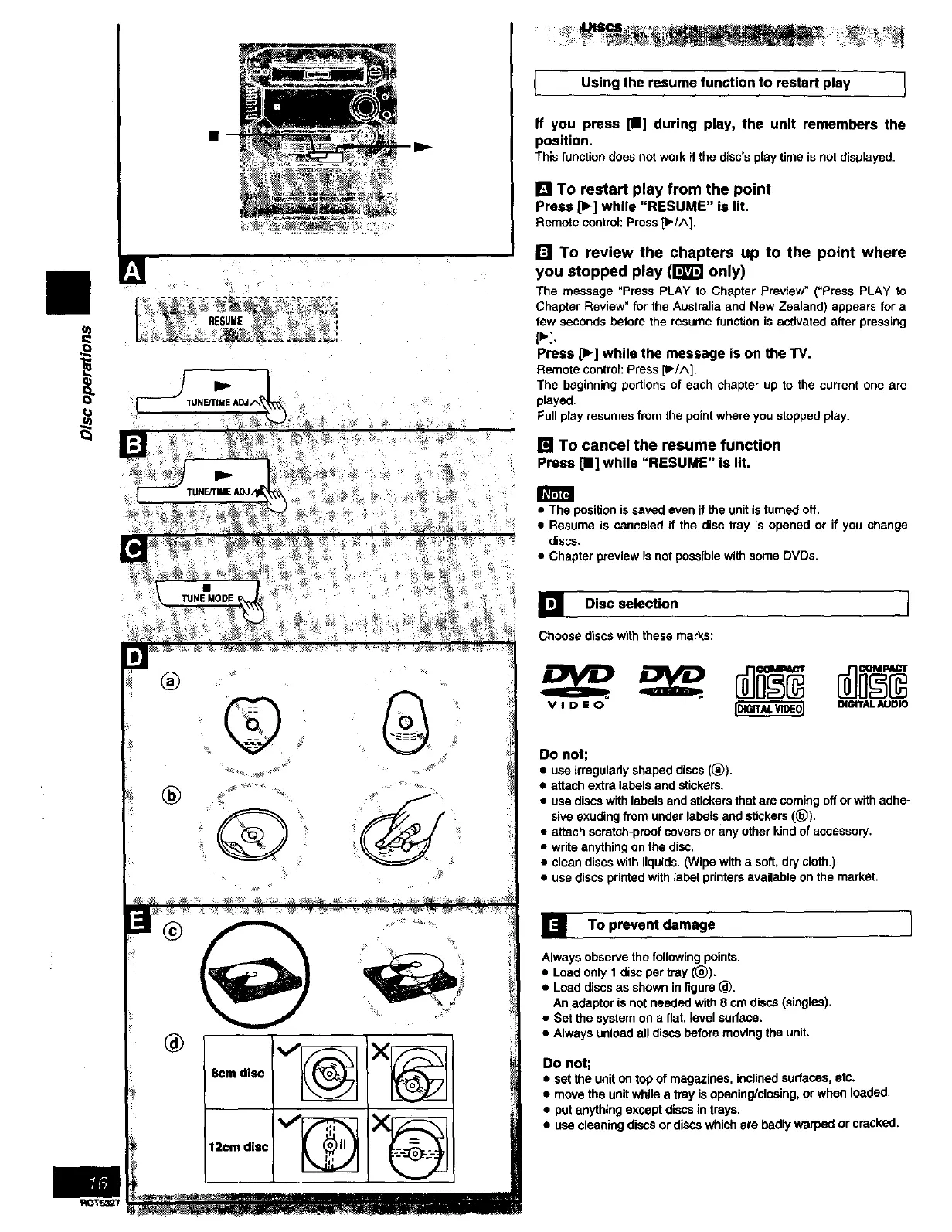
I Using the resume function to restart play 1
If you press [11] during play, the unit remembers the
position,
Thisfunctiondoesnotwork ifthedisc's playtime is notdisplayed.
[] TO restart play from the point
Press [1_] while "RESUME" Is lit.
Remotecontrol:Press p./A 1,
[] To review the chapters up to the point where
you stopped play (1'_ only)
The message "Press PLAY to Chapter Preview _ (=Press PLAY to
Chapter Review" for the Australia and New Zealand) appears for a
few seconds before the resume function is activated after pressing
p'].
Press [1_] while the message is on the TV.
Remote contror: Press p/A].
The beginning podions of each chapter up to the current one are
played.
Full play resumes from the point where you stopped play.
[] To cancel the resume function
Press[11]while "RESUME" is lit.
• The position is saved even if the unit is turned off.
• Resume is canceled if the disc tray is opened or if you change
discs.
• Chapter preview is not possible with some DVDs.
TUNEMODE
®
®
%
] Disc selection
Choosediscswiththese marks:
V I D E O [DIGITJ_. WDE0] DIGITAL AUDIO
Do not;
• use irragulady shaped discs (_)).
• attach extra labels and stickers.
• use discs with labels and stickers that are coming off or with adhe-
sive exuding from under labels and stickers (_)).
• attach scratch-proof covers or any other kind of accessory.
• write anything on the disc.
• clean discs with liquids. (Wipe with a soft, dry cloth.)
• use discs printed with label printers available on the market.
] To prevent damage I
Always observe the following points.
• Load only 1 disc per tray ((_).
• Load discs as shown in figure (_.
An adaptor is not needed with 8 cm discs (singles).
• Set the system on a flat. level sudace.
• Always unload all discs before moving the unit.
Do not;
• set the unit on top of magazines, inclined surfaces, etc.
• move the unit while a tray is opening/closing, or when loaded.
• put anything except discs in trays.
• use cleaning discs or discs which are badly warped or cracked.



 To Next Page